이 제출물을 팔로우합니다
- 팔로우하는 게시물 피드에서 업데이트를 확인할 수 있습니다
- 정보 수신 기본 설정에 따라 이메일을 받을 수 있습니다
편집자 메모: This file was selected as MATLAB Central Pick of the Week
UISETSCREENPIXELSPERINCH set the Root Property: 'ScreenPixelsPerInch'
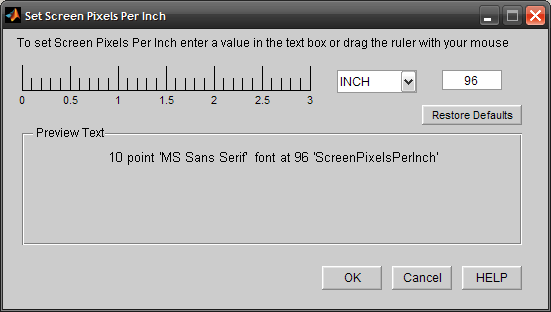
UISETSCREENPIXELSPERINCH() launches a GUI that can be used to visualize the effects of changing the root property prior to actually setting its value.
The 'Text in MATLAB Figures' can be made to appear larger or smaller by changing the value of the ScreenPixelsPerInch root property.
All the input parameters are optional.
The dialog box, helps in doing one of the following:
To increase the size of text and other items on MATLAB figures,
– Using 120 PPI makes text more readable, and then click OK.
To decrease the size of text and other items on MATLAB figures,
– Using 72 PPI will help fit more information on the text, and then click OK.
Or use a Custom Setting(recommended values would be 72,96 & 120).
UISETSCREENPIXELSPERINCH(ScreenPixelsPerInch_Value) will set the
% value of the root property to the one specified as the input argument.
%
%
% Example:
% uisetscreenpixelsperinch()
% uisetscreenpixelsperinch(120) % Set value to 120
% uisetscreenpixelsperinch('reset') % Restores system defaults
인용 양식
Varun Gandhi (2026). UISETSCREENPIXELSPERINCH (https://kr.mathworks.com/matlabcentral/fileexchange/25980-uisetscreenpixelsperinch), MATLAB Central File Exchange. 검색 날짜: .
