이 제출물을 팔로우합니다
- 팔로우하는 게시물 피드에서 업데이트를 확인할 수 있습니다
- 정보 수신 기본 설정에 따라 이메일을 받을 수 있습니다
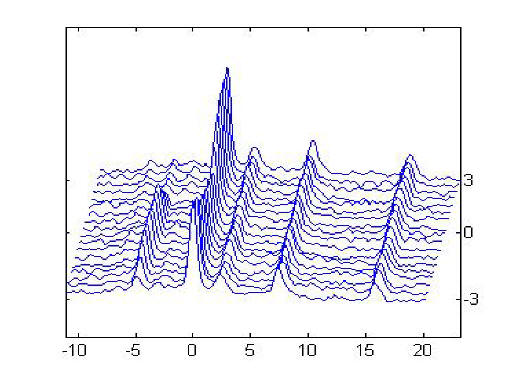
Stacked plots are commonly seen in NMR spectroscopy. They often illustrate the evolution of spectra with time or some other parameter. There are several (somewhat equivalent) methods to produce such plots in Matlab. This function serves as a common interface to these various methods. Certainly some methods may be evoked directly, e.g. mesh, but some others are not as obvious, e.g. plot3. In addition a method (style 1) has been added that produces the traditional stacked plot format. This fucntion can be found inside the program as "splot".
The purpose of this program is to educate through sample code and to provide a unified interface to these various styles. Select the method you like best.
There did not seem to be available such a program in the file exchange and it took some experimentation and time to explore different Matlab commands. As a result it seemed beneficial to have a common interface to these commands. Please leave or send me comments as improvements are hastened by user feedback.
Included in the downloaded documentation is a pdf describing how to make the z matrix, the 2D data array.
인용 양식
Mirko Hrovat (2026). Stacked Plot (https://kr.mathworks.com/matlabcentral/fileexchange/24368-stacked-plot), MATLAB Central File Exchange. 검색 날짜: .
| 버전 | 퍼블리시됨 | 릴리스 정보 | Action |
|---|---|---|---|
| 1.3.0.1 | Minor changes, documentation changes, and splot is available as a standalone function. |
||
| 1.3.0.0 | One bug pertaining to sytle selection has been fixed, errors in documetation, and axis labels can now be orientated in the reverse direction. |
||
| 1.1.0.0 | changed title in help file. |
||
| 1.0.0.0 |