Visulizing SVM with Iris Data for Binary Classes

버전 1.0.0 (1.69 KB) 작성자: Ayesha Sohail
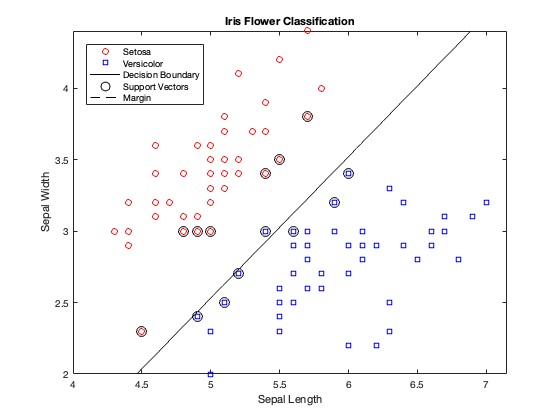
In this code as simple example is presented to learn more about the support vectors and the hyperplane.
다운로드 수: 20
업데이트 날짜: 2024/5/9

라이선스 보기

We start by loading the Iris dataset, which contains measurements of sepal length and width for three species of iris flowers.
We select only the Setosa and Versicolor classes for simplicity.
We extract the first two features (sepal length and width) from the dataset for training our classifier.
The species labels are converted to numeric values for training the SVM model.
We use the fitcsvm function to train a Support Vector Machine (SVM) classifier on the selected features and labels.
We use hold on to ensure that subsequent plots are added to the existing figure.
We create a grid of points (XGrid) to represent the entire feature space.
We use the trained SVM model to predict the class scores for each point in the grid.
The contour plot is used to visualize the decision boundary of the SVM classifier.
  • The decision boundary is the line where the class score is 0.5 (as in this example, 0 is for class 1, 1 is for class 2 so mid-point is for hyperplane), separating Setosa and Versicolor classes.
  • The contour plot is created using contour with a level of 0.5 and displayed in black ('k').
(Dig-deep In the context of SVMs, the decision boundary is the line (for 2D data) or hyperplane (for higher-dimensional data) that separates the classes. The contour function is used to plot the decision boundary because the decision function of the SVM is a continuous function that assigns a score to each point in the input space.
The decision boundary is where the score is exactly 0. In a binary classification setting like the Iris dataset (with classes 0 and 1), the decision boundary is where the score is 0.5 because values below 0.5 are classified as one class (e.g., 0) and values above 0.5 are classified as the other class (e.g., 1).
The contour function is used to plot the region where the score is close to 0.5, which corresponds to the decision boundary. The [0.5 0.5] argument specifies the level at which the contour should be drawn. Since we're interested in the decision boundary where the score is 0.5, we specify [0.5 0.5] as the contour level.
)

인용 양식

Ayesha Sohail (2025). Visulizing SVM with Iris Data for Binary Classes (https://kr.mathworks.com/matlabcentral/fileexchange/165566-visulizing-svm-with-iris-data-for-binary-classes), MATLAB Central File Exchange. 검색 날짜: .

MATLAB 릴리스 호환 정보
개발 환경: R2024a
모든 릴리스와 호환
플랫폼 호환성
Windows macOS Linux
태그 태그 추가

Community Treasure Hunt

Find the treasures in MATLAB Central and discover how the community can help you!

Start Hunting!
버전 게시됨 릴리스 정보
1.0.0