
REFLINEXY

버전 1.0.0.0 (2.94 KB) 작성자: Jos (10584)
Plot vertical and horizontal reference lines
다운로드 수: 2.4K
업데이트 날짜: 2007/4/19

라이선스 보기

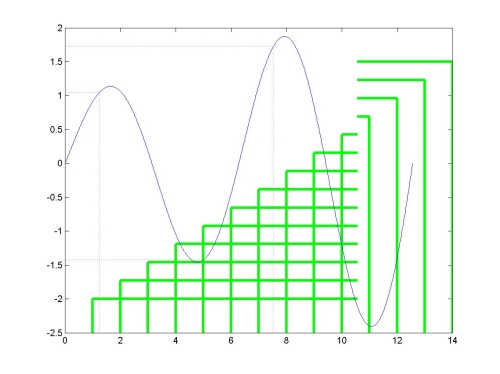
REFLINEXY(X,Y) plots vertical and horizontal reference lines. The vertical set of lines are drawn from the bottom of the axes up to each point Y at the positions X. The horizontal set of lines are drawn from the left of the axes to each point X at the positions Y.
REFLINEXY(X,Y,XOFFSET) uses the value XOFFSET as the vertical offset for the vertical lines. REFLINE(X,Y,XOFFSET,YOFFSET) uses the value YOFFSET as the horizontal offset for the horizontal lines. If the offsets are omitted, or if they are empty, the defaults are used, namely the bottom and/or the left side of the axis, respectively. The offsets can be specified for each point separately.
The lines are plotted as a two graphics object. H = XYREFLINE(..) returns the two graphics handles of the vertical and horizontal line objects.
REFLINEXY(..., 'Prop1','Val1','Prop2','Val2', ...) uses the properties and values specified for color, linestyle, etc. Execute GET(H), where H is a line handle, to see a list of line object properties and their current values. Execute SET(H) to see a list of line object properties and legal property values.
REFLINEXY uses the current axes, if any. Lines outside the plot area are plotted but not shown.

Examples
% some data
N = 1000 ; i=0:N ;
x = (i/N) * 4 * pi ; y = exp(i/N) .* sin(x) ;
plot(x,y,'b-') ;
% add specific reference lines
i0 = [100 400 600] ;
reflinexy(x(i0),y(i0),'color','r') ;
% other reference lines with a specific offset
h = reflinexy(1:14,linspace(-2,1.5,14),[],x(end)-2) ;
set(h,'color','g','linestyle','-','linewidth',3) ;

See also STEM, PLOT, REFLINE, GRID, AXES
and GRIDXY (on the FEX)

http://www.mathworks.com/matlabcentral/fileexchange/loadFile.do?objectId=9973&objectType=FILE

version 1.2 (april 19th, 2007)

인용 양식

Jos (10584) (2025). REFLINEXY (https://kr.mathworks.com/matlabcentral/fileexchange/14706-reflinexy), MATLAB Central File Exchange. 검색 날짜: .

MATLAB 릴리스 호환 정보
개발 환경: R13
모든 릴리스와 호환
플랫폼 호환성
Windows macOS Linux
카테고리
Help CenterMATLAB Answers에서 Grid Lines, Tick Values, and Labels에 대해 자세히 알아보기
도움

도움 받은 파일: GRIDXY

Community Treasure Hunt

Find the treasures in MATLAB Central and discover how the community can help you!

Start Hunting!
버전 게시됨 릴리스 정보
1.0.0.0

Changed input to uistack into column vector. Added warning message identifier.