shapemodel
R2026bDescription
Create a shapemodel object to locate objects in images based
on a geometric shape. Use the model to match objects of the same shape across variations in
position, rotation, and scale.
Creation
Description
creates a shape‑based model from a template image.model = shapemodel(templateImage)
specifies options using one or more name‑value arguments. For example,
model = shapemodel(templateImage,Name=Value)NumPyramidLevels=3 specifies that the shape model has three pyramid
levels.
Input Arguments
Template image data that contains the object of interest, specified as one of the following image types:
Grayscale image — Specify an m-by-n numeric matrix.
RGB image — Specify an m-by-n-by-3 numeric array.
Name-Value Arguments
Edge feature extraction threshold, specified as one of the following:
Positive scalar — Use a single gradient magnitude threshold.
Two-element vector — Specify lower and upper gradient magnitude thresholds to enable Canny hysteresis thresholding. Specify the vectors in the form of
[low high]."auto"— Automatically select a two‑element[low high]hysteresis threshold based on the template image.
Range of object rotation angles when matching the template image to the search
image, specified as a two‑element vector of the form [minAngle
maxAngle], in degrees. Evaluating a greater range of rotation angles
takes more time.
Rotation angle sampling rate used to explore the range of rotation angles
during matching, specified as a positive scalar in degrees or as
"auto". When you specify "auto", the shape
model estimates a suitable rotation angle sampling rate based on the edge features
extracted from the template image.
Range of scale factors explored when matching the template image to the search
image, specified as a two‑element vector of the form [minScale
maxScale]. Evaluating a greater range of scale factors takes more
time.
The default value [1 1] specifies that the function matches
the shape model and search image at the same scale.
Scale factor sampling rate used to explore the range of scale factors during
matching, specified as a positive scalar or as "auto". When you
specify "auto", the shape model estimates a suitable scale factor
sampling rate based on the edge features extracted from the template image.
Number of image pyramid levels used during matching, specified as a positive
integer or as "auto". When you specify
"auto", the shape model automatically selects an appropriate
number of pyramid levels based on the template image.
Object class label, specified as a string scalar. Use this label to distinguish between shape models when performing multiclass detection or matching.
Properties
This property is read-only.
Threshold for edge feature extraction, specified as a positive scalar or two-element vector.
This property is read-only.
Range of rotation angles to explore, specified as a two-element vector in degrees.
This property is read-only.
Rotation angle sampling rate, specified as a positive scalar in degrees.
This property is read-only.
Range of scale factors to explore, specified as a two-element vector.
This property is read-only.
Scale factor sampling rate, specified as a positive scalar.
This property is read-only.
Number of pyramid levels, specified as a positive integer.
This property is read-only.
Position of the shape model reference point within the template image, specified as a two‑element vector in image coordinates (pixels).
The ModelOriginTransformation property of the
visualinspection.shapematching.Match object returned by matchshape describes the rotation, scale, and translation that map the
ModelOrigin position to the corresponding location in the search
image.
This property is read-only.
Number of edge features in the shape model, specified as a vector. Each element corresponds to the number of edge features at a pyramid level. The edge features are ordered from the coarsest to the finest pyramid level.
This property is read-only.
Background gradient estimate, specified as a numeric scalar. The value of this property is the estimated gradient magnitude of non-edge pixels in the template image.
Examples
Read and display the template image.
templateImage = imread("edgeMatchModel.png");
imageshow(templateImage)
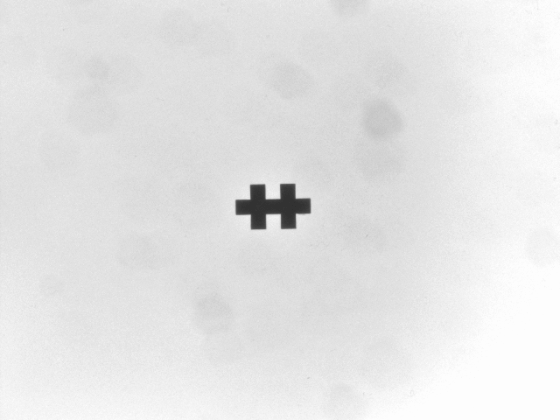
Create a shape model object, then visualize the shape model by using the show function.
model = shapemodel(templateImage); show(model)
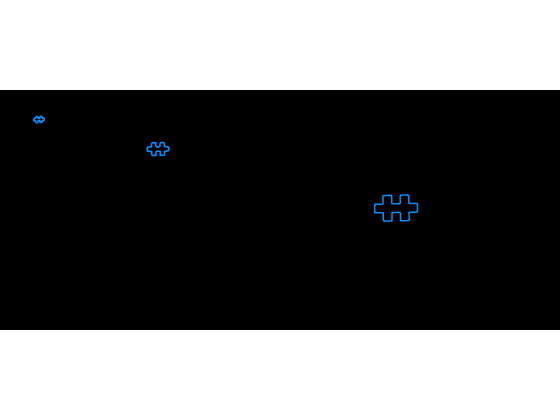
Read and display the search image,
searchImage = imread("edgeMatchSearch1.png");
imageshow(searchImage)
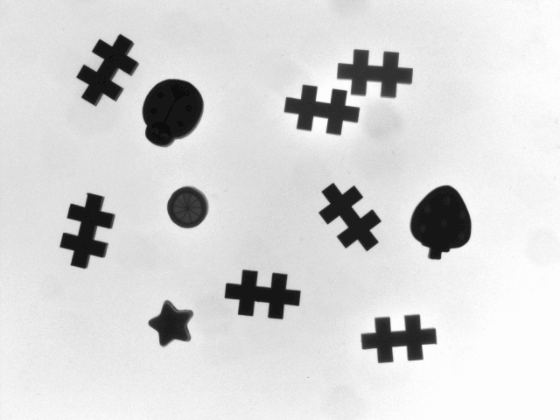
Find and locate shape model instances in the search image by using the matchshape function. Set MaxMatches to 10 to return up to ten instances.
matches = matchshape(model,searchImage,MaxMatches=10);
Visualize the shape model matches in the search image by using the showmatches function.
showmatches(model,matches,searchImage)
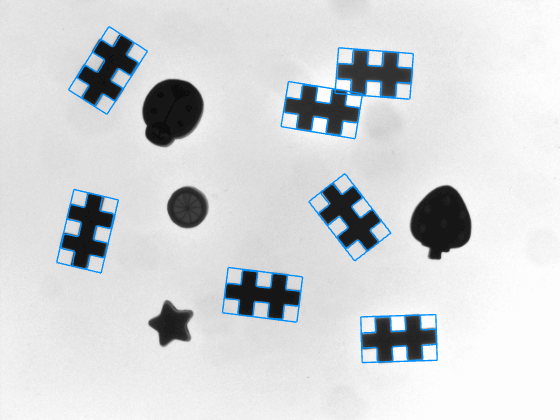
Read the template image.
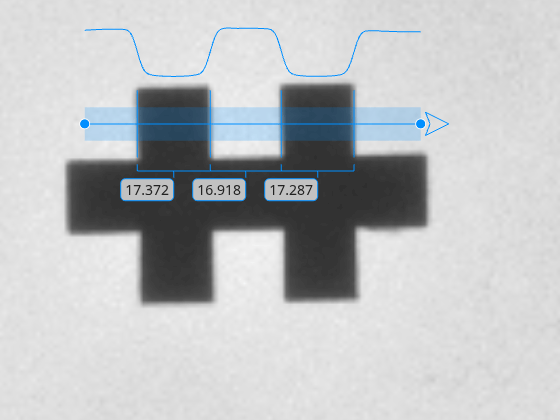
templateImage = imread("edgeMatchModel.png");Create an Image object by using the imageshow function. The image shows the template image with a caliper that is created in the next section.
hIm = imageshow(templateImage);
Define the position of the profile line of the caliper measurement tool so that the profile line contains the all the relevant edges, Then, detect and measure the distances between the edges in the reference image with the caliper tool by using the uicaliper object. Zoom into the template image to get a more detailed view.
caliperPositionInTemplateImage = [274 220; 354 220]; hCal = uicaliper(hIm,Position=caliperPositionInTemplateImage);
hIm.Parent.CameraZoom = 8;
The caliper detects 3 widths of detected edge pairs along the caliper profile.
templateMeasurement = hCal.IntraEdgeDistance
templateMeasurement = 1×3
17.3718 16.9179 17.2868
Create a shape model by using the template image.
model = shapemodel(templateImage);
Store the caliper position relative to the shape model origin.
relativeCaliperPosition = caliperPositionInTemplateImage - model.ModelOrigin;
Load the search image.
searchImage = imread("edgeMatchSearch1.png");Find and locate shape model instances in the search image by using the matchshape function.
matches = matchshape(model,searchImage);
The match result includes a geometric transformation that maps template coordinates to the search image. Apply the match transformation to place the caliper in the search image by using the transformPointsForward function.
caliperPositionMatch = transformPointsForward(matches.ModelOriginTransformation,relativeCaliperPosition); hImSearch = imageshow(searchImage); hCalMatch = uicaliper(hImSearch,Position=caliperPositionMatch);
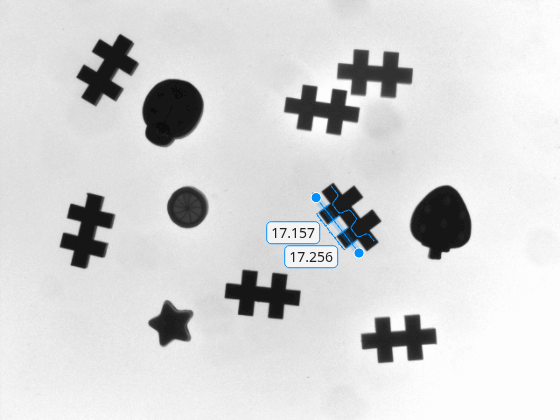
Compare the template and search image measurements to verify consistency.
searchMeasurement = hCalMatch.IntraEdgeDistance; table(templateMeasurement(:),searchMeasurement(:),VariableNames=["Template","Search"])
ans = 3×2 table
Template Search
________ ______
17.372 17.256
16.918 17.07
17.287 17.157
Version History
Introduced in R2026b
MATLAB Command
You clicked a link that corresponds to this MATLAB command:
Run the command by entering it in the MATLAB Command Window. Web browsers do not support MATLAB commands.
웹사이트 선택
번역된 콘텐츠를 보고 지역별 이벤트와 혜택을 살펴보려면 웹사이트를 선택하십시오. 현재 계신 지역에 따라 다음 웹사이트를 권장합니다:
또한 다음 목록에서 웹사이트를 선택하실 수도 있습니다.
사이트 성능 최적화 방법
최고의 사이트 성능을 위해 중국 사이트(중국어 또는 영어)를 선택하십시오. 현재 계신 지역에서는 다른 국가의 MathWorks 사이트 방문이 최적화되지 않았습니다.
미주
- América Latina (Español)
- Canada (English)
- United States (English)
유럽
- Belgium (English)
- Denmark (English)
- Deutschland (Deutsch)
- España (Español)
- Finland (English)
- France (Français)
- Ireland (English)
- Italia (Italiano)
- Luxembourg (English)
- Netherlands (English)
- Norway (English)
- Österreich (Deutsch)
- Portugal (English)
- Sweden (English)
- Switzerland
- United Kingdom (English)