Install Python 3.8.2 on Windows for Firmware Upload
R2026bThis section helps you complete the Install Python 3.8.2 Software step of the Hardware Setup process (using the Hardware Setup screens).
Note
If you restarted your computer after installing Ubuntu Distribution for Windows Subsystem for Linux (WSL), the Hardware Setup screen might be closed. Before proceeding, launch MATLAB® and restart the Hardware Setup process.

Note
Internet connection is required to install Python®
3.8.2 version in your Windows® computer
Scenario 1: Python 3.7 or later is already installed on Windows computer
If Python
3.7 or later version is already installed on your computer, select
I have already installed Python 3.7 or later version and click
Next. The next hardware setup requires a valid path where you
have Python
3.7 or later installed.
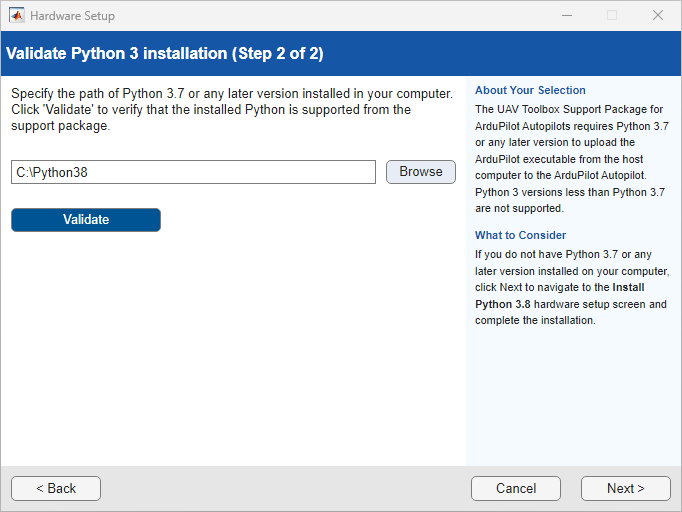
After you provide the path where Python
3.7 or later is installed. Click Validate.
Upon successful validation, you can move to subsequent hardware setup screens.
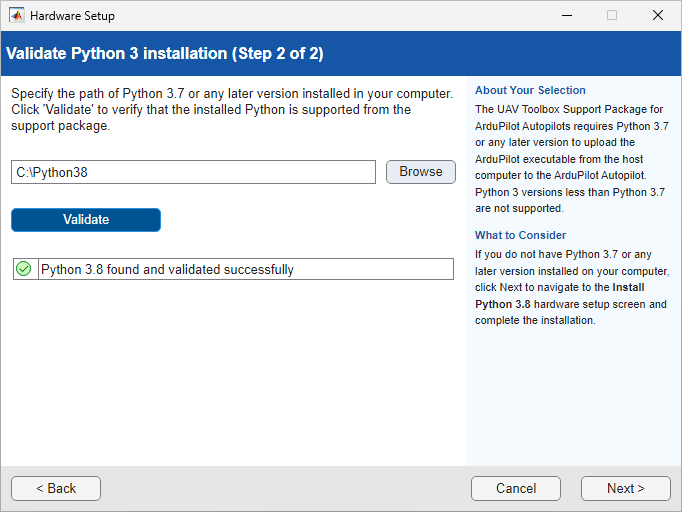
If validation fails, it might be due to missing dependencies such as Python
3.8.2, pySerial 3.4, or EmPy
4.2. To resolve this, go back and select Automatically
Download and Install on the hardware setup screen and click Next to allow the installer to download and install the
required dependencies. For more information, see Scenario 2: Python 3.8.2, pySerial, and EmPy are not installed on Windows computer.
Scenario 2: Python 3.8.2, pySerial, and EmPy are not installed on Windows computer
If Python
3.7 or later version, pySerial, and EmPy are not installed on the
computer, select Automatically Download and install and
click Next.
After clicking Next, the following screen appears.
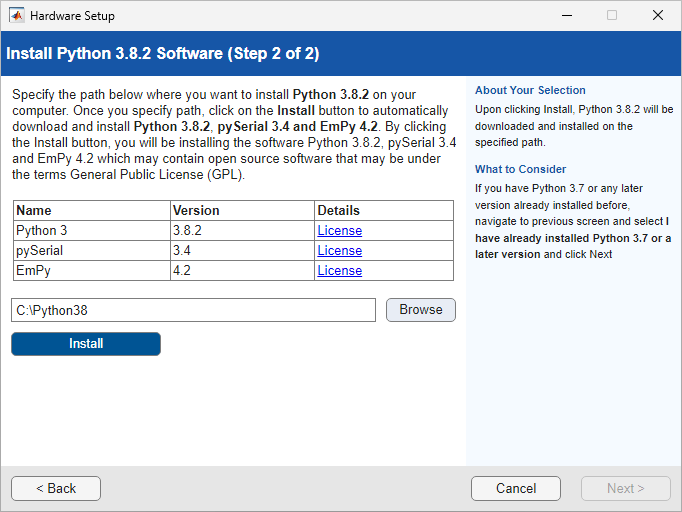
Specify the path where you want to install Python
3.8.2 in your computer and click Install.
Python
3.8.2, pySerial 3.4, and EmPy
4.2 are installed on that path. After successful installation,
click Next for subsequent screens.
Next Steps
Select an ArduPilot® vehicle type.

