Train Classification Ensemble in Parallel
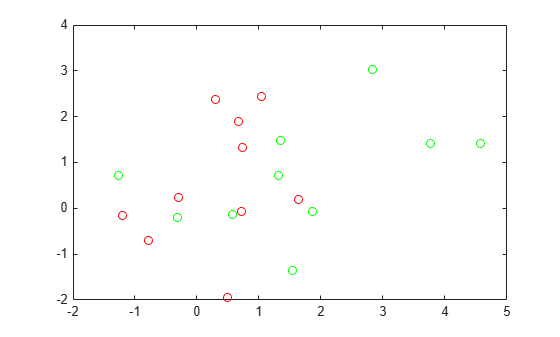
R2026bThis example shows how to train a classification ensemble in parallel. The model has ten red and ten green base locations, and red and green populations that are normally distributed and centered at the base locations. The objective is to classify points based on their locations. These classifications are ambiguous because some base locations are near the locations of the other color.
Create and plot ten base locations of each color.
rng default % For reproducibility
grnpop = mvnrnd([1,0],eye(2),10);
redpop = mvnrnd([0,1],eye(2),10);
plot(grnpop(:,1),grnpop(:,2),'go')
hold on
plot(redpop(:,1),redpop(:,2),'ro')
hold off
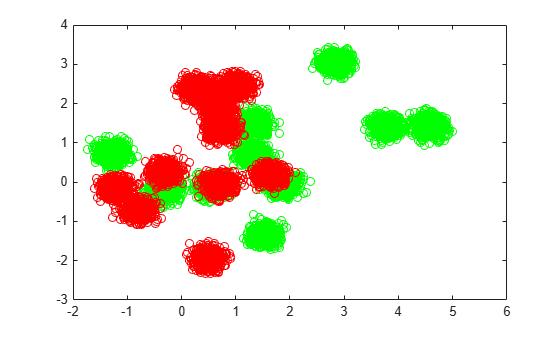
Create 40,000 points of each color centered on random base points.
N = 40000;
redpts = zeros(N,2);grnpts = redpts;
for i = 1:N
    grnpts(i,:) = mvnrnd(grnpop(randi(10),:),eye(2)*0.02);
    redpts(i,:) = mvnrnd(redpop(randi(10),:),eye(2)*0.02);
end
figure
plot(grnpts(:,1),grnpts(:,2),'go')
hold on
plot(redpts(:,1),redpts(:,2),'ro')
hold off
cdata = [grnpts;redpts];
grp = ones(2*N,1);
% Green label 1, red label -1
grp(N+1:2*N) = -1;
Fit a bagged classification ensemble to the data. For comparison with parallel training, fit the ensemble in serial and return the training time.
tic
mdl = fitcensemble(cdata,grp,'Method','Bag');
stime = toc
stime =
12.6677
Evaluate the out-of-bag loss for the fitted model.
myerr = oobLoss(mdl)
myerr =
0.0572
Create a bagged classification model in parallel, using a reproducible tree template and parallel substreams. You can create a parallel pool on a cluster or a parallel pool of thread workers on your local machine. To choose the appropriate parallel environment, see Choose Between Thread-Based and Process-Based Environments (Parallel Computing Toolbox).
parpool
Starting parallel pool (parpool) using the 'Processes' profile ...
31-Jul-2026 08:57:58: Job Running. Waiting for parallel pool workers to connect ...
31-Jul-2026 08:58:59: Job Running. Waiting for parallel pool workers to connect ...
31-Jul-2026 09:00:00: Job Running. Waiting for parallel pool workers to connect ...
Connected to parallel pool with 8 workers.

ans =

 ProcessPool with properties:

            Connected: true
           NumWorkers: 8
                 Busy: false
              Cluster: Processes (Local Cluster)
        AttachedFiles: {}
    AutoAddClientPath: true
            FileStore: [1x1 parallel.FileStore]
           ValueStore: [1x1 parallel.ValueStore]
          IdleTimeout: 30 minutes (30 minutes remaining)
          SpmdEnabled: true
s = RandStream('mrg32k3a');
options = statset("UseParallel","auto","UseSubstreams",true,"Streams",s);
t = templateTree("Reproducible",true);
tic
mdl2 = fitcensemble(cdata,grp,'Method','Bag','Learners',t,'Options',options);
ptime = toc
ptime =
6.5968
On this eight-core system, the training process in parallel is faster.
speedup = stime/ptime
speedup =
1.9203
Evaluate the out-of-bag loss for this model.
myerr2 = oobLoss(mdl2)
myerr2 =
0.0577
The error rate is similar to the rate of the first model.
To demonstrate the reproducibility of the model, reset the random number stream and fit the model again.
reset(s);
tic
mdl2 = fitcensemble(cdata,grp,'Method','Bag','Learners',t,'Options',options);
toc
Elapsed time is 3.528188 seconds.
Check that the loss is the same as the previous loss.
myerr2 = oobLoss(mdl2)
myerr2 =
0.0577

