Parameterize Half-Bridge Block from Wolfspeed Datasheets
This example shows how to import the device parameters from Wolfspeed® datasheets for MOSFETs and diodes into a Half-Bridge (Ideal, Switching) block.
Open Model
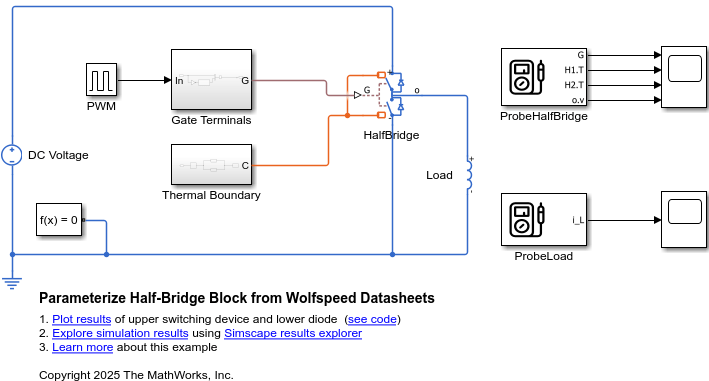
Open the ImportWolfspeedPartsToHalfBridge model and specify the block path. The Half-Bridge (Ideal, Switching) block uses ideal switching for fast simulation. You can optionally draw the requisite power due to switching losses from the electrical supply.
modelName = "ImportWolfspeedPartsToHalfBridge";
open_system(modelName);
blockPath = modelName + "/HalfBridge";
Import Device Parameters
To import the device parameters into the Half-Bridge (Ideal, Switching) block, first specify the XML files.
switchingDeviceFile = "CAB400M12XM3_mosfet.xml";
diodeFile = "CAB400M12XM3_bodydiode.xml";
For Wolfspeed datasheets, specify the switch-on and switch-off gate resistance values.
gateResistanceOn =20; gateResistanceOff =
9;
Use the ee_importDeviceParameters function to import the device parameters from the XML files into the block.
ee_importDeviceParameters({switchingDeviceFile,diodeFile},"wolfspeed",blockPath,...
GateResistanceOn=gateResistanceOn,GateResistanceOff=gateResistanceOff);
Current axis diode_IfVec contains a negative value. Removing negative current value and the corresponding column of lookup table diode_VfMat for parameterization. Off-state voltage for loss data (Voff) contains invalid value 0. Replacing the value with 10.
After the parameterization, observe the annotations under the Half-Bridge (Ideal, Switching) block.
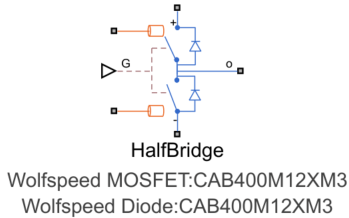
If the datasheet does not provide a value for a block parameter, the ee_importDeviceParameters function automatically assigns the default value to this block parameter and appends % Parameter not set. After the parameterization, check for block parameters that contain % Parameter not set in their value.
This table shows some of the parameters of the Half-Bridge (Ideal, Switching) block in this example after the parameterization.
Block Parameter | Parameter Value | Data Source |
Off-state conductance | 1e-06 % Parameter not set | Default value |
Temperature vector for losses, Tj | [25 100 150 175] | MOSFET datasheet |
Junction temperatures, Tj | [25 175] | Diode datasheet |
offConductance = get_param(blockPath,"Goff");
temperatureVector = get_param(blockPath,"mosfet_Tj_loss");
junctionTemperature = get_param(blockPath,"diode_TjVec");
Simulate Model and Plot Results
Simulate the model.
sim(modelName);
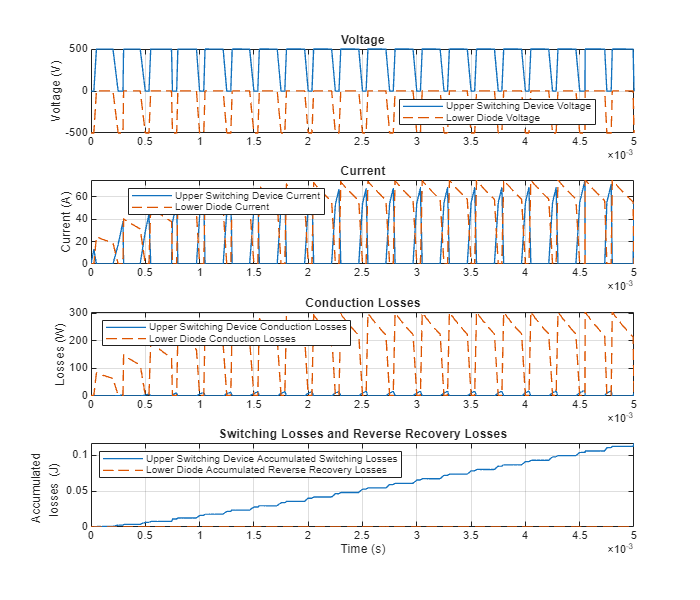
Plot the voltage, current, conduction losses, and switching losses for the upper switching device and lower diode.
ImportWolfspeedPartsToHalfBridgePlot;
See Also
ee_importDeviceParameters | Half-Bridge (Ideal,
Switching)

