MATLAB 도움말 센터
Find Requirements Table blocks
Since R2022a
reqTables = slreq.modeling.find(model)
reqTables = slreq.modeling.find(model,table)
reqTables = slreq.modeling.find(model) returns all the Requirements Table blocks in the model or subsystem specified by model.
reqTables
model
example
reqTables = slreq.modeling.find(model,table) returns the Requirements Table block, table, in the model or subsystem specified by model. Use this syntax to return a Requirements Table block in a model. (since R2026a)
table
collapse all
Find the Requirements Table blocks in a model named myModel.
myModel
reqTables = slreq.modeling.find("myModel");
The function returns reqTables as an array of RequirementsTable objects.
RequirementsTable
Get the handle of the current model.
modelH = get_param(gcs,"Handle");
Find the Requirements Table blocks in the model named myModel.
reqTables = slreq.modeling.find(modelH);
Since R2026a
This example shows how to return a specific Requirements Table block in a model.
Load the model spec_model_final. The model has two Requirements Table blocks.
spec_model_final
model = "spec_model_final"; load_system(model);
The model has two Requirements Table blocks named AP_Mode_Determination and Cmd_Determination.
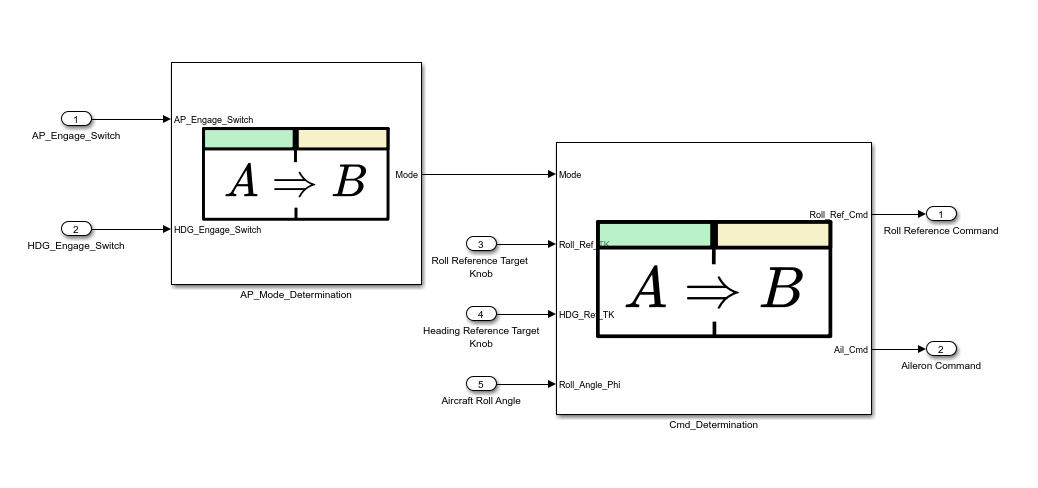
AP_Mode_Determination
Cmd_Determination
Get the AP_Mode_Determination Requirements Table block.
table = slreq.modeling.find(model,"AP_Mode_Determination")
table = RequirementsTable with properties: Name: 'AP_Mode_Determination' Path: 'spec_model_final/AP_Mode_Determination' RequirementHeaders: [1×1 struct] ChildEvaluation: 'independent'
Model or subsystem, specified as a string scalar or character vector that contains the name of the model, or a model handle.
Data Types: char | string | double
char
string
double
Requirements Table block, specified as a string scalar or character vector that contains the Requirements Table block name or path.
Data Types: char | string
Requirements Table blocks, returned as an array of RequirementsTable objects.
expand all
Use the new table argument to find specific Requirements Table blocks.
slreq.modeling.create
get_param
findRequirementRow
You clicked a link that corresponds to this MATLAB command:
Run the command by entering it in the MATLAB Command Window. Web browsers do not support MATLAB commands.
웹사이트 선택
번역된 콘텐츠를 보고 지역별 이벤트와 혜택을 살펴보려면 웹사이트를 선택하십시오. 현재 계신 지역에 따라 다음 웹사이트를 권장합니다:
또한 다음 목록에서 웹사이트를 선택하실 수도 있습니다.
사이트 성능 최적화 방법
최고의 사이트 성능을 위해 중국 사이트(중국어 또는 영어)를 선택하십시오. 현재 계신 지역에서는 다른 국가의 MathWorks 사이트 방문이 최적화되지 않았습니다.
미주
유럽
아시아 태평양
지역별 지사에 문의