getSignalIDByIndex
R2026bGet signal ID for signal at specified index in
Simulink.sdi.Run object
Description
sigID = getSignalIDByIndex(runObj,idx)sigID for the signal at the specified index
idx in the Simulink.sdi.Run object
runObj.
Tip
You can use the signal ID to get the Simulink.sdi.Signal object
that contains the signal data and metadata or perform a signal comparison
using the Simulink.sdi.compareSignals
function.
Examples
You can use the Simulation Data Inspector programmatic interface to compare signals within a single run. This example compares the input and output signals of an aircraft longitudinal flight controller.
Load the Simulation Data Inspector session file that contains the flight control data.
Simulink.sdi.load("AircraftExample.mldatx");To access the latest run, use the Simulink.sdi.Run.getLatest function.
aircraftRun = Simulink.sdi.Run.getLatest;
The Stick signal represents the input to the controller. The alpha, rad signal represents the output. To access these signals, use Simulink.sdi.getSignalsByName.
stick = getSignalsByName(aircraftRun,"Stick");
alpha = getSignalsByName(aircraftRun,"alpha, rad");
To compare the Stick and alpha, rad signals, use the signal IDs as input in the Simulink.sdi.compareSignals. The Stick signal is the baseline. The alpha, rad signal is the signal to compare against the baseline.
comparisonResults = Simulink.sdi.compareSignals(stick.ID,alpha.ID);
match = comparisonResults.Status
match =
  ComparisonSignalStatus enumeration

    OutOfTolerance
The comparison result is out of tolerance. To open the Simulation Data Inspector to view and analyze the comparison results, use Simulink.sdi.view.
Simulink.sdi.view
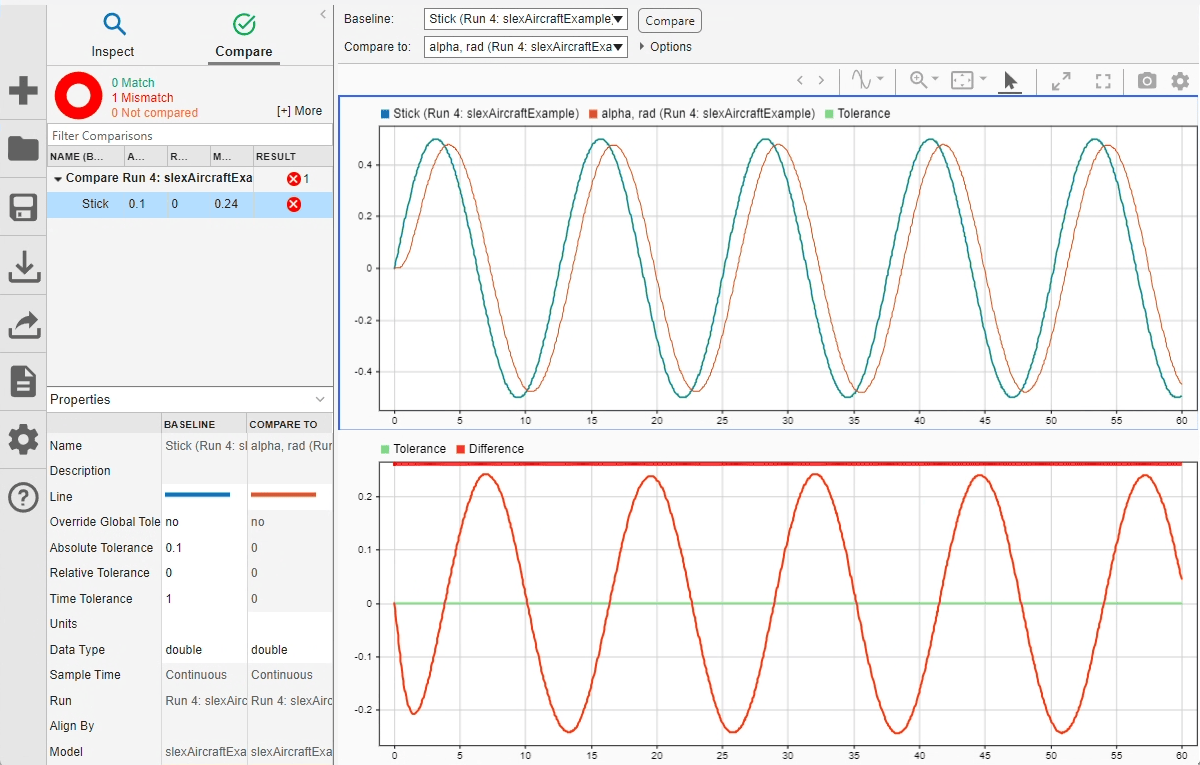
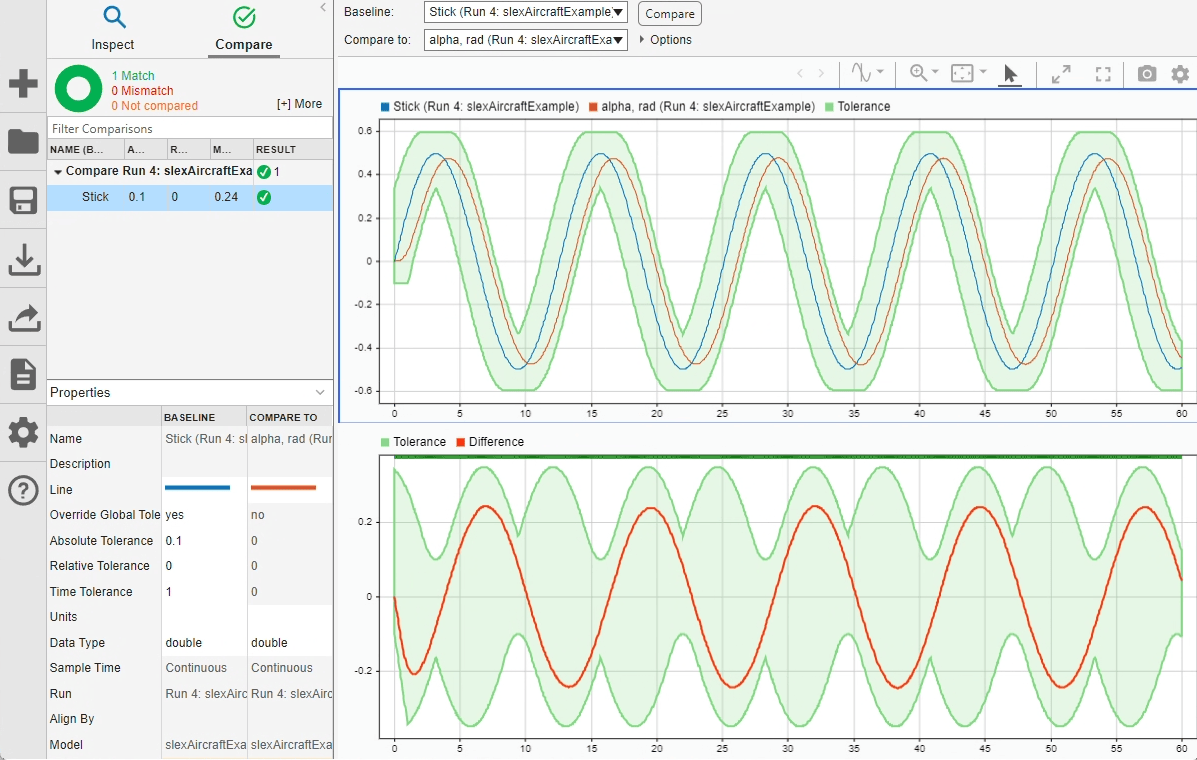
You can specify time and magnitude tolerance values to use for the comparison. Comparisons use tolerance values specified for the baseline signal in the comparison. To account for the phase shift, set a time tolerance of 1 on the Stick signal. To account for magnitude differences, set an absolute tolerance value of 0.1 on the Stick signal.
stick.TimeTol = 1;
stick.AbsTol = 0.1;
Compare the signals again. This time, because of the absolute and time tolerances, the signal comparison passes.
comparisonResults = Simulink.sdi.compareSignals(stick.ID,alpha.ID);
match = comparisonResults.Status
match =
  ComparisonSignalStatus enumeration

    WithinTolerance
Input Arguments
Output Arguments
Version History
Introduced in R2012b
See Also
Objects
Functions
Simulink.sdi.compareSignals|Simulink.sdi.getSignal|getSignalByIndex|getAllSignalIDs|getAllSignals|getSignalsByName|getSignalIDsByName

