주요 콘텐츠

Simulink.sdi.compareSignals

R2026b

Compare data in two Simulink.sdi.Signal objects

Description

diff = Simulink.sdi.compareSignals(sigID1,sigID2) compares the signals that correspond to the signal IDs sigID1 and sigID2 and returns the results in a Simulink.sdi.DiffSignalResult object. For more information on how the comparison results are computed, see How the Simulation Data Inspector Compares Data.

Use Simulink.sdi.compareSignals when you want to compare only two signals. Using a signal comparison returns the Simulink.sdi.diffSignalResult object with the comparison data directly. When you want to compare multiple signals between runs, use Simulink.sdi.compareRuns.

example

diff = Simulink.sdi.compareSignals(sigID1,sigID2,Name=Value) specifies options using one or more name-value arguments. For example, to ignore mismatches in signal units, specify Units="Ignore". (since R2023a)

Examples

collapse all

Suppose you simulate a model twice, making small changes between the runs. To see how these changes to your model affect a particular signal, compare the logged signal data from each run.

For example, compare the effect of your changes to the model on the first logged signal. Get the signal ID for the first signal logged in both the current and previous run.

runIDs = Simulink.sdi.getAllRunIDs;

runID1 = runIDs(end-1);
runID2 = runIDs(end);

run1 = Simulink.sdi.getRun(runID1);
run2 = Simulink.sdi.getRun(runID2);

sigID1 = getSignalIDByIndex(run1,1);
sigID2 = getSignalIDByIndex(run2,1);

Compare the signal between runs.

diffResult = Simulink.sdi.compareSignals(sigID1,sigID2);

You can use the Simulation Data Inspector programmatic interface to compare signals within a single run. This example compares the input and output signals of an aircraft longitudinal flight controller.

Load the Simulation Data Inspector session file that contains the flight control data.

Simulink.sdi.load("AircraftExample.mldatx");

To access the latest run, use the Simulink.sdi.Run.getLatest function.

aircraftRun = Simulink.sdi.Run.getLatest;

The Stick signal represents the input to the controller. The alpha, rad signal represents the output. To access these signals, use Simulink.sdi.getSignalsByName.

stick = getSignalsByName(aircraftRun,"Stick");
alpha = getSignalsByName(aircraftRun,"alpha, rad");

To compare the Stick and alpha, rad signals, use the signal IDs as input in the Simulink.sdi.compareSignals. The Stick signal is the baseline. The alpha, rad signal is the signal to compare against the baseline.

comparisonResults = Simulink.sdi.compareSignals(stick.ID,alpha.ID);
match = comparisonResults.Status
match = 
  ComparisonSignalStatus enumeration

    OutOfTolerance

The comparison result is out of tolerance. To open the Simulation Data Inspector to view and analyze the comparison results, use Simulink.sdi.view.

Simulink.sdi.view
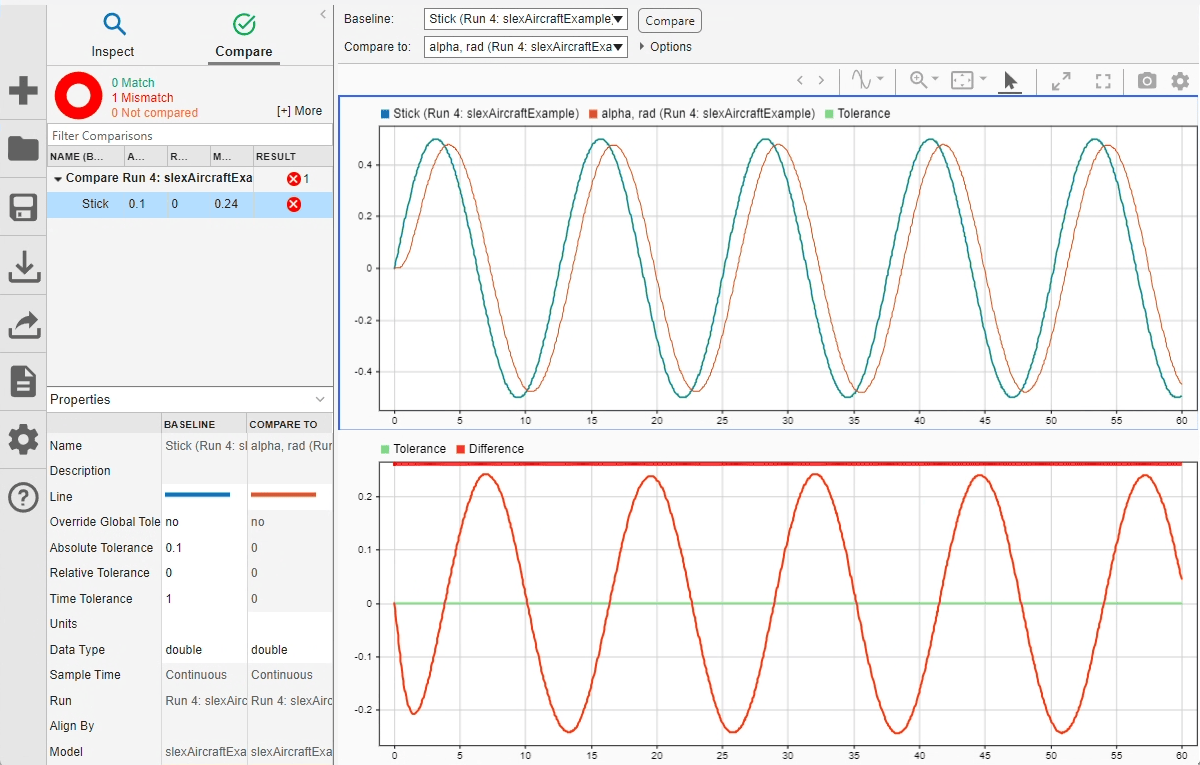
The Compare pane of the Simulation Data Inspector showing that the signal comparison is out of tolerance.

You can specify time and magnitude tolerance values to use for the comparison. Comparisons use tolerance values specified for the baseline signal in the comparison. To account for the phase shift, set a time tolerance of 1 on the Stick signal. To account for magnitude differences, set an absolute tolerance value of 0.1 on the Stick signal.

stick.TimeTol = 1;
stick.AbsTol = 0.1;

Compare the signals again. This time, because of the absolute and time tolerances, the signal comparison passes.

comparisonResults = Simulink.sdi.compareSignals(stick.ID,alpha.ID);
match = comparisonResults.Status
match = 
  ComparisonSignalStatus enumeration

    WithinTolerance
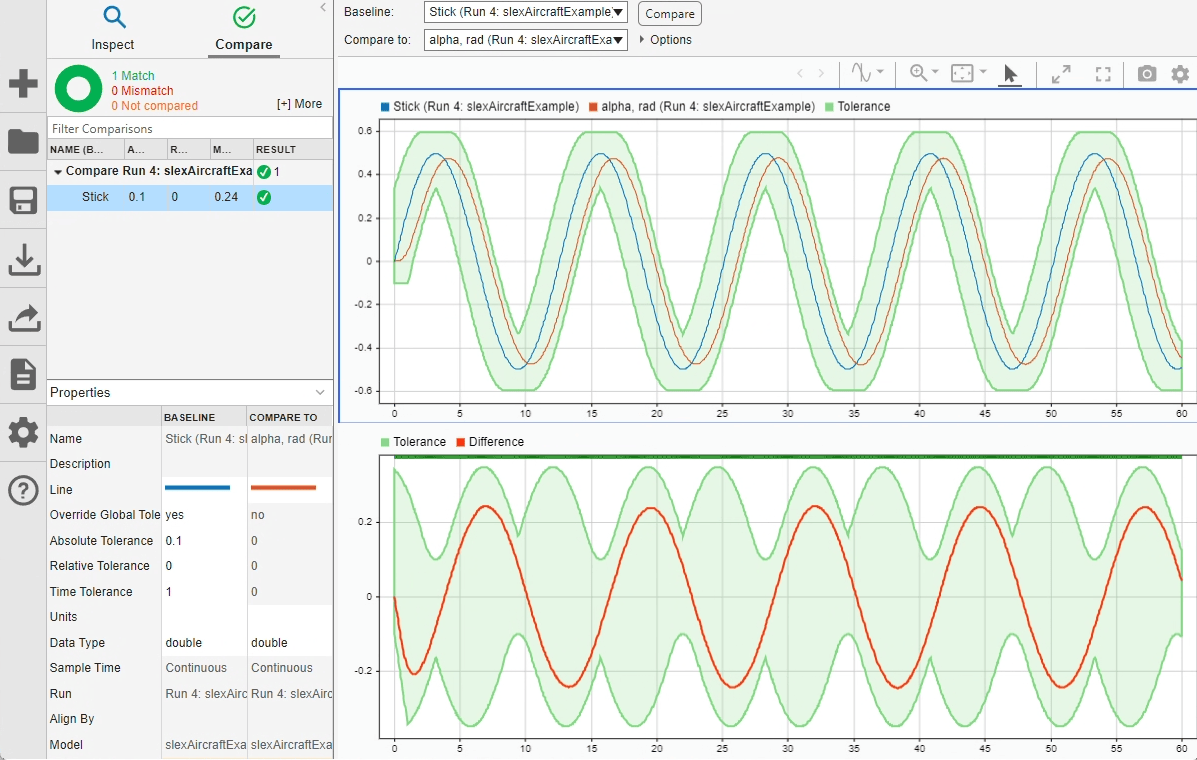
Compare pane of the Simulation Data Inspector showing a passing signal comparison

Input Arguments

collapse all

Signal ID of baseline signal, specified as an integer. The Simulation Data Inspector assigns a signal ID to each signal when a run is created. You can get the signal ID for a signal using one of these functions:

Signal ID of signal to compare, specified as an integer. The Simulation Data Inspector assigns a signal ID to each signal when a run is created. You can get the signal ID for a signal using one of these functions:

Name-Value Arguments

collapse all

Specify optional pairs of arguments as Name1=Value1,...,NameN=ValueN, where Name is the argument name and Value is the corresponding value. Name-value arguments must appear after other arguments, but the order of the pairs does not matter.

Example: diff = Simulink.sdi.compareSignals(sigID1,sigID2,DataType="MustMatch")

Comparison sensitivity to signal data types, specified as "MustMatch". Specify DataType="MustMatch" when you want the comparison to be sensitive to numeric data type mismatches in compared signals.

When signal data types do not match, the Status property of the Simulink.sdi.DiffSignalResult object for the result is set to DataTypeMismatch.

The Simulink.sdi.compareSignals function compares the data types before synchronizing and comparing the signal data. When you do not specify this name-value argument, the comparison checks data types only to detect a comparison between string and numeric data. For a comparison between string and numeric data, results are not computed, and the status for the result is DataTypeMismatch. For signals that have different numeric data types, the comparison computes results.

When you configure the comparison to stop on the first mismatch, a data type mismatch stops the comparison.

Comparison sensitivity to signal time vectors, specified as "MustMatch". Specify Time="MustMatch" when you want the comparison to be sensitive to mismatches in the time vectors of compared signals. When you specify this name-value argument, the algorithm compares the time vectors before synchronizing and comparing the signal data.

When the time vectors do not match, the Status property of the Simulink.sdi.DiffSignalResult object for the result is set to TimeMismatch.

Comparisons are not sensitive to differences in signal time vectors unless you specify this name-value argument. For comparisons that are not sensitive to differences in the time vectors, the comparison algorithm synchronizes the signals prior to the comparison. For more information about how synchronization works, see How the Simulation Data Inspector Compares Data.

When you specify that time vectors must match and configure the comparison to stop on the first mismatch, a time vector mismatch stops the comparison.

Comparison sensitivity to signal start and stop times, specified as "MustMatch". Specify StartStop="MustMatch" when you want the comparison to be sensitive to mismatches in signal start and stop times. When you specify this name-value argument, the algorithm compares the start and stop times for each signal before synchronizing and comparing the signal data.

When the start times and stop times do not match, the Status property of the Simulink.sdi.DiffSignalResult object for the result is set to StartStopMismatch.

When you specify that start and stop times must match and configure the comparison to stop on the first mismatch, a start or stop time mismatch stops the comparison.

Comparison sensitivity to signal units, specified by "Ignore". Specify Units="Ignore" when you want the comparison to ignore mismatches in signal units.

Comparisons are sensitive to differences in aligned signal units unless you specify this name-value argument. When you do not specify this name-value argument and both the baseline and comparison signal have units that do not match, the Status property of the Simulink.sdi.DiffSignalResult object for the result is set to UnitsMismatch. The comparison is not sensitive to the difference if only one signal has units.

When you specify the comparison to ignore mismatches in signal units and configure the comparison to stop on the first mismatch, a unit mismatch does not stop the comparison.

Whether comparison stops on first detected mismatch, specified as "Metadata" or "Any". A stopped comparison might not compute results for all channels when comparing multidimensional signals and can return a mismatched result more quickly.

  • "Metadata" — A mismatch in metadata stops the comparison. Metadata comparisons happen before signal data comparisons.

    The Simulation Data Inspector always aligns signals. When you configure the comparison to stop on the first mismatch, an unaligned signal always stops the comparison.

    By default, the Simulation Data Inspector compares the units of aligned signals when both the baseline and comparison signals have units. When you configure the comparison to stop on the first mismatch, mismatched units stop the comparison. To ignore mismatches in signal units, specify Units="Ignore".

    You can specify additional name-value arguments to configure the comparison to check and stop on the first mismatch for additional metadata, such as signal data type, start and stop times, and time vectors.

  • "Any" — A mismatch in metadata or signal data stops the comparison.

Whether to compute comparison results for each channel in multidimensional signals, specified as logical true (1) or false (0).

  • true or 1 — Comparison expands multidimensional signals represented as a single signal with nonscalar sample values to a set of signals with scalar sample values and computes a comparison result for each signal.

    The representation of the multidimensional signal in the Simulation Data Inspector as a single signal with nonscalar sample values does not change.

  • false or 0 — Comparison does not compute results for multidimensional signals represented as a single signal with nonscalar sample values.

Output Arguments

collapse all

Signal comparison result, returned as a Simulink.sdi.DiffSignalResult object. Complex signal comparison results are returned as an array of two DiffSignalResult objects. One DiffSignalResult object contains the real data and the other contains the imaginary data. Check the Name property of the DiffSignalResult object to determine whether it contains real or imaginary data.

Limitations

The Simulation Data Inspector does not support comparing:

  • Signals of data types int64 or uint64

  • Variable-size signals

If you perform multiple signal comparisons or run comparisons, only the latest DiffSignalResult object has visible properties.

Version History

Introduced in R2011b