Design Battery Module for Automotive Requirements
R2026bThis example shows how to design a battery module and a cooling plate from battery cell test data. Modular battery units are a good solution to decrease the cost of automotive battery packs. Battery modules can help meet requirements of different customers in similar industry domains. The battery cells are typically parameterized using pulse discharge and charge data. This example uses the hybrid pulse power characterization (HPPC) test [1] to estimate the battery ohmic resistance and other dynamic resistance values.
An A123 cell with lithium-ferrous-phosphate (LFP) chemistry was tested in a test chamber at five different temperatures: , , , , and [2]. During the test, the temperature inside the chamber is uniform. To learn more about the test procedure and how to parameterize the battery cell, see the Characterize Battery Cell for Electric Vehicles example.
Parameterize Battery Cell
Specify the HPPC test temperatures, in degree Celsius.
TestTemperatures = [0 10 25 35 45];
testData = struct();
To read, visualize, and extract the individual pulse information from the HPPC test data, use the hppcTest function.
for tempIdx = 1:5
    filename = strcat("A123HPPCdata",num2str(TestTemperatures(tempIdx)),"deg");
    loadFilename = fullfile("testDataA123cells",filename);
    hppcData = load(loadFilename);

    testData.(filename) = hppcTest(hppcData.data,ValidVoltageRange=[2 4]);
    figure
    plot(testData.(filename))
    title(filename)
end
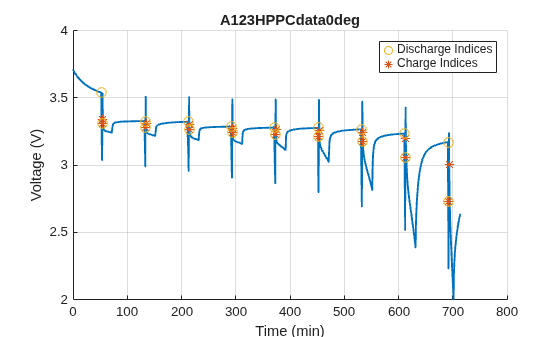
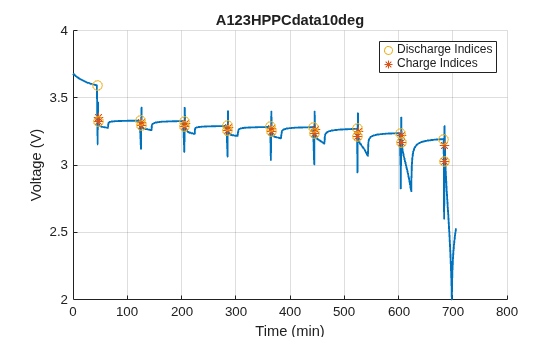
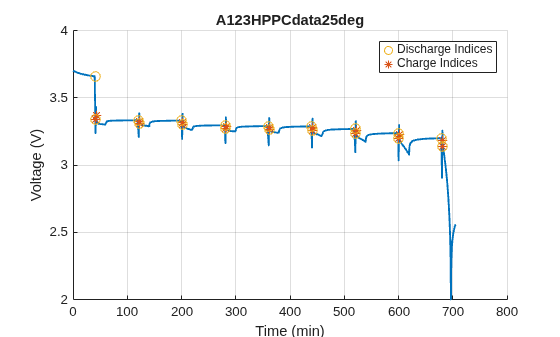
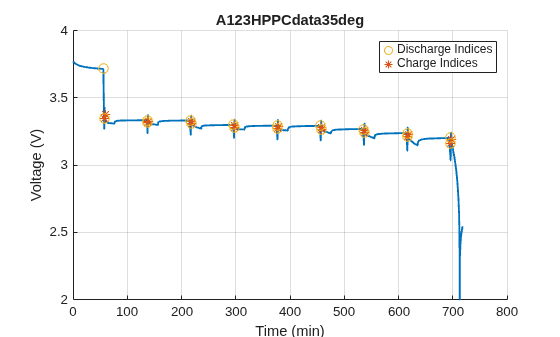
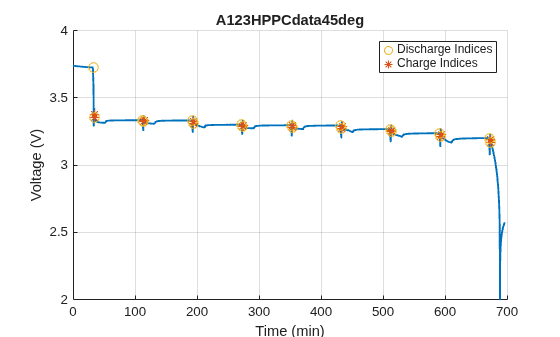
To find the best fit parameters for a battery equivalent circuit model for all the temperatures that you specified in the TestTemperatures workspace variable, use the hppcTestSuite function to create a test container object.
hppcSuite = hppcTestSuite([testData.A123HPPCdata0deg,...
    testData.A123HPPCdata10deg,...
    testData.A123HPPCdata25deg,...
    testData.A123HPPCdata35deg,...
    testData.A123HPPCdata45deg], ...
    Temperature=TestTemperatures);
To specify the desired battery model breakpoints and number of RC branches in the battery model, use the ecm function.
batteryEcm = ecm(2,"TemperatureBreakpoints",simscape.Value(TestTemperatures,"degC"),...
    "ResistanceTemperatureBreakpoints",simscape.Value(TestTemperatures,"degC"));
To fit the model parameters, use the fitECM function.
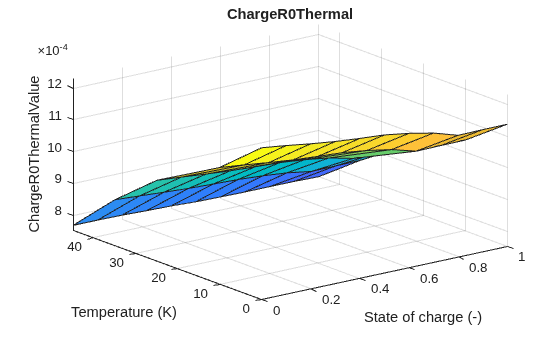
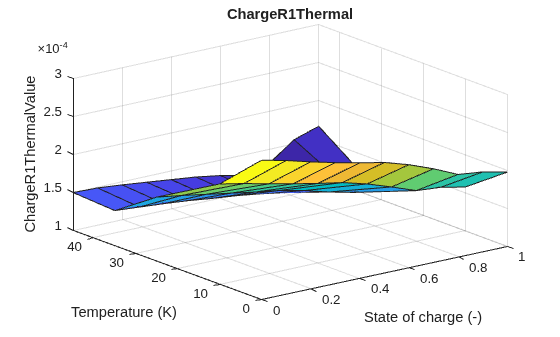
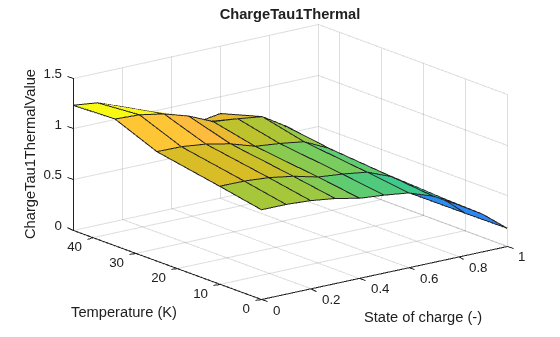
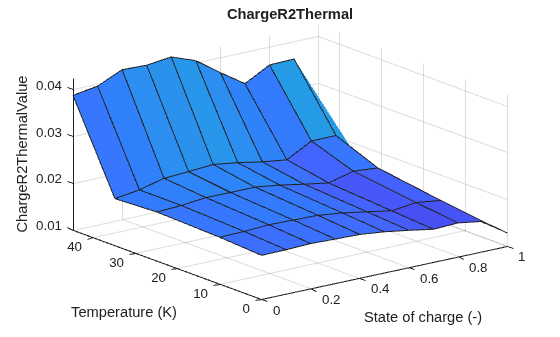
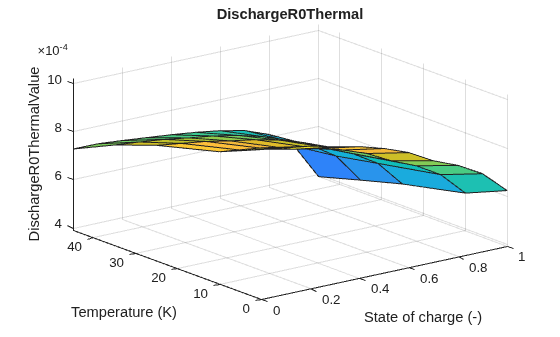
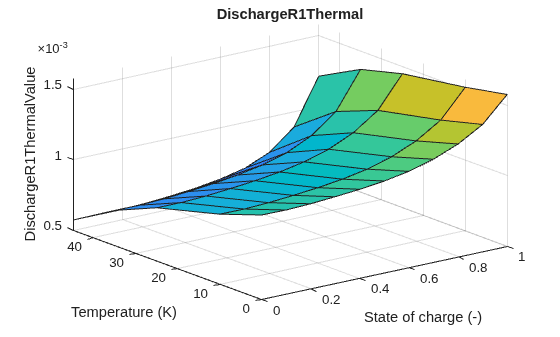
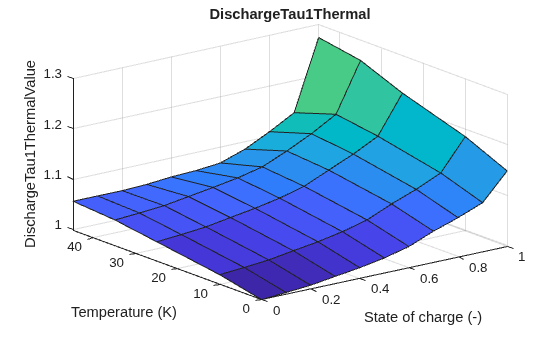
batteryEcm = fitECM(hppcSuite,SegmentToFit="loadAndRelaxation",ECM=batteryEcm); The ModelParameterTables and ParameterSummary properties of the batteryEcm object contain the estimated model parameters. To visualize the parameter trends, use the plotModelParameters method.
plotModelParameters(batteryEcm)






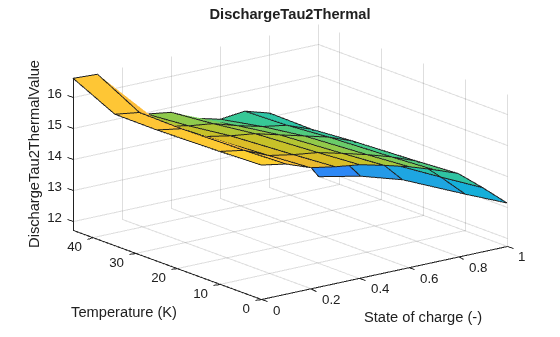
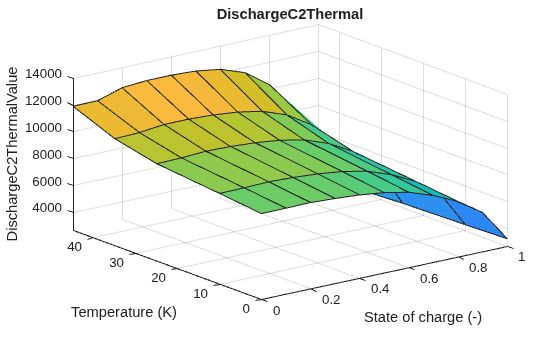
The Battery block parameters stored in the cellModel workspace variable are:
Vector of temperature values
Vector of state-of-charge values
Open-circuit voltage
Terminal resistance during charging
Terminal resistance during discharging
Cell capacity
Cell dynamics — Polarization resistance and time constants for all the RC pairs
You can specify other relevant battery parameters within the cellModel struct.
cellModel.Dim.Height = 0.195;    % Battery cell height
cellModel.Dim.Width = 0.150;     % Battery cell width
cellModel.Dim.Thickness = 0.020; % Battery cell thickness
cellModel.Dim.Mass = 0.4;        % Battery cell mass
cellModel.Dim.Cp = 800;          % Battery cell heat capacity
clearvars -except cellModel batteryEcm
Build Battery Modules
The battery cells produce heat when charged or discharged. You must attach a cooling plate to remove this heat and keep the battery within reasonable temperatures during its operation. This table shows the key design requirements and how to specify the battery module parameters to meet these requirements:
Requirement | Model Parameters |
Operate the battery module under a 100 A constant current fast-charge for 20 minutes. The HPPC pulse magnitude is 40 A. For a current of 100 A, you must connect at least three cells in parallel. |
|
To prevent cell overheating, the maximum rise in cell temperature must be lower than or equal to 10 degrees Celsius. Set this requirement as low as possible. |
|
The maximum temperature gradient within a module must not exceed 5 degrees Celsius. The cells must degrade uniformly. Set this requirements as low as possible. |
|
The pumping requirement for the coolant must be low and less than 20 kPa for the module. |
|
The battery module comprises five series-connected units of three parallel-connected cells each, for a total of 15 cells.
% Specify the number of cells in the parallel set.
numCells_p = 3;
% Specify the number of series-connected parallel set.
numCells_s = 5;
% Specify the maximum acceptable temperature gradient in the battery module.
requirements.MaxModuleTgrad  = 5;
% Specify the maximum acceptable temperature rise within the battery module.
requirements.MaxCellTempInc  = 10;
% Specify the maximum acceptable pressure drop for the module cooling system.
requirements.MaxPressureDrop = 20000;
Load a pre-generated battery module library.
batteryLFP = load('BattDetailedModuleLFP.mat');To update the pre-generated battery library block, use the buildBatteryModule function. At the MATLAB® Command Window, enter:
% If you already have BattDetailedModuleLFP library folder in your working directory,
% then you must delete it before running this code.
[~,moduleDetailed] = buildBatteryModule(numCells_s,numCells_p,cellModel);
buildBattery(moduleDetailed,'LibraryName','BattDetailedModuleLFP',...
                            'MaskParameters','VariableNamesByType');
moduleLFP = load('BattDetailedModuleLFP.mat');
Plot the battery module.
battDetailedPlot = batteryChart(batteryLFP.Detailed);
title(battDetailedPlot,"Detailed Battery Model");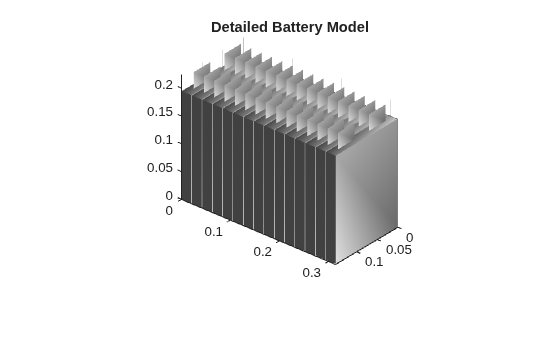
Initialize the parameters for the detailed battery module block.
run('BattDetailedModuleLFP_param');Parameterize Battery Module
Set the module parameters based on the cell parameters that you previously defined.
run('setBattModuleLFPcell_param');Set the thermal mass variation of the battery cell by specifying the thermal_massCellPercentDeviation value.
thermalMassPercentDev = load("BattDetailedModuleCellVar.mat");
Detailed.thermal_massCellPercentDeviation = thermalMassPercentDev.cellToCell;
Design Cooling System for Battery Module
The battery module in this example employs a Parallel Channels cooling plate. Set the parameters for the parallel channel cooling plate.
run('setBattModuleCoolingPlate_param');Set the operating parameters.
chargingParams.SOC = 0.05;  % Initial battery state of charge
chargingParams.T = 300;     % Initial battery temperature, K
chargingParams.I = 100;     % Charging current, A
chargingParams.time = 1200; % Charging time, s
chargingParams.CoolT = 300; % Coolant inlet temperature, K
chargingParams.Flow = 3;    % Flowrate, lpm
You must run an experimental design to estimate the desired parameters for the cooling plate. Set the options for the number of cooling channels, the channel diameter, and the applicable coolant flow rate. Define the design parameters for the parallel channel cooling plate.
designParams.NumChannelOptions = [2 3 4];
designParams.FlowrateOptions = [1 3 5];
designParams.ChannelDiaOptions = [1.5e-3 2e-3 2.5e-3];
To run a full factorial of design options, at the MATLAB Command Window, enter:
simResults = getBattModuleThermalDesign(designParams, chargingParams, thermalMassPercentDev.cellToCell);
save battModuleLFPsimResults.mat simResults
Load the results of the simulation.
load('battModuleLFPsimResults.mat');Select the simulations that meet the requirements.
selectData = simResults.("Max. Gradient Tcell") <= requirements.MaxModuleTgrad &...
             simResults.("Pressure Drop") <= requirements.MaxPressureDrop &...
             simResults.("Max. Tcell") - chargingParams.T <= requirements.MaxCellTempInc;

goodDesignPoints = simResults(selectData,:)
goodDesignPoints = 2×6 table
    Max. Gradient Tcell    Max. Tcell    Pressure Drop    Num. Channels    Flowrate    Channel Diameter
    ___________________    __________    _____________    _____________    ________    ________________

           1.3088            309.27          18024              2             1             0.002
          0.32956            308.72          13021              3             1             0.002
Select the final design based on the lowest value of the cell temperature rise.
[~,bestOptionID] = min(goodDesignPoints.("Max. Tcell"));
finalDesign = goodDesignPoints(bestOptionID,:)
finalDesign = 1×6 table
Max. Gradient Tcell Max. Tcell Pressure Drop Num. Channels Flowrate Channel Diameter
___________________ __________ _____________ _____________ ________ ________________
0.32956 308.72 13021 3 1 0.002
disp(strcat('Select coolant plate with #Channels=',num2str(finalDesign.("Num. Channels")),', ChannelDia=',num2str(finalDesign.("Channel Diameter")*1000),'mm.'));
Select coolant plate with #Channels=3, ChannelDia=2mm.
This parameterized cooling plate is well suited according to the requirements.
References
Christophersen, Jon P. Battery Test Manual For Electric Vehicles, Revision 3. United States: N. p., 2015. Web. doi:10.2172/1186745
Anandaroop Bhattacharya, Subhasish Basu Majumder. "Experimental data collected with Biologic BCS-815 8-channel battery tester for battery HPPC test". Indian Institute of Technology (IIT) Kharagpur, India.

