주요 콘텐츠

summary

Return parameter estimates and fit quality statistics from SimBiology least-squares estimation as structure array of tables

Description

fitMetrics = summary(resultsObj) returns a structure array fitMetrics that contains tables of estimated values and fit quality statistics from least-squares estimation (nonlinear regression).

example

Examples

collapse all

Load the sample data set.

load data10_32R.mat
gData = groupedData(data);
gData.Properties.VariableUnits = ["","hour","milligram/liter","milligram/liter"];

Create a two-compartment PK model.

pkmd                 = PKModelDesign;
pkc1                 = addCompartment(pkmd,"Central");
pkc1.DosingType      = "Infusion";
pkc1.EliminationType = "linear-clearance";
pkc1.HasResponseVariable = true;
pkc2                 = addCompartment(pkmd,"Peripheral");
model                = construct(pkmd);
configset            = getconfigset(model);
configset.CompileOptions.UnitConversion = true;
responseMap = ["Drug_Central = CentralConc","Drug_Peripheral = PeripheralConc"];

Provide model parameters to estimate.

paramsToEstimate   = ["log(Central)","log(Peripheral)","Q12","Cl_Central"];
estimatedParam     = estimatedInfo(paramsToEstimate,'InitialValue',[1 1 1 1]);

Assume every individual receives an infusion dose at time = 0, with a total infusion amount of 100 mg at a rate of 50 mg/hour.

dose             = sbiodose("dose","TargetName","Drug_Central");
dose.StartTime   = 0;
dose.Amount      = 100;
dose.Rate        = 50;
dose.AmountUnits = "milligram";
dose.TimeUnits   = "hour";
dose.RateUnits   = "milligram/hour";

Estimate model parameters. By default, the function estimates a set of parameter for each individual (unpooled fit).

fitResults =  sbiofit(model,gData,responseMap,estimatedParam,dose);

Plot the results.

plot(fitResults);
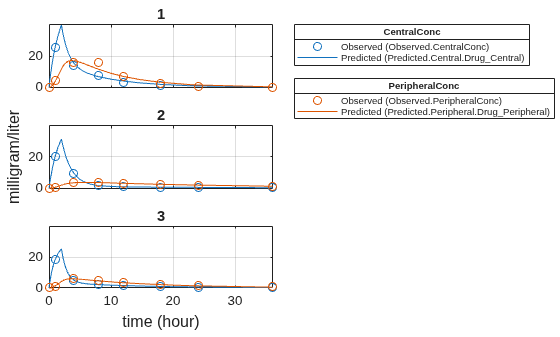
Figure contains 5 axes objects. Axes object 1 with title 3 contains 4 objects of type line. One or more of the lines displays its values using only markers Axes object 2 with title 2 contains 4 objects of type line. One or more of the lines displays its values using only markers Axes object 3 with title 1 contains 4 objects of type line. One or more of the lines displays its values using only markers Hidden axes object 4 contains 2 objects of type line. One or more of the lines displays its values using only markers These objects represent Predicted (Predicted.Central.Drug_Central), Observed (Observed.CentralConc). Hidden axes object 5 contains 2 objects of type line. One or more of the lines displays its values using only markers These objects represent Predicted (Predicted.Peripheral.Drug_Peripheral), Observed (Observed.PeripheralConc).

Plot all groups in one plot.

plot(fitResults,"PlotStyle","one axes");
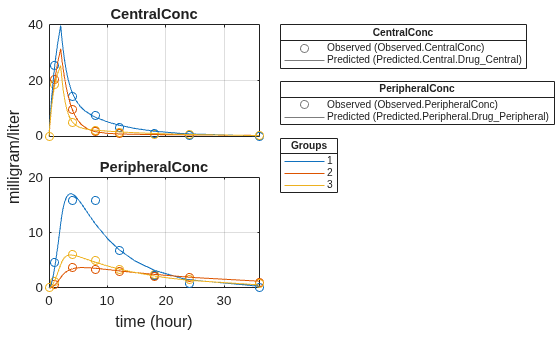
Figure contains 5 axes objects. Axes object 1 with title PeripheralConc contains 6 objects of type line. One or more of the lines displays its values using only markers Axes object 2 with title CentralConc contains 6 objects of type line. One or more of the lines displays its values using only markers Hidden axes object 3 contains 2 objects of type line. One or more of the lines displays its values using only markers These objects represent Predicted (Predicted.Central.Drug_Central), Observed (Observed.CentralConc). Hidden axes object 4 contains 2 objects of type line. One or more of the lines displays its values using only markers These objects represent Predicted (Predicted.Peripheral.Drug_Peripheral), Observed (Observed.PeripheralConc). Hidden axes object 5 contains 3 objects of type line. These objects represent 3, 2, 1.

Change some axes properties.

s = struct;
s.Properties.XGrid = "on";
s.Properties.YGrid = "on";
plot(fitResults,"PlotStyle","one axes","AxesStyle",s);
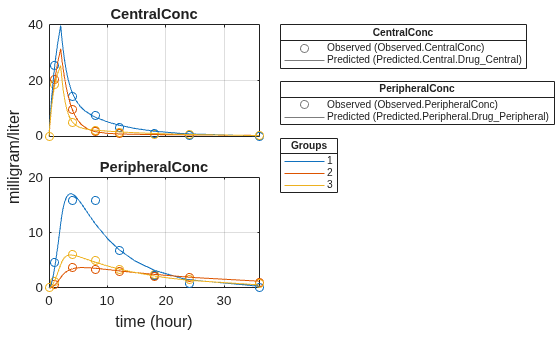
Figure contains 5 axes objects. Axes object 1 with title PeripheralConc contains 6 objects of type line. One or more of the lines displays its values using only markers Axes object 2 with title CentralConc contains 6 objects of type line. One or more of the lines displays its values using only markers Hidden axes object 3 contains 2 objects of type line. One or more of the lines displays its values using only markers These objects represent Predicted (Predicted.Central.Drug_Central), Observed (Observed.CentralConc). Hidden axes object 4 contains 2 objects of type line. One or more of the lines displays its values using only markers These objects represent Predicted (Predicted.Peripheral.Drug_Peripheral), Observed (Observed.PeripheralConc). Hidden axes object 5 contains 3 objects of type line. These objects represent 3, 2, 1.

Compare the model predictions to the actual data.

plotActualVersusPredicted(fitResults);
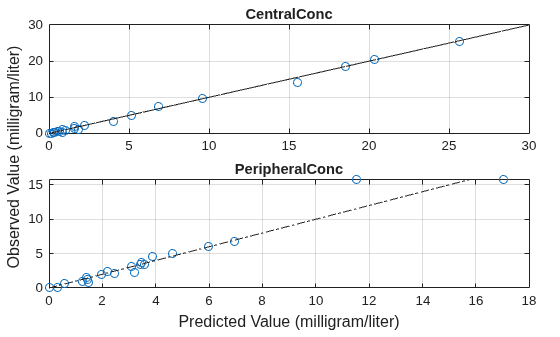
Figure contains 2 axes objects. Axes object 1 with title PeripheralConc contains 2 objects of type line. One or more of the lines displays its values using only markers Axes object 2 with title CentralConc contains 2 objects of type line. One or more of the lines displays its values using only markers

Use boxplot to show the variation of estimated model parameters.

plotParameterStats(fitResults,"box");
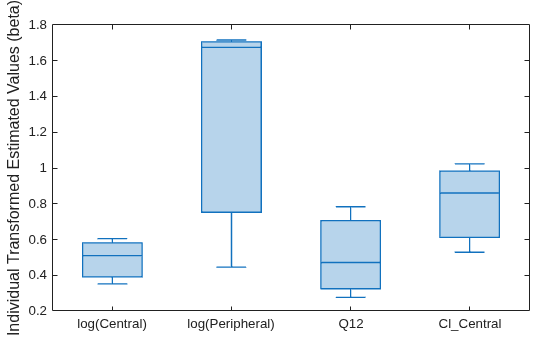
Figure contains an axes object. The axes object contains an object of type boxchart.

Plot the distribution of residuals. This normal probability plot shows the deviation from normality and the skewness on the right tail of the distribution of residuals. The default (constant) error model might not be the correct assumption for the data being fitted.

plotResidualDistribution(fitResults);
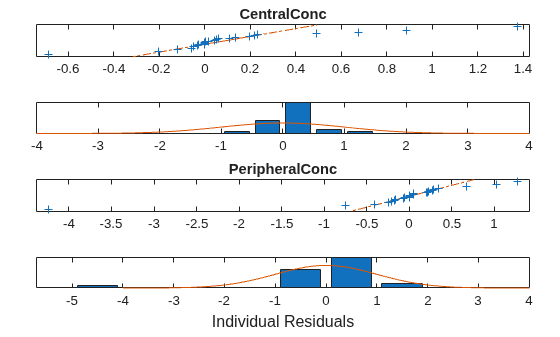
Figure contains 4 axes objects. Axes object 1 contains 2 objects of type bar, line. Axes object 2 with title PeripheralConc contains 3 objects of type line. One or more of the lines displays its values using only markers Axes object 3 contains 2 objects of type bar, line. Axes object 4 with title CentralConc contains 3 objects of type line. One or more of the lines displays its values using only markers

Plot residuals for each response using the model predictions on x-axis.

plotResiduals(fitResults,"Predictions");
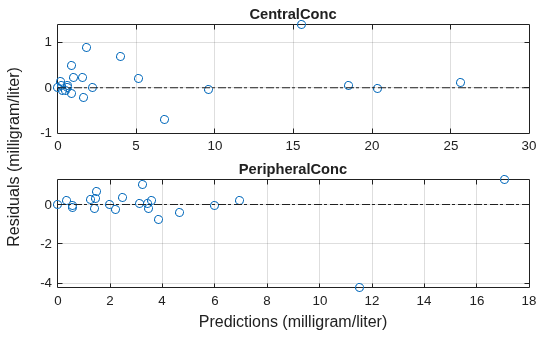
Figure contains 2 axes objects. Axes object 1 with title PeripheralConc contains 2 objects of type line. One or more of the lines displays its values using only markers Axes object 2 with title CentralConc contains 2 objects of type line. One or more of the lines displays its values using only markers

Get the summary of the fit results. stats.Name contains the name for each table from stats.Table, which contains a list of tables with estimated parameter values and fit quality statistics.

fitMetrics = summary(fitResults);

Display the table that contains parameter estimates summary statistics.

tableToShow = "Parameter Estimates Summary Statistics";
tableNames = {fitMetrics.Name};
tfShowTable = matches(tableNames,tableToShow);
disp(fitMetrics(tfShowTable).Table);
          Statistic           Central    Peripheral     Q12      Cl_Central
    ______________________    _______    __________    ______    __________

    {'Minimum'           }     1.422       0.5291      1.5619      0.2764  
    {'Lower Quartile'    }     1.483      0.61191      2.5055     0.32521  
    {'Median'            }    1.6657      0.86035      5.3364     0.47163  
    {'Upper Quartile'    }    1.7906      0.98252      5.5065     0.70562  
    {'Maximum'           }    1.8322       1.0233      5.5632     0.78361  
    {'Mean'              }      1.64      0.80423      4.1539     0.51055  
    {'Standard Deviation'}    0.2063      0.25181      2.2476     0.25583  

Input Arguments

collapse all

Estimation results, specified as an OptimResults object or NLINResults object, or vector of results objects which contain least-squares estimation results.

Output Arguments

collapse all

Parameter estimates and fit statistics, returned as a structure array of tables.

Each structure contains the fields:

  • Name — Name of a fit statistics

  • Table — Table containing values of the corresponding fit statistics

The reported metrics vary depending on the fit problem, such as a pooled fit, unpooled fit, hierarchical or categorical fit and so on. Some of the commonly-reported metrics are:

  • Unpooled Parameter Estimates or Pooled Parameter Estimates

  • Parameter Estimates Summary Statistics. This table is included if the same parameter has multiple estimates, such as, from an unpooled fit or a hierarchical fit. The table reports the minimum, lower quartile, median, upper quartile, maximum, mean, and standard deviation values for parameter estimates which are weighted equally across each individual. (since R2026a)

  • Statistics

  • Unpooled Beta or Pooled Beta

  • Residuals

  • Covariance Matrix

  • Error Model

Version History

Introduced in R2014a

expand all