이 페이지는 기계 번역을 사용하여 번역되었습니다. 최신 내용을 영문으로 보려면 여기를 클릭하십시오.
calibrateAccel
R2026aMPU-9250 센서 내부에 있는 가속도계 보정
설명
Add-On Required: 이 기능을 사용하려면 Simulink Coder Support Package for BeagleBone Blue Hardware 애드온이 필요합니다.
예제
BeagleBone Blue 하드웨어와 연결을 설정합니다. 이 연결은 BeagleBone Blue 하드웨어에 대한 가장 최근 연결 시 사용된 IP 주소, 사용자 이름 및 비밀번호를 재사용합니다.
그 결과 생성된 객체인 bbblue는 BeagleBone Blue 하드웨어를 나타냅니다. BeagleBone Blue 하드웨어와의 연결 설정에 대한 자세한 내용은 beagleboneblue를 참조하십시오.
bbblue = beagleboneblue
bbblue =

  beagleboneblue with properties:

    DeviceAddress: '172.69.7.2'
             Port: 22
calibrateAccel 함수를 사용하십시오. 이 함수는 내부 보정 알고리즘을 시작합니다. 보정 시, 이 함수는 하드웨어를 다음 여섯 가지 안정된 위치에 고정하도록 안내합니다. 지시에 따라 하드웨어의 위치를 조정하고, 가속도계 보정 상태를 알려주는 메시지가 표시될 때까지 기다리십시오.
참고
보정 중에는 하드웨어가 안정된 상태로 고정되어 있는지 확인하십시오.
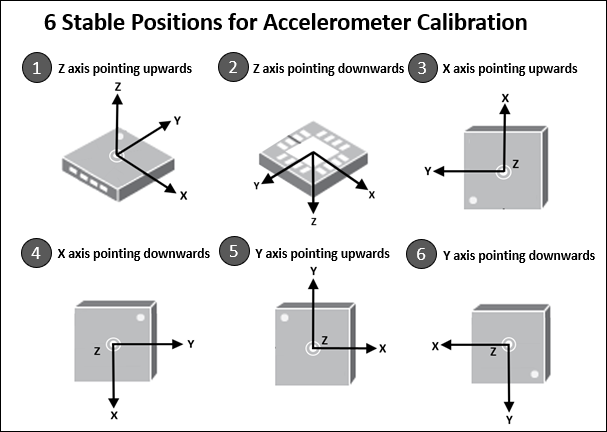
calibrateAccel(bbblue)
Hold the hardware stable and press ENTER to start the calibration. For more information, see Calibrate the Accelerometer in the MPU-9250 Sensor.


Hold the hardware with its z-axis pointing upwards and press ENTER.
Calibration of z-axis pointing upwards successful

Hold the hardware with its z-axis pointing downwards and press ENTER.
Calibration of z-axis pointing downwards successful

Hold the hardware with its x-axis pointing upwards and press ENTER.
Calibration of x-axis pointing upwards successful

Hold the hardware with its x-axis pointing downwards and press ENTER.
Calibration of x-axis pointing downwards successful

Hold the hardware with its y-axis pointing upwards and press ENTER.
Calibration of y-axis pointing upwards successful

Hold the hardware with its y-axis pointing downwards and press ENTER.
Calibration of y-axis pointing downwards successful

Accelerometer calibration successful.
입력 인수
버전 내역
R2019a에 개발됨

