directivity
System object: phased.ShortDipoleAntennaElement
Namespace: phased
Directivity of short-dipole antenna element
Syntax
D = directivity(H,FREQ,ANGLE)
Description
D = directivity( returns
the Directivity (dBi) of a short-dipole
antenna element, H,FREQ,ANGLE)H, at frequencies specified
by FREQ and in direction angles specified by ANGLE.
Input Arguments
Short-dipole antenna element specified as a phased.ShortDipoleAntennaElement System object.
Example: H = phased.ShortDipoleAntennaElement;
Frequencies for computing directivity and patterns, specified as a positive scalar or 1-by-L real-valued row vector. Frequency units are in hertz.
For an antenna, microphone, or sonar hydrophone or projector element,
FREQmust lie within the range of values specified by theFrequencyRangeorFrequencyVectorproperty of the element. Otherwise, the element produces no response and the directivity is returned as–Inf. Most elements use theFrequencyRangeproperty except forphased.CustomAntennaElementandphased.CustomMicrophoneElement, which use theFrequencyVectorproperty.For an array of elements,
FREQmust lie within the frequency range of the elements that make up the array. Otherwise, the array produces no response and the directivity is returned as–Inf.
Example: [1e8 2e6]
Data Types: double
Angles for computing directivity, specified as a 1-by-M real-valued
row vector or a 2-by-M real-valued matrix, where M is
the number of angular directions. Angle units are in degrees. If ANGLE is
a 2-by-M matrix, then each column specifies a direction
in azimuth and elevation, [az;el]. The azimuth
angle must lie between –180° and 180°. The elevation
angle must lie between –90° and 90°.
If ANGLE is a 1-by-M vector,
then each entry represents an azimuth angle, with the elevation angle
assumed to be zero.
The azimuth angle is the angle between the x-axis and the projection of the direction vector onto the xy plane. This angle is positive when measured from the x-axis toward the y-axis. The elevation angle is the angle between the direction vector and xy plane. This angle is positive when measured towards the z-axis. See Azimuth and Elevation Angles.
Example: [45 60; 0 10]
Data Types: double
Output Arguments
Examples
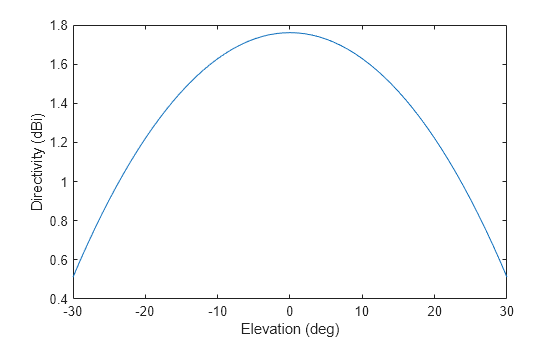
Compute the directivity of a z-directed short-dipole antenna element as a function of elevation.
Create the crossed-dipole antenna element System object™.
myAnt = phased.ShortDipoleAntennaElement;
myAnt.AxisDirection = 'Z';
myAnt.FrequencyRange = [0,10e9];Select the desired angles of interest to be at constant azimuth angle at zero degrees. Set the elevation angles to center around boresight (zero degrees azimuth and zero degrees elevation). Set the frequency to 1 GHz.
elev = [-30:30]; azm = zeros(size(elev)); ang = [azm;elev]; freq = 1e9;
Plot the directivity along the constant azimuth cut.
d = directivity(myAnt,freq,ang); plot(elev,d) xlabel('Elevation (deg)'); ylabel('Directivity (dBi)');
More About
Directivity describes the directionality of the radiation pattern of a sensor element or array of sensor elements.
Higher directivity is desired when you want to transmit more radiation in a specific direction. Directivity is the ratio of the transmitted radiant intensity in a specified direction to the radiant intensity transmitted by an isotropic radiator with the same total transmitted power
where Urad(θ,φ) is the radiant intensity of a transmitter in the direction (θ,φ) and Ptotal is the total power transmitted by an isotropic radiator. For a receiving element or array, directivity measures the sensitivity toward radiation arriving from a specific direction. The principle of reciprocity shows that the directivity of an element or array used for reception equals the directivity of the same element or array used for transmission. When converted to decibels, the directivity is denoted as dBi. For information on directivity, read the notes on Element Directivity and Array Directivity.
See Also
MATLAB Command
You clicked a link that corresponds to this MATLAB command:
Run the command by entering it in the MATLAB Command Window. Web browsers do not support MATLAB commands.
웹사이트 선택
번역된 콘텐츠를 보고 지역별 이벤트와 혜택을 살펴보려면 웹사이트를 선택하십시오. 현재 계신 지역에 따라 다음 웹사이트를 권장합니다:
또한 다음 목록에서 웹사이트를 선택하실 수도 있습니다.
사이트 성능 최적화 방법
최고의 사이트 성능을 위해 중국 사이트(중국어 또는 영어)를 선택하십시오. 현재 계신 지역에서는 다른 국가의 MathWorks 사이트 방문이 최적화되지 않았습니다.
미주
- América Latina (Español)
- Canada (English)
- United States (English)
유럽
- Belgium (English)
- Denmark (English)
- Deutschland (Deutsch)
- España (Español)
- Finland (English)
- France (Français)
- Ireland (English)
- Italia (Italiano)
- Luxembourg (English)
- Netherlands (English)
- Norway (English)
- Österreich (Deutsch)
- Portugal (English)
- Sweden (English)
- Switzerland
- United Kingdom (English)