extractSegmentationInfo
R2026bDescription
Examples
Download and unzip an MRI prostrate volume [1].
zipFile = matlab.internal.examples.downloadSupportFile("medical","ProstatexMRIData.zip");
filepath = fileparts(zipFile);
unzip(zipFile,filepath)
Create a medical volume object for the MRI prostate volume.
filepathMRI = fullfile(filepath,"ProstatexMRIData","5.000000-t2tsetra-75680");
mriVol = medicalVolume(filepathMRI)
mriVol =
  medicalVolume with properties:

                  Voxels: [384×384×19 int16]
          VolumeGeometry: [1×1 medicalref3d]
            SpatialUnits: "mm"
             Orientation: "transverse"
            VoxelSpacing: [0.5000 0.5000 4.5000]
            NormalVector: [1.4081e-17 0.2419 0.9703]
        NumCoronalSlices: 384
       NumSagittalSlices: 384
     NumTransverseSlices: 19
            PlaneMapping: ["sagittal"    "coronal"    "transverse"]
    DataDimensionMeaning: ["left"    "posterior"    "superior"]
                Modality: "MR"
           WindowCenters: [19×1 double]
            WindowWidths: [19×1 double]
Unzip the prostrate segmentation volume attached to this example as a supporting file.
unzip("ProstateXSegData.zip",pwd)Create a medical volume object for the prostate segmentation volume.
filepathSEG = fullfile(pwd,"ProstateX-0004","10-18-2011-NA-MR prostaat kanker detectie WDSmc MCAPRODETW-45493", ...
    "300.000000-Segmentation-3.549","1-1.dcm");
segVol = medicalVolume(filepathSEG)
segVol =
  medicalVolume with properties:

                  Voxels: [384×384×171 logical]
          VolumeGeometry: [1×1 medicalref3d]
            SpatialUnits: "mm"
             Orientation: "transverse"
            VoxelSpacing: [0.5000 0.5000 0.5000]
            NormalVector: [2.6606e-17 0.2419 0.9703]
        NumCoronalSlices: 384
       NumSagittalSlices: 384
     NumTransverseSlices: 171
            PlaneMapping: ["sagittal"    "coronal"    "transverse"]
    DataDimensionMeaning: ["left"    "posterior"    "superior"]
                Modality: "SEG"
           WindowCenters: []
            WindowWidths: []
Extract segmentation information from the segmentation volume.
segInfo = extractSegmentationInfo(segVol)
segInfo = struct with fields:
         SegmentNumber: 1
          SegmentLabel: "Prostate"
    SegmentDescription: "Prostate"
           ColorCIELab: [43803 26565 37722]
         AlgorithmType: "MANUAL"
     SegmentationColor: [128 174 128]
      SegmentationType: 'BINARY'
Observe that the voxel spacing for the MRI and segmentation volumes is different. Resample the segmentation volume to align with the MRI volume.
segVol = resample(segVol,mriVol.VolumeGeometry)
segVol =
  medicalVolume with properties:

                  Voxels: [384×384×19 logical]
          VolumeGeometry: [1×1 medicalref3d]
            SpatialUnits: "mm"
             Orientation: "transverse"
            VoxelSpacing: [0.5000 0.5000 4.5000]
            NormalVector: [1.4081e-17 0.2419 0.9703]
        NumCoronalSlices: 384
       NumSagittalSlices: 384
     NumTransverseSlices: 19
            PlaneMapping: ["sagittal"    "coronal"    "transverse"]
    DataDimensionMeaning: ["left"    "posterior"    "superior"]
                Modality: "SEG"
           WindowCenters: []
            WindowWidths: []
The segmentation data contains only one label. Create a label map for the segmentation.
labelMap = segVol.Voxels;
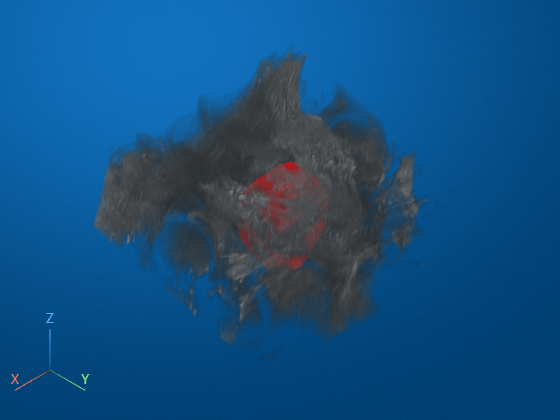
Visualize the label map overlaid on the MRI volume.
tf = oneSliceIntrinsicToWorldMapping(mriVol.VolumeGeometry,1);
vol = volshow(mriVol.Voxels, ...
    Transformation=tf, ...
    DisplayRangeMode="data-range", ...
    OverlayData=labelMap, ...
    OverlayDisplayRangeMode="data-range", ...
    OverlayColormap=[1 0 0], ...
    OverlayAlpha=0.5);
References
[1] Meyer, A., Schindele, D., von Reibnitz, D., Rak, M., Schostak, M., & Hansen, C. (2020). PROSTATEx Zone Segmentations [Data set]. The Cancer Imaging Archive. https://doi.org/10.7937/TCIA.NBB4-4655.
Input Arguments
Output Arguments
Version History
Introduced in R2026b

