Specific Dissipation Heat Exchanger (TL)
R2026bHeat exchanger parameterized by specific dissipation data for systems with thermal liquid and controlled flows
Since R2024a
Specific Dissipation Heat Exchanger (TL) block

To add a block to a model, double-click the canvas and start typing the block name. Then, select the block from the list.
Libraries:
Simscape /
Fluids /
Heat Exchangers /
Thermal Liquid
Description
The Specific Dissipation Heat Exchanger (TL) block models the cooling and heating of fluids through conduction over a thin wall. The properties of a single-phase thermal liquid are defined on the Thermal Liquid tab. The second fluid is a controlled fluid, which is specified only by the user-defined parameters on the Controlled Fluid tab. It does not receive any properties from the domain fluid network. The heat exchange between the fluids is based on the thermal liquid sensible heat.
Heat Transfer Model
Heat transfer by the simple model is based on specific dissipation:
where:
ξ is specific dissipation, which is a function of the mass flow rates of the thermal and controlled liquids.
TIn,Th is the thermal liquid inlet temperature.
TIn,C is the controlled liquid inlet temperature.
The simple model is based on linear interpolation of user-provided tabulated data and does not capture individual features of the heat exchanger.
The fluid properties that the block uses in heat transfer calculations are the average between the value at the inlet and the value in the fluid volume.
Composite Structure
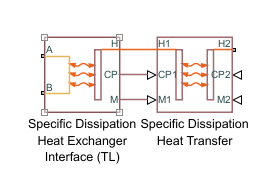
The Heat Exchanger (TL) block is a composite of the Specific Dissipation Heat Exchanger Interface (TL) and Specific Dissipation Heat Transfer blocks:
Examples
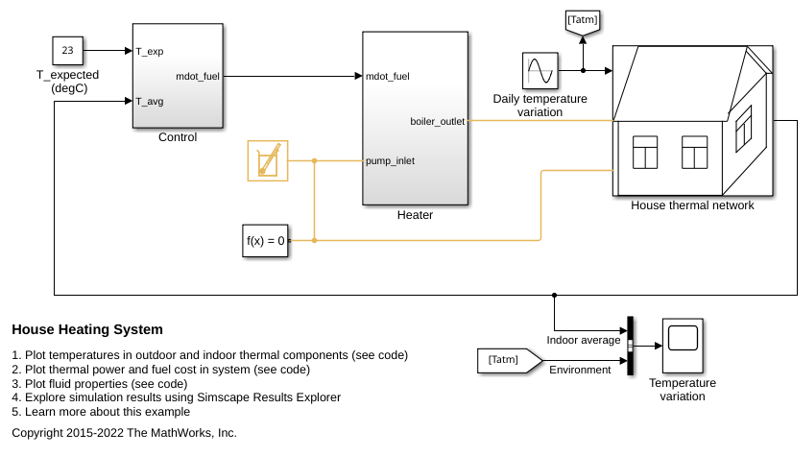
House Heating System
Model a simple house heating system. The model contains a heater, a controller, and a house structure with four radiators and four rooms. Each room exchanges heat with the environment through its exterior walls, roof, and windows. Each path is simulated as a combination of a thermal convection, thermal conduction, and the thermal mass. It is assumed that heat is not transferred internally between rooms. The heater consists of a furnace, a boiler, an accumulator, and a pump to circulate hot water in the system. The controller starts admitting fuel into the furnace if the overall average temperature of rooms falls below 21 degree C and it stops if the temperature exceeds 25 degree C. The simulation calculates the heating cost and indoor temperatures.
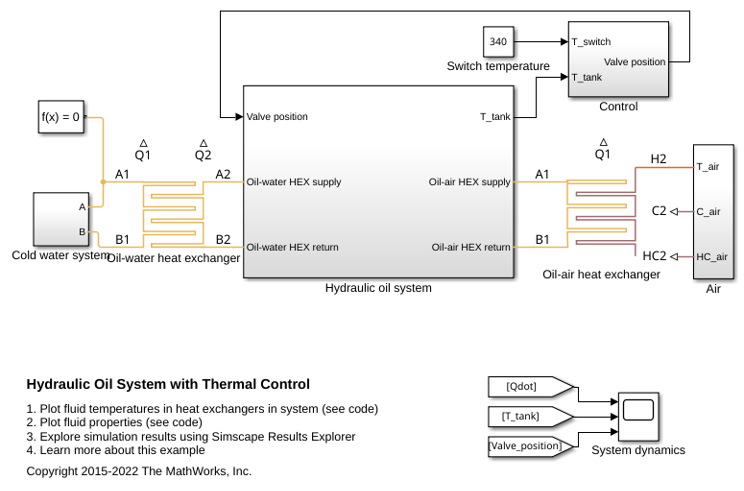
Hydraulic Oil System with Thermal Control
A hydraulic oil system with a thermal control using Simscape™ Fluids™ Thermal Liquid blocks. The hydraulic oil system consists of an oil storage tank represented by the Tank (TL) block with two inlets, a pump represented by a Mass Flow Rate Source (TL) block, and pipelines represented by Pipe (TL) block.
Ports
Conserving
Opening for thermal liquid to enter and exit its side of the heat exchanger.
Programmatic Use
Port:
A1
Opening for thermal liquid to enter and exit its side of the heat exchanger.
Programmatic Use
Port:
B1
Entrance temperature of controlled fluid 2.
Programmatic Use
Port:
H2
Input
Instantaneous value of the isobaric specific heat for the controlled fluid.
Programmatic Use
Port:
CP2
Instantaneous value of the mass flow rate of the controlled fluid.
Programmatic Use
Port:
M2
Output
Rate of heat transfer to the thermal liquid, in W.
Programmatic Use
Port:
Q1
Parameters
Heat Transfer
Mass flow rate of thermal liquid at each breakpoint in the lookup
table for the specific heat dissipation table. The block inter- and
extrapolates the breakpoints to obtain the specific heat dissipation of
the heat exchanger at any mass flow rate. Interpolation is
linear and extrapolation is
nearest.
The mass flow rates can be positive, zero, or negative, but they must increase monotonically from left to right. Their number must equal the number of columns in the Specific heat dissipation table parameter. If the table has m rows and n columns, the mass flow rate vector must be n elements long.
Programmatic Use
Parameter:
mdot1_TLU
Mass flow rate of controlled fluid at each breakpoint in the lookup
table for the specific heat dissipation table. The block inter- and
extrapolates the breakpoints to obtain the specific heat dissipation of
the heat exchanger at any mass flow rate. Interpolation is
linear and extrapolation is
nearest.
The mass flow rates can be positive, zero, or negative, but they must increase monotonically from left to right. Their number must equal the number of columns in the Specific heat dissipation table parameter. If the table has m rows and n columns, the mass flow rate vector must be n elements long.
Programmatic Use
Parameter:
mdot2_TLU
Specific heat dissipation at each breakpoint in its lookup table over
the mass flow rates of thermal liquid and controlled fluid. The block
inter- and extrapolates the breakpoints to obtain the effectiveness at
any pair of thermal liquid and controlled fluid mass flow rates.
Interpolation is linear and extrapolation is
nearest.
The specific heat dissipation values must be not be negative. They must align from top to bottom in order of increasing mass flow rate in the thermal liquid channel, and from left to right in order of increasing mass flow rate in the controlled fluid channel. The number of rows must equal the size of the Thermal liquid mass flow rate vector parameter, and the number of columns must equal the size of the Controlled fluid mass flow rate vector parameter.
If your heat exchanger data sheet supplies the heat transfer coefficients, multiply the provided heat transfer coefficients by the surface area to calculate the specific dissipation.
Programmatic Use
Parameter:
SD_TLU
Warning condition for specific heat dissipation in excess of minimum heat capacity rate. Heat capacity rate is the product of mass flow rate and specific heat, and its minimum value is the lowest between the flows. This minimum gives the specific dissipation for a heat exchanger with maximum effectiveness and cannot be exceeded. See the Specific Dissipation Heat Transfer block for more detail.
Programmatic Use
| Parameter: | Q_check |
| Values: | "simscape.enum.assert.action.warn" | "simscape.enum.assert.action.none" | "simscape.enum.assert.action.error" |
Pressure Loss
Mass flow rate at each breakpoint in the lookup table for the pressure
drop. The block inter- and extrapolates the breakpoints to obtain the
pressure drop at any mass flow rate. Interpolation is
linear and extrapolation is
nearest.
The mass flow rates can be positive, zero, or negative and they can span across laminar, transient, and turbulent zones. They must, however, increase monotonically from left to right. Their number must equal the size of the Pressure drop vector parameter, with which they are to combine to complete the tabulated breakpoints.
Programmatic Use
Parameter:
mdot_dp_TLU_1
Parameter:
mdot_dp_TLU_2
Pressure drop at each breakpoint in its lookup table over the mass
flow rate. The block inter- and extrapolates the breakpoints to obtain
the pressure drop at any mass flow rate. Interpolation is
linear and extrapolation is
nearest.
The pressure drops can be positive, zero, or negative, and they can span across laminar, transient, and turbulent zones. They must, however, increase monotonically from left to right. Their number must equal the size of the Mass flow rate vector parameter, with which they are to combine to complete the tabulated breakpoints.
Programmatic Use
Parameter:
p_diff_TLU_1
Parameter:
p_diff_TLU_2
Absolute temperature established at the inlet in the gathering of the tabulated pressure drops. The reference inflow temperature and pressure determine the fluid density assumed in the tabulated data. During simulation, the ratio of reference to actual fluid densities multiplies the tabulated pressure drop to obtain the actual pressure drop.
Programmatic Use
Parameter:
T_ref_in_1
Parameter:
T_ref_in_2
Absolute pressure established at the inlet in the gathering of the tabulated pressure drops. The reference inflow temperature and pressure determine the fluid density assumed in the tabulated data. During simulation, the ratio of reference to actual fluid densities multiplies the tabulated pressure drop to obtain the actual pressure drop.
Programmatic Use
Parameter:
p_ref_in_1
Parameter:
p_ref_in_2
Mass flow rate below which its value is numerically smoothed to avoid
discontinuities known to produce simulation errors at zero flow. See the
Specific Dissipation Heat Exchanger Interface (TL)
block (on which the Simple Model variant is
based) for detail on the calculations for the thermal liquid side of the
exchanger.
Programmatic Use
Parameter:
mdot_threshold_1
Parameter:
mdot_threshold_2
Volume of fluid in the thermal liquid flow channel.
Programmatic Use
Parameter:
liquid_volume_1
Flow area at the inlet and outlet of the thermal liquid flow channel. The ports are of the same size.
Programmatic Use
Parameter:
area_1
Effects and Initial Conditions
Option to model the pressure dynamics inside the heat exchanger.
Setting this parameter to Off removes the
pressure derivative terms from the component energy and mass
conservation equations. The pressure inside the heat exchanger is then
reduced to the weighted average of the two port pressures.
Programmatic Use
| Parameter: | dynamic_compressibility_1 |
| Values: | "true" | "false" |
Thermal liquid temperature at nominal operating conditions. The block uses this value to calculate the nominal density to use in the mass and energy conservation equation when dynamic compressibility is disabled.
Dependencies
To enable this parameter, clear the Enable Thermal Liquid dynamic compressibility checkbox.
Programmatic Use
Parameter:
T_nominal_1
Thermal liquid pressure at nominal operating conditions. The block uses this value to calculate the nominal density to use in the mass and energy conservation equation when dynamic compressibility is disabled.
Dependencies
To enable this parameter, clear the Enable Thermal Liquid dynamic compressibility checkbox.
Programmatic Use
Parameter:
p_nominal_1
Temperature in the thermal liquid channel at the start of simulation
Programmatic Use
Parameter:
T0_1
Pressure in the thermal liquid channel at the start of simulation.
Dependencies
To enable this parameter, select Enable Thermal Liquid dynamic compressibility.
Programmatic Use
Parameter:
p0_1
Extended Capabilities
C/C++ Code Generation
Generate C and C++ code using Simulink® Coder™.
Version History
Introduced in R2024aUse port Q1 to output the rate of heat transfer to the thermal liquid.
Previously, the Heat Exchanger (TL) block used
the Modeling option parameter to model two block variants. This
parameter has been removed and the two block variants are now two separate blocks.
The Specific Dissipation Heat Exchanger (TL) block uses the heat
transfer model that was previously used when Modeling option
was Simple model. To use the block model used when
Modeling option was E-NTU Model,
see the Heat Exchanger (TL) block.
MATLAB Command
You clicked a link that corresponds to this MATLAB command:
Run the command by entering it in the MATLAB Command Window. Web browsers do not support MATLAB commands.
웹사이트 선택
번역된 콘텐츠를 보고 지역별 이벤트와 혜택을 살펴보려면 웹사이트를 선택하십시오. 현재 계신 지역에 따라 다음 웹사이트를 권장합니다:
또한 다음 목록에서 웹사이트를 선택하실 수도 있습니다.
사이트 성능 최적화 방법
최고의 사이트 성능을 위해 중국 사이트(중국어 또는 영어)를 선택하십시오. 현재 계신 지역에서는 다른 국가의 MathWorks 사이트 방문이 최적화되지 않았습니다.
미주
- América Latina (Español)
- Canada (English)
- United States (English)
유럽
- Belgium (English)
- Denmark (English)
- Deutschland (Deutsch)
- España (Español)
- Finland (English)
- France (Français)
- Ireland (English)
- Italia (Italiano)
- Luxembourg (English)
- Netherlands (English)
- Norway (English)
- Österreich (Deutsch)
- Portugal (English)
- Sweden (English)
- Switzerland
- United Kingdom (English)