이 페이지는 기계 번역을 사용하여 번역되었습니다. 최신 내용을 영문으로 보려면 여기를 클릭하십시오.
refreshDerivedValues
R2026a설명
refreshDerivedValues(는 지정된 안전성 분석 관리자 스프레드시트의 도출된 열에서 수행된 계산을 새로 고칩니다. 도출된 열에서 외부 호출 함수를 업데이트할 경우, 이 함수를 사용하여 도출 값을 재계산하십시오.spreadsheet)
예제
이 예제에서는 외부에서 호출된 MATLAB® 함수를 업데이트한 후 도출 셀의 값을 새로 고치는 방법을 보여줍니다.
스프레드시트 검사
안전성 분석 관리자 스프레드시트 myRefreshedSheet를 엽니다.
mySheet = safetyAnalysisMgr.openDocument("myRefreshedSheet.mldatx");계산 열은 외부 MATLAB 함수 myCalculationFunction을 호출하여 Input 1 열과 Input 2 열의 값을 곱하고 결과를 출력합니다.
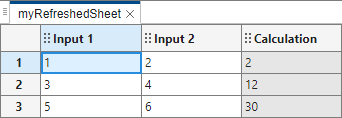
myCalculatorFunction MATLAB 파일을 열어서 코드를 봅니다.
open("myCalculatorFunction")function output = myCalculatorFunction(x,y) output = str2double(x) * str2double(y); output = num2str(output); end
계산 업데이트 및 스프레드시트 셀 값 새로 고침
myCalculationFunction 함수를 변경하여 두 숫자를 더합니다.
function output = myCalculatorFunction(x,y)
    output = str2double(x) + str2double(y);
    output = num2str(output);
end
함수를 저장하고 안전성 분석 관리자 스프레드시트로 돌아갑니다. 셀 값은 업데이트되지 않습니다. 업데이트된 함수를 호출하고 셀 값을 재계산하기 위해, refreshDerivedValues 함수를 사용하여 셀 값을 새로 고침합니다.
refreshDerivedValues(mySheet)
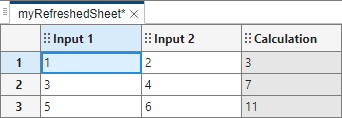
스프레드시트는 계산 열에 계산된 값을 업데이트합니다.
입력 인수
버전 내역
R2024b에 개발됨

