이 페이지는 기계 번역을 사용하여 번역되었습니다. 최신 내용을 영문으로 보려면 여기를 클릭하십시오.
결함 동작 정의
R2026a이 예제에서는 모델에 새로운 동작을 갖는 결함을 추가하는 방법을 보여줍니다. 결함을 모델링할 때, 사용자 지정된 동작을 만들 수 있으며 설계에 영향을 주지 않고 이러한 동작을 업데이트할 수 있습니다. 결함이 언제 어떻게 주입되는지 지정할 수도 있습니다. 결함을 정의하는 방법에 대한 자세한 내용은 결함 정의 및 모델링 항목을 참조하십시오.
비디오 안내
예제를 살펴보려면 영상을 재생하십시오.
모델을 열고 결함 추가
sldemo_fuelsys_fault_analyzer 모델을 열고 헬퍼 함수 myFuelSysCase를 사용하여 결함을 설정합니다. 헬퍼 함수는 기존 Simulink® Fault Analyzer™ 모델 아티팩트를 삭제하고 이를 예제에서 사용된 결함으로 대체합니다.
myFuelSysCase(2)
함수를 실행한 후, 모델에는 To Controller 서브시스템의 각 입력 신호에 대한 결함이 포함됩니다.
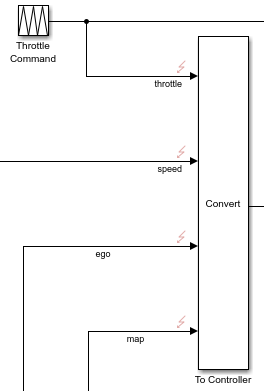
이 예에서는 사용자 지정 동작을 사용하여 throttle 신호에 또 다른 결함을 추가합니다.
앱 탭에서 결함 분석기를 클릭합니다.
throttle신호를 선택합니다.결함 분석기 탭의 결함 준비 섹션에서 결함 추가를 클릭합니다.
결함 추가 창에서 결함 속성을 지정합니다. 모델 요소를
sldemo_fuelsys_fault_analyzer/To Controller/Inport/1로 설정하고, 결함 이름을throttle_fault_custom으로 설정하고, 결함 동작을Custom fault behavior로 설정합니다.
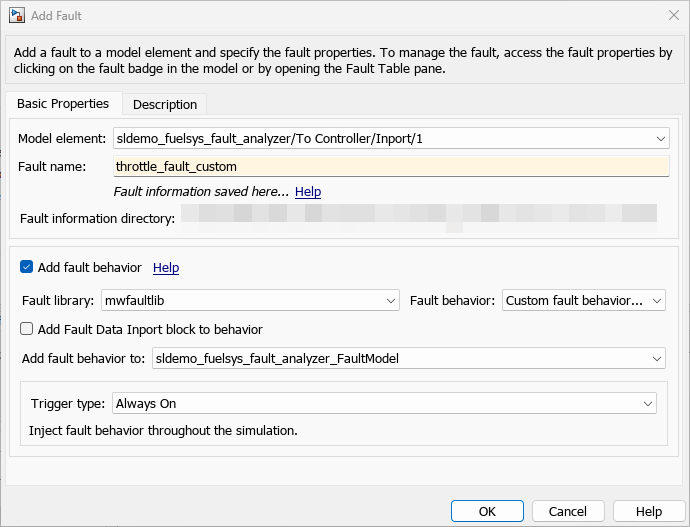
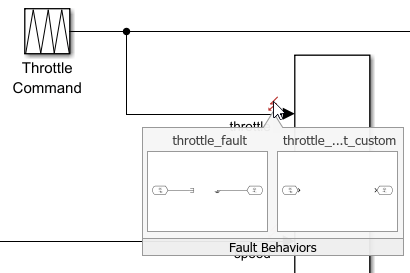
확인을 클릭합니다. throttle 신호에는 이제 두 개의 결함이 있습니다. 스로틀 신호의 결함 배지를 클릭하면 미리보기 창에 두 개의 결함이 표시됩니다.
사용자 지정 동작 만들기
사용자 지정 결함 동작에는 로직이나 의미 체계가 없습니다. 블록을 사용하여 로직과 의미 체계를 모델링해야 합니다. 이 예제에서는 스로틀 신호가 10을 초과하지 않도록 하는 블록을 추가합니다. throttle 신호의 결함 배지를 클릭하여 미리보기 창을 엽니다. throttle_fault_custom 미리보기 창을 클릭하십시오. 결함 동작이 포함된 모델인 결함 모델이 열립니다. 결함 모델에는 각 결함 동작을 모델링하는 서브시스템이 포함되어 있습니다. 사용자 지정 결함 동작의 경우, 모델에는 Fault Inport 블록과 Fault Outport 블록만 포함됩니다.
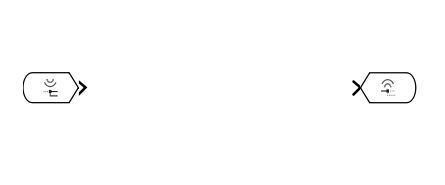
throttle_fault_custom 서브시스템에 있는 Fault Inport 블록과 Fault Outport 블록 사이에서 스로틀의 입력값이 10보다 큰 경우 컨트롤러에 대한 신호가 10으로 유지되도록 동작을 모델링합니다.
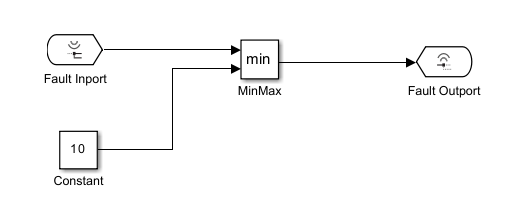
MinMax 블록에서 출력 데이터 유형 속성을 Inherit: Inherit via internal rule로 설정합니다. 결함 모델을 저장합니다. 미리보기 창에 업데이트된 모델이 표시됩니다.
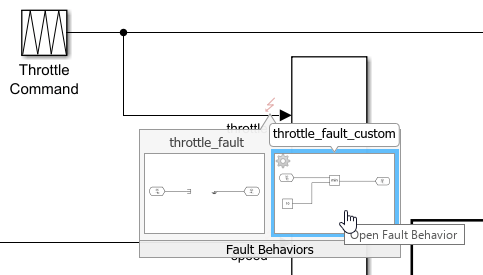
이러한 결함 동작을 새로운 결함에서 재사용하려면 라이브러리에 Fault Subsystem 블록을 저장하고 Simulink.fault.libraries 함수를 사용하여 등록하면 됩니다. 미리 정의된 결함 동작 및 사용자 지정 결함 동작 생성 항목을 참조하십시오.

