Inverse Rescale-Zero-One
R2026bInverse Rescale-Zero-One block
To add a block to a model, double-click the canvas and start typing the block name. Then, select the block from the list.
Libraries:
Deep Learning Toolbox /
Deep Learning Layers /
Input Layer Normalizations
Description
The Inverse Rescale-Zero-One block applies the inverse of the
rescale-zero-one normalization operation. It multiplies the input by the difference of the
Max and Min property values, then adds the value of
the Min property to the result.
The exportNetworkToSimulink function generates this block to represent an inverseNormalizationLayer object with a Normalization
property value of "rescale-zero-one".
Examples
Export a trained neural network to Simulink® as layer blocks.
For most workflows, you do not need to create neural networks in Simulink. Instead, import or train a neural network in MATLAB® and export it to Simulink.
Suppose that you have a trained neural network net specified as
a dlnetwork object. Export the network to Simulink using the exportNetworkToSimulink function.
mdlInfo = exportNetworkToSimulink(net)
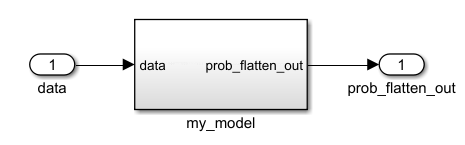
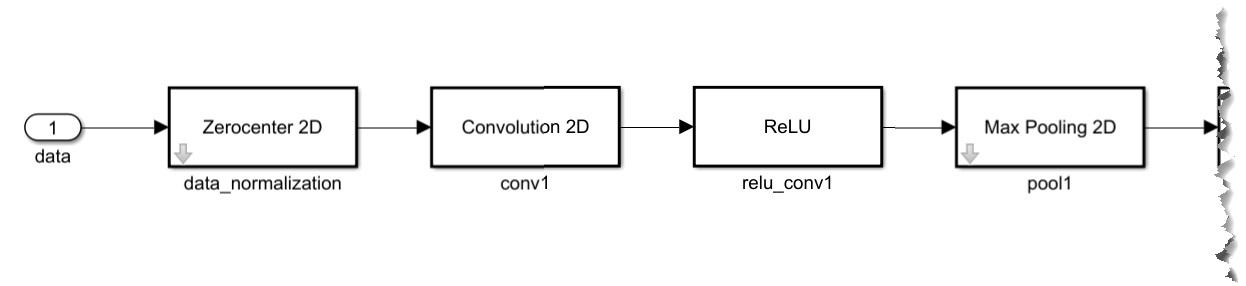
The exported Simulink model represents the neural network as a subsystem. To view the layer blocks, open the subsystem. This example shows the first few blocks of a neural network.
To view and edit the layer block parameters, open the corresponding layer block mask. This example shows the parameters for the ReLU block.
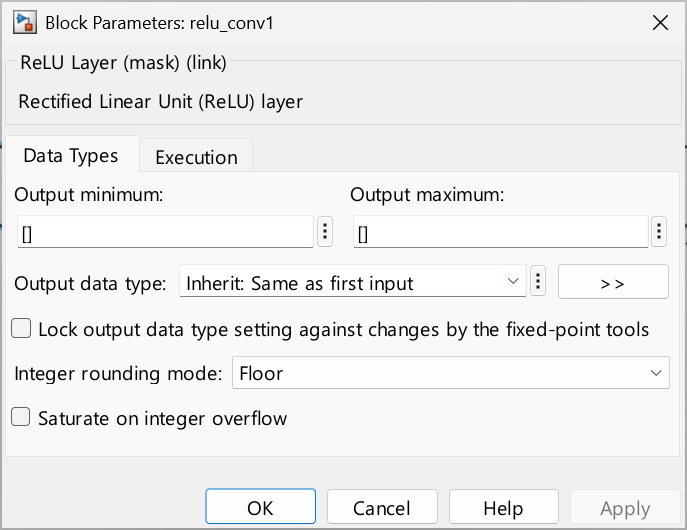
Using the layer block parameters, you can configure aspects like data types and execution options like sample times.
Limitations
The layer object specified by the Layer parameter must have a
Normalizationproperty value of"rescale-zero-one".
Ports
Input
Input data on which to perform the inverse normalization operation.
Data Types: single | double | int8 | int16 | int32 | int64 | uint8 | uint16 | uint32 | uint64 | fixed point
Output
The result of performing the inverse normalization operation on the input data.
Data Types: single | double | int8 | int16 | int32 | int64 | uint8 | uint16 | uint32 | uint64 | fixed point
Parameters
To edit block parameters interactively, use the Property Inspector. From the Simulink Toolstrip, on the Simulation tab, in the Prepare gallery, select Property Inspector.
Main
Specify the name of a workspace variable that contains an
inverseNormalizationLayer object. The layer object must come from a
trained network, and its Normalization property must have a value
of "rescale-zero-one". The Inverse
Rescale-Zero-One block parameterizes itself by using the properties of the
object and calculates the block output by using the Min and
Max properties of the object.
Programmatic Use
Block Parameter:
Layer |
| Type: workspace variable |
Values:
inverseNormalizationLayer object |
Default:
'layerObject' |
Data format for the input data. The options use the same
notation as the fmt argument of the
dlarray object, except layer blocks do not support the Batch
(B) dimension and instead assume an observation number of
1.
Dependencies
This parameter is enabled only when the
OperationDimension property of the layer object is set to
"channel".
Programmatic Use
Block Parameter:
DataFormat
|
| Type: character vector |
Values:
'CT' | 'C' |
'SC' | 'SSC' | 'SSSC'
|
Default:
'CT'
|
Data Types
Minimum value of the output range that the software checks.
The software uses the minimum value to perform:
Parameter range checking for some blocks. For more information, see Specify Minimum and Maximum Values for Block Parameters (Simulink).
Simulation range checking. For more information, see Specify Signal Ranges (Simulink) and Enable Simulation Range Checking (Simulink).
Automatic scaling of fixed-point data types.
Optimization of the code that you generate from the model. This optimization can remove algorithmic code and affect the results of some simulation modes, such as SIL or external mode. For more information, see Optimize using the specified minimum and maximum values (Embedded Coder).
Tips
Output minimum does not saturate or clip the actual output signal. Use the Saturation (Simulink) block instead.
Programmatic Use
To set the block parameter value programmatically, use
the set_param (Simulink) function.
| Parameter: | OutMin |
| Values: | '[]' (default) | scalar in quotes |
Maximum value of the output range that the software checks.
The software uses the maximum value to perform:
Parameter range checking for some blocks. For more information, see Specify Minimum and Maximum Values for Block Parameters (Simulink).
Simulation range checking. For more information, see Specify Signal Ranges (Simulink) and Enable Simulation Range Checking (Simulink).
Automatic scaling of fixed-point data types.
Optimization of the code that you generate from the model. This optimization can remove algorithmic code and affect the results of some simulation modes, such as SIL or external mode. For more information, see Optimize using the specified minimum and maximum values (Embedded Coder).
Tips
Output maximum does not saturate or clip the actual output signal. Use the Saturation (Simulink) block instead.
Programmatic Use
To set the block parameter value programmatically, use
the set_param (Simulink) function.
| Parameter: | OutMax |
| Values: | '[]' (default) | scalar in quotes |
Choose the data type for the output. The type can be inherited, specified directly, or expressed as a data type object such as Simulink.NumericType. When you select Inherit: Inherit via internal rule, the
software chooses a data type to balance numerical accuracy, performance, and generated code
size, while taking into account the properties of the embedded target hardware.
Programmatic Use
To set the block parameter value programmatically, use
the set_param (Simulink) function.
| Parameter: | OutDataTypeStr |
| Values: | Inherit: Inherit via internal
rule (default) | Inherit: Same as first input | double | single | half | int8 | uint8 | int16 | uint16 | int32 | uint32 | int64 | uint64 | boolean | fixdt(1,16) | fixdt(1,16,0) | fixdt(1,16,2^0,0) | <data type expression> |
Select this parameter to prevent Fixed-Point Tool from overriding the Output data type you specify on the block. For more information, see Use Lock Output Data Type Setting (Fixed-Point Designer).
Programmatic Use
To set the block parameter value programmatically, use
the set_param (Simulink) function.
| Parameter: | LockScale |
| Values: | 'off' (default) | 'on' |
Specify the rounding mode for fixed-point operations. For more information, see Rounding Modes (Fixed-Point Designer).
Block parameters always round to the nearest representable value. To control the rounding of a block parameter, enter an expression using a MATLAB rounding function in the mask field.
Programmatic Use
To set the block parameter value programmatically, use
the set_param (Simulink) function.
| Parameter: | RndMeth |
| Values: | 'Floor' (default) | 'Ceiling' | 'Convergent' | 'Nearest' | 'Round' | 'Simplest' | 'Zero' |
Specify whether integer overflows saturate or wrap for the output value of the block, which is generated by the final fixed-point cast operation. For the method of overflow action of the internal block operations, see Internal saturate on integer overflow.
on— Overflows saturate to either the minimum or maximum value that the data type can represent.off— Overflows wrap according to the rules of the data type.
For example, the maximum value that the signed 8-bit integer int8
can represent is 127. Any block operation result greater than the maximum value causes
overflow of the 8-bit integer.
With this parameter selected, the block output saturates at 127. Similarly, the block output saturates at a minimum output value of –128.
With this parameter cleared, the software interprets the overflow-causing value as
int8, which can produce an unintended result. For example, a block result of 130 (binary 1000 0010) expressed asint8is –126.
Tips
Set this parameter to
onwhen your model has a possible overflow and you want explicit saturation protection in the generated code.To optimize the efficiency of your generated code, keep the default
offsetting for this parameter. Using the default setting also helps you avoid overspecifying how the block handles out-of-range signals. For more information, see Troubleshoot Signal Range Errors (Simulink).In general, the code generation process can detect when overflow is not possible. In this case, the code generator does not produce saturation code.
Programmatic Use
To set the block parameter value programmatically, use
the set_param (Simulink) function.
| Parameter: | SaturateOnIntegerOverflow |
| Values: | 'off' (default) | 'on' |
The block casts the value of the Min property of the layer object
to this data type.
The type can be inherited, specified directly, or expressed as a data type object such as Simulink.NumericType.
Programmatic Use
To set the block parameter value programmatically, use
the set_param (Simulink) function.
| Parameter: | MinDataTypeStr |
| Values: | 'Inherit: Inherit via back
propagation' (default) | 'Inherit: Inherit from 'Constant value'' | <data type expression> |
The block casts the value of the Max property of the layer object
to this data type.
The type can be inherited, specified directly, or expressed as a data type object such as Simulink.NumericType.
Programmatic Use
To set the block parameter value programmatically, use
the set_param (Simulink) function.
| Parameter: | MaxDataTypeStr |
| Values: | 'Inherit: Inherit via back
propagation' (default) | 'Inherit: Inherit from 'Constant value'' | <data type expression> |
Choose the data type for the output of the Product block within the layer block. The type can be inherited, specified directly, or expressed as a data type object such as Simulink.NumericType. When you select Inherit: Inherit via internal rule, the
software chooses a data type to balance numerical accuracy, performance, and generated code
size, while taking into account the properties of the embedded target hardware.
Programmatic Use
To set the block parameter value programmatically, use
the set_param (Simulink) function.
| Parameter: | ProductOutDataTypeStr |
| Values: | Inherit: Inherit via internal
rule (default) | Inherit: Same as first input | <data type expression> |
Choose the data type of the SubtractMin block within the layer block.
This block subtracts the trained minimum from the input. The type can be inherited, specified directly, or expressed as a data type object such as Simulink.NumericType. When you select Inherit: Inherit via internal rule, the
software chooses a data type to balance numerical accuracy, performance, and generated code
size, while taking into account the properties of the embedded target hardware.
Programmatic Use
To set the block parameter value programmatically, use
the set_param (Simulink) function.
| Parameter: | SubtractMinAccumDataTypeStr |
| Values: | 'Inherit: Inherit via internal
rule' (default) | 'Inherit: Same as first input' | <data type expression> |
Choose the data type of the AddMin block within the layer block.
This block adds the trained minimum to the result. The type can be inherited, specified directly, or expressed as a data type object such as Simulink.NumericType. When you select Inherit: Inherit via internal rule, the
software chooses a data type to balance numerical accuracy, performance, and generated code
size, while taking into account the properties of the embedded target hardware.
Programmatic Use
To set the block parameter value programmatically, use
the set_param (Simulink) function.
| Parameter: | AddMinAccumDataTypeStr |
| Values: | 'Inherit: Inherit via internal
rule' (default) | 'Inherit: Same as first input' | <data type expression> |
Specify the rounding mode for internal fixed-point computations, except for the output operation. For the rounding mode of the output operation, see Output integer rounding mode. For more information, see Rounding Modes (Fixed-Point Designer).
Block parameters always round to the nearest representable value. To control the rounding of a block parameter, enter an expression using a MATLAB rounding function in the mask field.
Programmatic Use
To set the block parameter value programmatically, use
the set_param (Simulink) function.
| Parameter: | InternalRndMeth |
| Values: | 'Floor' (default) | 'Ceiling' | 'Convergent' | 'Nearest' | 'Round' | 'Simplest' | 'Zero' |
Specify whether integer overflows saturate or wrap for the internal operations of the block. For the method of overflow action of the block output, see Output saturate on integer overflow.
on— Overflows saturate to either the minimum or maximum value that the data type can represent.off— Overflows wrap according to the rules of the data type.
For example, the maximum value that the signed 8-bit integer int8
can represent is 127. Any block operation result greater than the maximum value causes
overflow of the 8-bit integer.
With this parameter selected, the block output saturates at 127. Similarly, the block output saturates at a minimum output value of –128.
With this parameter cleared, the software interprets the overflow-causing value as
int8, which can produce an unintended result. For example, a block result of 130 (binary 1000 0010) expressed asint8is –126.
Tips
Set this parameter to
onwhen your model has a possible overflow and you want explicit saturation protection in the generated code.To optimize the efficiency of your generated code, keep the default
offsetting for this parameter. Using the default setting also helps you avoid overspecifying how the block handles out-of-range signals. For more information, see Troubleshoot Signal Range Errors (Simulink).In general, the code generation process can detect when overflow is not possible. In this case, the code generator does not produce saturation code.
Programmatic Use
To set the block parameter value programmatically, use
the set_param (Simulink) function.
| Parameter: | InternalSaturateOnIntegerOverflow |
| Values: | 'off' (default) | 'on' |
Execution
Specify the discrete interval between sample time hits or specify another type of sample time, such as continuous (0) or inherited (-1). For more options, see Types of Sample Time (Simulink).
By default, the block inherits its sample time based on the context of the block within the model.
Programmatic Use
To set the block parameter value
programmatically, use the set_param (Simulink) function.
Parameter:
SampleTime |
Data Types:
char |
Values:
'-1' | scalar |
Default:
'-1' |
Extended Capabilities
C/C++ Code Generation
Generate C and C++ code using Simulink® Coder™.
Version History
Introduced in R2026b
MATLAB Command
You clicked a link that corresponds to this MATLAB command:
Run the command by entering it in the MATLAB Command Window. Web browsers do not support MATLAB commands.


웹사이트 선택
번역된 콘텐츠를 보고 지역별 이벤트와 혜택을 살펴보려면 웹사이트를 선택하십시오. 현재 계신 지역에 따라 다음 웹사이트를 권장합니다:
또한 다음 목록에서 웹사이트를 선택하실 수도 있습니다.
사이트 성능 최적화 방법
최고의 사이트 성능을 위해 중국 사이트(중국어 또는 영어)를 선택하십시오. 현재 계신 지역에서는 다른 국가의 MathWorks 사이트 방문이 최적화되지 않았습니다.
미주
- América Latina (Español)
- Canada (English)
- United States (English)
유럽
- Belgium (English)
- Denmark (English)
- Deutschland (Deutsch)
- España (Español)
- Finland (English)
- France (Français)
- Ireland (English)
- Italia (Italiano)
- Luxembourg (English)
- Netherlands (English)
- Norway (English)
- Österreich (Deutsch)
- Portugal (English)
- Sweden (English)
- Switzerland
- United Kingdom (English)