Optimize using the specified minimum and maximum values
R2026bOptimize using minimum and maximum values for signals and parameters
Model Configuration Pane: Code Generation / Optimization
Description
The Optimize using the specified minimum and maximum values parameter instructs the code generator whether to optimize generated code using the specified minimum and maximum values for signals and parameters in the model.
The specified minimum and maximum values usually represent environmental limits, such as temperature, or mechanical and electrical limits, such as output ranges of sensors. This optimization uses these values to streamline the generated code by:
Reducing expressions to constants
Removing dead branches of conditional statements
Eliminating unnecessary mathematical operations
Note
Make sure the minimum and maximum values that you specify are valid limits. Otherwise, this optimization might result in numerical mismatch with simulation.
Settings
off (default) | on- On
Optimizes the generated code using range information derived from the minimum and maximum specified values for signals and parameters in the model.
- Off
Ignores specified minimum and maximum values when generating code.
Examples
This example shows how the minimum and maximum values specified on signals and parameters in a model are used to optimize the generated code.
Review Minimum and Maximum Information
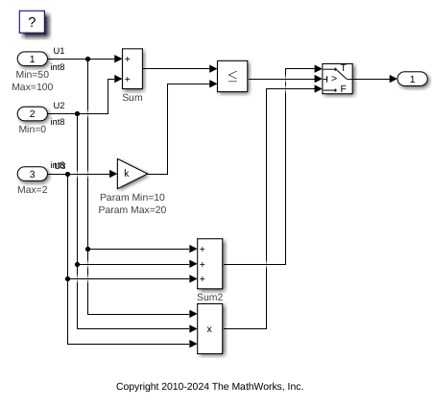
Consider the MinMaxOptimization model. In this model, there are minimum and maximum values specified on Inports and on the gain parameter of the Gain block.
model = 'MinMaxOptimization';
open_system(model);
Generate Code Without This Optimization
First, generate code for this model without considering the min and max values.
slbuild(model)
### Searching for referenced models in model 'MinMaxOptimization'.
### Total of 1 models to build.
### Starting top model code generation target build for: MinMaxOptimization
### Successful completion of build procedure for: MinMaxOptimization

Build Summary

Top model targets:

Model               Build Reason                                  Status                        Build Duration
==============================================================================================================
MinMaxOptimization  Target (MinMaxOptimization.c) did not exist.  Code generated and compiled.  0h 0m 16.832s

1 of 1 models built (0 models already up to date)
Build duration: 0h 0m 19.095s
A portion of MinMaxOptimization.c is listed below.
cfile = fullfile('MinMaxOptimization_ert_rtw','MinMaxOptimization.c');
coder.example.extractLines(cfile,'/* Model step', '/* Model initialize', 1, 0);
/* Model step function */
void MinMaxOptimization_step(void)
{
  int32_T tmp;

  /* Sum: '<Root>/Sum' incorporates:
   *  Inport: '<Root>/U1'
   *  Inport: '<Root>/U2'
   *  Sum: '<Root>/Sum2'
   *  Switch: '<Root>/Switch'
   */
  tmp = U1 + U2;

  /* Switch: '<Root>/Switch' incorporates:
   *  Gain: '<Root>/Gain'
   *  Inport: '<Root>/U3'
   *  RelationalOperator: '<Root>/Relational Operator'
   *  Sum: '<Root>/Sum'
   */
  if (tmp <= k * U3) {
    /* Outport: '<Root>/Out1' incorporates:
     *  Sum: '<Root>/Sum2'
     */
    rtY.Out1 = tmp + U3;
  } else {
    /* Outport: '<Root>/Out1' incorporates:
     *  Inport: '<Root>/U1'
     *  Inport: '<Root>/U2'
     *  Product: '<Root>/Product'
     */
    rtY.Out1 = U1 * U2 * U3;
  }
}
Enable This Optimization
Open the Configuration Parameters dialog box.
On the Optimization pane, select Optimize using the specified minimum and maximum values.
Alternatively, you can enable this optimization by setting the command-line parameter.
set_param(model, 'UseSpecifiedMinMax', 'on');
Generate Code with This Optimization
In the model, with the specified minimum and maximum values for U1 and U2, the sum of U1 and U2 has a minimum value of 50. Considering the range of U3 and the specified minimum and maximum values for the Gain block parameter, the maximum value of the Gain block's output is 40.
The output of the Relational Operator block remains false, and the output of the Switch block remains the product of the three inputs.
Build the model.
slbuild(model)
### Searching for referenced models in model 'MinMaxOptimization'.
### Total of 1 models to build.
### Starting top model code generation target build for: MinMaxOptimization
### Successful completion of build procedure for: MinMaxOptimization

Build Summary

Top model targets:

Model               Build Reason                                              Status                        Build Duration
==========================================================================================================================
MinMaxOptimization  Model or library MinMaxOptimization has unsaved changes.  Code generated and compiled.  0h 0m 7.1996s

1 of 1 models built (0 models already up to date)
Build duration: 0h 0m 7.8721s
View the optimized code from MinMaxOptimization.c.
cfile = fullfile('MinMaxOptimization_ert_rtw','MinMaxOptimization.c');
coder.example.extractLines(cfile,'/* Model step', '/* Model initialize', 1, 0);
/* Model step function */
void MinMaxOptimization_step(void)
{
  /* Outport: '<Root>/Out1' incorporates:
   *  Inport: '<Root>/U1'
   *  Inport: '<Root>/U2'
   *  Inport: '<Root>/U3'
   *  Product: '<Root>/Product'
   *  Switch: '<Root>/Switch'
   */
  rtY.Out1 = U1 * U2 * U3;
}
Close the model and cleanup.
bdclose(model)
Tips
To detect mismatches between model and generated code simulations that arise from the use of this parameter, before running normal, accelerator, software-in-the-loop (SIL), or processor-in-the-loop (PIL) simulations, set Diagnostics > Data Validity > Simulation range checking to
WarningorError.Provide as much design minimum and maximum information as possible. Specify minimum and maximum values for signals and parameters in the model for:
Inport and Outport blocks.
Block outputs.
Block inputs, for example, for the MATLAB Function and Stateflow Chart blocks.
Simulink.Signalobjects.
Before generating code, test the minimum and maximum values for signals and parameters. Otherwise, optimization might result in numerical mismatch with simulation. You can simulate your model with simulation range checking enabled. If errors or warnings occur, fix these issues before generating code.
In the Configuration Parameters dialog box, select Diagnostics > Data Validity.
On the Data Validity pane, under Signals, set Simulation range checking to
warningorerror.
Provide design minimum and maximum information upstream of blocks as close to the inputs of the blocks as possible. If you specify minimum and maximum values for a block output, these values are most likely to affect the outputs of the blocks immediately downstream.
This optimization does not take into account minimum and maximum values specified for:
Merge block inputs. To work around this, use a
Simulink.Signalobject on the Merge block output and specify the range on this objectBus elements.
Conditionally-executed subsystem (such as a triggered subsystem) block outputs that are directly connected to an Outport block.
Outport blocks in conditionally-executed subsystems can have an initial value specified for use only when the system is not triggered. In this case, the optimization cannot use the range of the block output because the range might not cover the initial value of the block.
Enabling this optimization improves the ability of the Fixed-Point Designer™ software to eliminate unnecessary utility functions and saturation code from the generated code.
Recommended Settings
| Application | Setting |
|---|---|
| Debugging | Off |
| Traceability | Off |
| Efficiency | On |
| Safety precaution | No impact |
Programmatic Use
Parameter: UseSpecifiedMinMax |
| Type: character vector |
Value: 'on' | 'off' |
Default: 'off' |
Limitations
This optimization does not take into account minimum and maximum values specified for:
Merge block inputs. To work around this, use a
Simulink.Signalobject on the Merge block output and specify the range on this objectBus elements.
Conditionally-executed subsystem (such as a triggered subsystem) block outputs that are directly connected to an Outport block.
Outport blocks in conditionally-executed subsystems can have an initial value specified for use only when the system is not triggered. In this case, the optimization cannot use the range of the block output because the range might not cover the initial value of the block.
If you use the Polyspace® Code Prover™ software to verify code generated using this optimization, it might mark code that was previously green as orange. For example, if your model contains a division where the range of the denominator does not include zero, the generated code does not include protection against division by zero. Polyspace Code Prover might mark this code orange because it does not have information about the minimum and maximum values specified for the inputs to the division.
The Polyspace Code Prover software does automatically capture some minimum and maximum values specified in the MATLAB® workspace, for example, for
Simulink.SignalandSimulink.Parameterobjects. In this example, to provide range information to the Polyspace Code Prover software, use aSimulink.Signalobject on the input of the division and specify a range that does not include zero.The Polyspace Code Prover software stores these values in a Data Range Specification (DRS) file. However, they do not capture minimum and maximum values specified in your Simulink® model. To provide additional min/max information to Polyspace Code Prover, you can manually define a DRS file. For more information, see the Polyspace Code Prover documentation.
If you are using double-precision data types and the Code Generation > Interface > Support non-finite numbers configuration parameter is selected, this optimization does not occur.
This optimization does not apply to reusable subsystems.
The Model Advisor check Check safety-related optimization settings for specified minimum and maximum values (Simulink Check) generates a warning if this option is selected. For many safety-critical applications, removing dead code automatically is unacceptable because doing so might make code untraceable.
If you specify maximum and minimum values for signals or parameters in the model that have storage classes other than
Auto, this optimization does not occur.
Version History
Introduced in R2010b

