Assemble and Simulate AUTOSAR Software Components in Architecture Model
R2026bAn AUTOSAR architecture model in Simulink® provides a graphical environment and modeling elements for developing AUTOSAR software compositions and software components (requires System Composer™). From the architecture model, you can:
Add and connect AUTOSAR compositions and components.
View component or composition dependencies.
Link components to requirements (requires Requirements Toolbox™).
Add Simulink behavior to components by creating or linking models.
Configure scheduling and simulation.
Export composition and component ARXML descriptions and generate component code (requires Embedded Coder®).
Architecture models provide an end-to-end AUTOSAR software design workflow. In Simulink, you can author a high-level application design for AUTOSAR Classic or Adaptive Platform architectures, implement behavior for application components, and simulate the application. For classic architecture compositions, you can add Basic Software (BSW) service calls and service implementations.
In this example, you assemble AUTOSAR software components in an AUTOSAR architecture model, simulate client–server and sender–receiver communication, and generate AUTOSAR C code and ARXML files. The generated artifacts include features such as RTE access functions and asynchronous server call points.
Design Components and Link Simulink Behavior Models in AUTOSAR Architecture
Create an AUTOSAR architecture model configured for the AUTOSAR Classic Platform. Add four Classic Component blocks.
arch = autosar.arch.createModel("AUTOSAR_SWArchitecture",platform="Classic");
sensor = addComponent(arch,"Sensor");
controller = addComponent(arch,"Controller");
speedometer = addComponent(arch,"Speedometer");
actuator = addComponent(arch,"Actuator");
addPort(arch,"Sender","ReportEmergencyBrake")
ans =
  ArchPort with properties:

              Name: 'ReportEmergencyBrake'
         Interface: [0×0 Simulink.dictionary.archdata.PortInterface]
    SimulinkHandle: 183.0002
            Parent: [1×1 autosar.arch.Model]
              Kind: 'Sender'
         Connected: 0
Link the AUTOSAR architecture to data dictionary speedometerInterfaces.sldd that is already used by the component models.
linkDictionary(arch,"speedometerInterfaces.sldd");Link the Simulink models to the component blocks in the AUTOSAR architecture.
linkToModel(sensor,"autosar_sensorSWC");
linkToModel(controller,"autosar_controllerSWC");
linkToModel(speedometer,"autosar_speedometerSWC");
linkToModel(actuator,"autosar_actuatorSWC");
Connect the component blocks by using the connect function or by clicking the Smart Connect on the Modeling tab of the Simulink Toolstrip.
connect(arch,sensor,controller);
connect(arch,controller,actuator);
connect(arch,speedometer,actuator);
connect(arch,actuator,[]);
layout(arch);
save(arch);
Simulate the AUTOSAR software architecture.
sim("AUTOSAR_SWArchitecture.slx");Simulink function callers mapped to AUTOSAR client ports with communication attribute ServerCallPoint set to Asynchronous are simulated as if they were synchronous, but they are asynchronous in the generated code and exported ARXML.
Generate and Inspect AUTOSAR-Compliant C Code and Composition ARXML
Generate code and export composition ARXML from the AUTOSAR architecture model, AUTOSAR_SWArchitecture by using the export function.
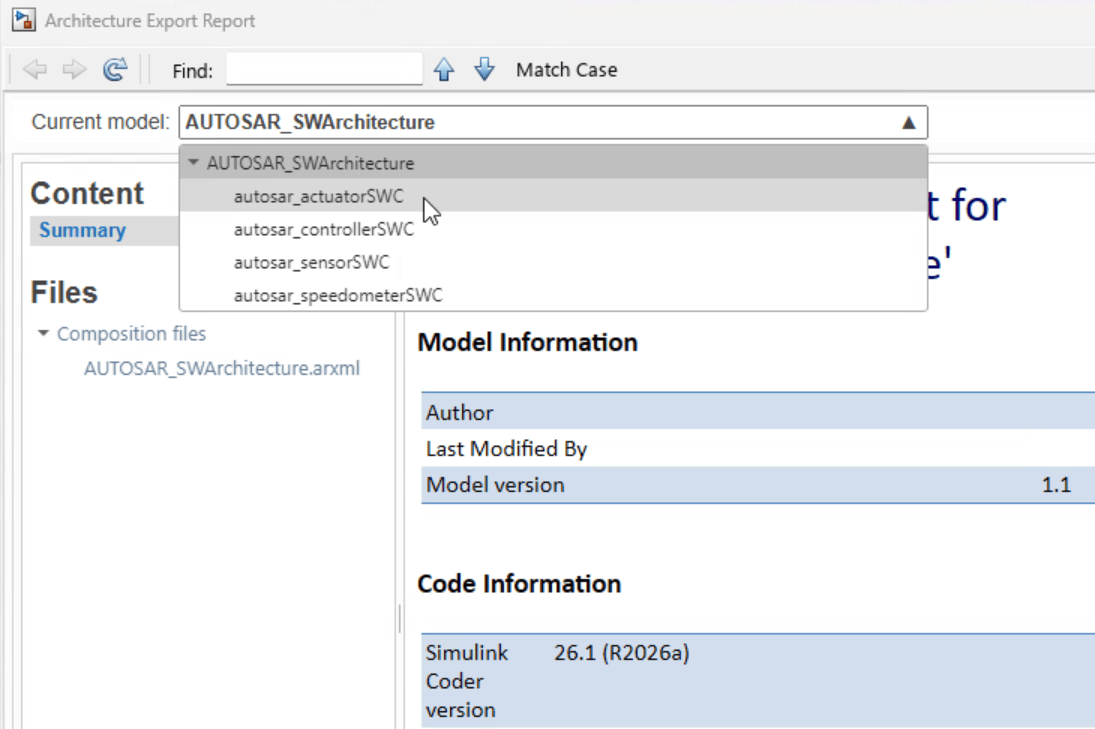
Click the Export Composition ARXML button to export ARXML from the AUTOSAR architecture model. The exporter generates ARXML from the AUTOSAR architecture model and AUTOSAR-compliant C code for each of the linked component models in the architecture model, and opens the AUTOSAR architecture export report.

In the architecture export report, you can navigate to code generated for each of the component models. For example, to view code for the model autosar_actuatorSWC, select it from the Current model list.
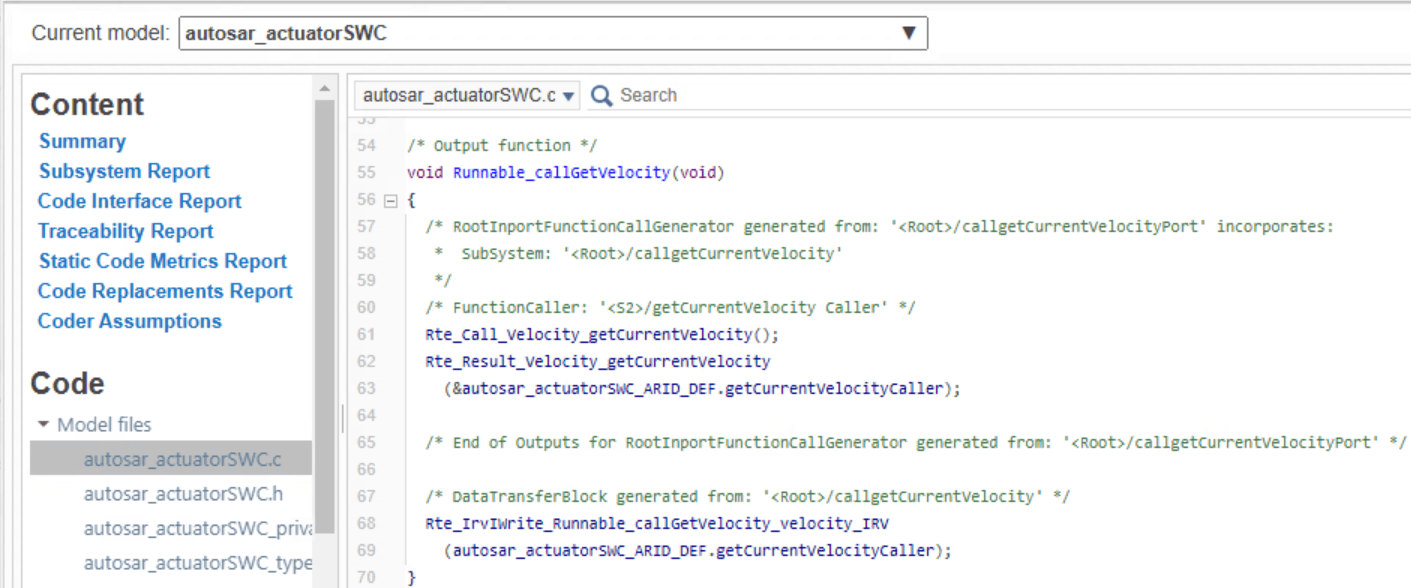
For model AUTOSAR_SWArchitecture, which contains a client that invokes a server operation asynchronously, the generated code contains two RTE access function definitions. In ARXML descriptions, operation arguments have a direction: IN, OUT, or INOUT. In the generated code, the Rte_Call function invokes the server operation and passes IN arguments. The Rte_Result function retrieves the server results and passes OUT arguments.
In this example, function Rte_Call_Velocity_getCurrentVelocity invokes the server operation, and function Rte_Result_Velocity_getCurrentVelocity retrieves the result.
In the exported ARXML files, the ASYNCHRONOUS-SERVER-CALL-RESULT-POINT element indicates which runnable processes the result, in this case Runnable_callGetVelocity. The ASYNCHRONOUS-SERVER-CALL-RESULT-POINT references the corresponding ASYNCHRONOUS-SERVER-CALL-POINT.
<RUNNABLE-ENTITY UUID="...">
    <SHORT-NAME>Runnable_callGetVelocity</SHORT-NAME>
    <MINIMUM-START-INTERVAL>0</MINIMUM-START-INTERVAL>
    <ASYNCHRONOUS-SERVER-CALL-RESULT-POINTS>
        <ASYNCHRONOUS-SERVER-CALL-RESULT-POINT UUID="...">
            <SHORT-NAME>SCR_Velocity_getCurrentVelocity</SHORT-NAME>
            <ASYNCHRONOUS-SERVER-CALL-POINT-REF DEST="ASYNCHRONOUS-SERVER-CALL-POINT">/Components/autosar_actuatorSWC/autosar_actuatorSWC_IB/Runnable_callGetVelocity/SC_Velocity_getCurrentVelocity</ASYNCHRONOUS-SERVER-CALL-POINT-REF>
        </ASYNCHRONOUS-SERVER-CALL-RESULT-POINT>
    </ASYNCHRONOUS-SERVER-CALL-RESULT-POINTS>
    <CAN-BE-INVOKED-CONCURRENTLY>false</CAN-BE-INVOKED-CONCURRENTLY>
    <SERVER-CALL-POINTS>
        <ASYNCHRONOUS-SERVER-CALL-POINT UUID="...">
            <SHORT-NAME>SC_Velocity_getCurrentVelocity</SHORT-NAME>
            <OPERATION-IREF>
                <CONTEXT-R-PORT-REF DEST="R-PORT-PROTOTYPE">/Components/autosar_actuatorSWC/Velocity</CONTEXT-R-PORT-REF>
                <TARGET-REQUIRED-OPERATION-REF DEST="CLIENT-SERVER-OPERATION">/Interfaces/SpeedInterface/getCurrentVelocity</TARGET-REQUIRED-OPERATION-REF>
            </OPERATION-IREF>
            <TIMEOUT>1.0E-06</TIMEOUT>
        </ASYNCHRONOUS-SERVER-CALL-POINT>
    </SERVER-CALL-POINTS>
    <SYMBOL>Runnable_callGetVelocity</SYMBOL>
    <WRITTEN-LOCAL-VARIABLES>
        <VARIABLE-ACCESS UUID="...">
            <SHORT-NAME>WV_velocity_IRV</SHORT-NAME>
            <ACCESSED-VARIABLE>
                <LOCAL-VARIABLE-REF DEST="VARIABLE-DATA-PROTOTYPE">/Components/autosar_actuatorSWC/autosar_actuatorSWC_IB/velocity_IRV</LOCAL-VARIABLE-REF>
            </ACCESSED-VARIABLE>
        </VARIABLE-ACCESS>
    </WRITTEN-LOCAL-VARIABLES>
</RUNNABLE-ENTITY>
See Also
Objects
Functions
Topics
- Author AUTOSAR Compositions and Components in Architecture Model
- Add and Connect Client-Server Ports in AUTOSAR Software Architectures
- Import AUTOSAR Data Types and Shared Elements to Simulink
- Map Function Callers to AUTOSAR Client-Server Ports and Operations
- AUTOSAR Client-Server Communication
- Client-Server Interface
- Client-Server Ports

