array
Description
sets the properties of the array using one or more name-value
arguments.pcbArr = array(___,Name=Value)
Examples
Create a PCB antenna from a circular microstrip patch antenna using the pcbStack object.
ant = patchMicrostripCircular(Substrate=dielectric("FR4"));
pcbAnt = pcbStack(ant);
show(pcbAnt)
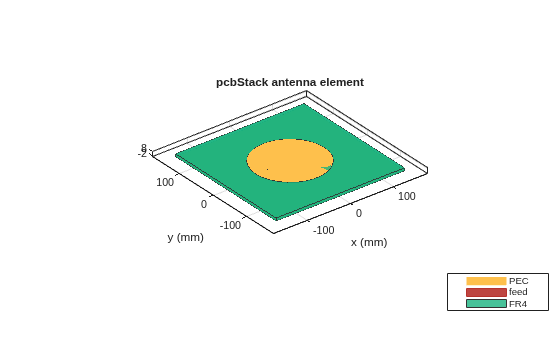
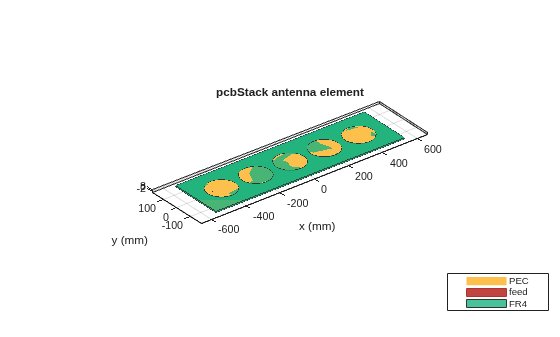
Create a linear array of the antenna using the array function.
pcbArr = array(pcbAnt,"linear",NumElements=5,ElementSpacing=0.2);
show(pcbArr)
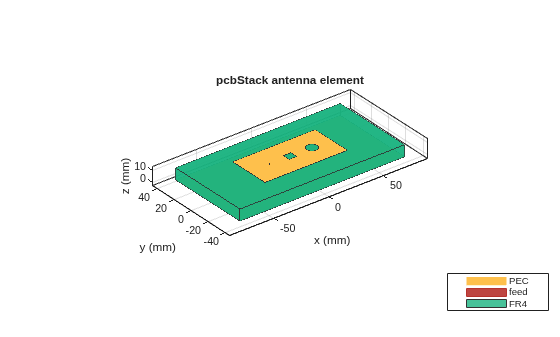
Create a PCB antenna using pcbStack object.
pcbAnt = pcbStack
pcbAnt =
pcbStack with properties:
Name: 'MyPCB'
Revision: 'v1.0'
BoardShape: [1×1 antenna.Rectangle]
BoardThickness: 0.0100
Layers: {[1×1 antenna.Rectangle] [1×1 antenna.Rectangle]}
FeedLocations: [-0.0187 0 1 2]
FeedDiameter: 1.0000e-03
ViaLocations: []
ViaDiameter: []
FeedViaModel: 'strip'
FeedVoltage: 1
FeedPhase: 0
Conductor: [1×1 metal]
Tilt: 0
TiltAxis: [1 0 0]
Load: [1×1 lumpedElement]
pcbAnt.Layers{1} = pcbAnt.Layers{1} - antenna.Rectangle(Length=7e-3,Width=7e-3);
pcbAnt.Layers{1} = pcbAnt.Layers{1} - antenna.Circle(Radius=5e-3,Center=[20e-3,0]);
d = dielectric("FR4");
d.Thickness = pcbAnt.BoardThickness;
pcbAnt.Layers{2} = d;
pcbAnt.Layers{3} = antenna.Rectangle(Length=0.15,Width=0.075);
pcbAnt.FeedLocations(end) = 3;
show(pcbAnt)
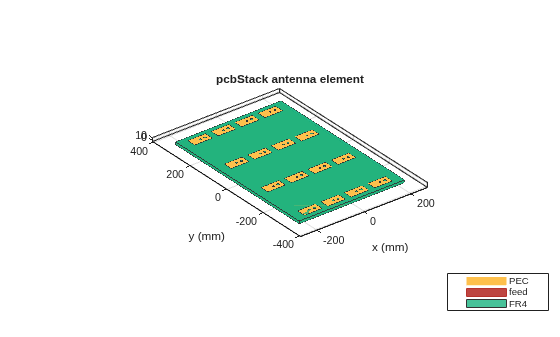
Create a 4-by-4 rectangular array of PCB antennas.
pcbArr = array(pcbAnt,"rectangular",Size=[4 4],ColumnSpacing=0.1,RowSpacing=0.2);
show(pcbArr)
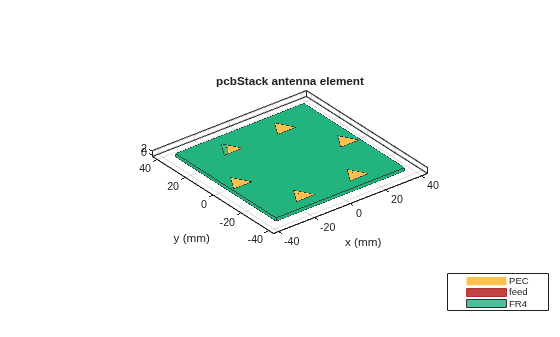
Create a PCB antenna from a triangular patch microstrip antenna using the pcbStack object.
ant = patchMicrostripTriangular(Substrate=dielectric("FR4"));
pcbAnt = pcbStack(ant);Create a circular array of the PCB antenna.
pcbArr = array(pcbAnt,"circular",Radius=0.03);
show(pcbArr)
Input Arguments
PCB antenna, specified as a pcbStack object.
Example: pcbStack
Type of array configuration, specified as a string. The array configuration can be:
linear- Creates a default 2 element linear array with a spacing of 2 meters between the elements.rectangular- Creates a default 2-by-2 rectangular array with row and column spacing of 2 meters each.circular- Creates a default six element circular array with a radius of 1 meter and an offset angle of 0 degrees.
Example: "linear"
Data Types: string
Name-Value Arguments
Specify optional pairs of arguments as
Name1=Value1,...,NameN=ValueN, where Name is
the argument name and Value is the corresponding value.
Name-value arguments must appear after other arguments, but the order of the
pairs does not matter.
Example: NumElements=4
Linear Array
Number of the antenna elements in the array, specified as a positive integer.
Example: 4
Spacing between the antenna elements, specified as a positive scalar or positive vector in meters. By default, the elements are spaced 2 meters apart. Use scalar for uniform and vector for non-uniform spacing between the antenna elements.
Example: 3
Example: [3 2]
Data Types: double
Rectangular Array
Number of the antenna elements in the row and column of the array, specified as a two-element vector.
Example: [4 4]
Row spacing between the two antenna elements, specified as a scalar or vector in meters. By default, the antenna elements are spaced 2 meters apart. Use scalar for uniform and vector for non uniform spacing between the antenna elements.
Example: 0.1
Example: [2 1]
Data Types: double
Column spacing between the two antenna elements, specified as a positive scalar or positive vector in meters. By default, the antenna elements are spaced 2 meters apart. Use scalar for uniform and vector for non uniform spacing between the antenna elements.
Example: 0.1
Example: [2 1]
Data Types: double
Circular Array
Number of elements in the array, specified as a positive integer. The elements in the array are arranged along the X-axis.
Example: 4
Data Types: double
Radius of the array, specified as a positive scalar in meters.
Example: 0.4
Data Types: double
Offset angle for the first element in the array, specified as a real scalar in degrees.
Example: 8
Data Types: double
Output Arguments
Array of the PCB antenna elements, returned as a pcbStack
object.
Version History
Introduced in R2021a
See Also
MATLAB Command
You clicked a link that corresponds to this MATLAB command:
Run the command by entering it in the MATLAB Command Window. Web browsers do not support MATLAB commands.
웹사이트 선택
번역된 콘텐츠를 보고 지역별 이벤트와 혜택을 살펴보려면 웹사이트를 선택하십시오. 현재 계신 지역에 따라 다음 웹사이트를 권장합니다:
또한 다음 목록에서 웹사이트를 선택하실 수도 있습니다.
사이트 성능 최적화 방법
최고의 사이트 성능을 위해 중국 사이트(중국어 또는 영어)를 선택하십시오. 현재 계신 지역에서는 다른 국가의 MathWorks 사이트 방문이 최적화되지 않았습니다.
미주
- América Latina (Español)
- Canada (English)
- United States (English)
유럽
- Belgium (English)
- Denmark (English)
- Deutschland (Deutsch)
- España (Español)
- Finland (English)
- France (Français)
- Ireland (English)
- Italia (Italiano)
- Luxembourg (English)
- Netherlands (English)
- Norway (English)
- Österreich (Deutsch)
- Portugal (English)
- Sweden (English)
- Switzerland
- United Kingdom (English)