platform
R2026bSyntax
Description
platform(
adds scenario,trajectory)Platform objects to
the satellite scenario using the trajectory from the geoTrajectory
System object™ trajectory.
platform(
adds scenario,positiontable)Platform objects to
the satellite scenario scenario from position data in
planetographic coordinates. positiontable is a MATLAB®
timetable or table with exactly one monotonically
increasing column of rowTimes (datetime or duration) and either:
One or more columns of variables, where each column contains data for an individual platform over time.
One column of 2‑D data, where the length of one dimension equals 3 and the remaining dimension defines the number of platforms in the ephemeris.
One column of 3‑D data, where the length of one dimension equals 3, one dimension is a singleton, and the remaining dimension defines the number of platforms in the ephemeris.
If the provided rowTimes are of type duration,
time values are measured relative to the current scenario StartTime
property. The timetable VariableNames property provides the default
platform names when no names are specified as input.
The platform function assumes platform states are specified
in the planetographic coordinate frame of the celestial body defined by the
CentralBody name‑value argument, with position given as latitude
(degrees), longitude (degrees), and altitude (meters). The function holds platform states
constant in the ICRF for scenario time steps outside the time range of
positiontable.
Note
If you want to use NED, you can explicitly create a geoTrajectory (Satellite Communications Toolbox) object, which
includes a Frame flag, and use that as a single input for the platform.
platform(
adds scenario,positiontable,velocitytable)Platform objects to
the satellite scenario scenario from position and velocity data.
positiontable and velocitytable are of type
MATLAB
timetable or table with exactly one monotonically
increasing column of rowTimes (datetime or duration) and either:
One or more columns of variables, where each column contains data for an individual platform over time.
One column of 2‑D data, where the length of one dimension equals 3 and the remaining dimension defines the number of platforms.
One column of 3‑D data, where the length of one dimension equals 3, one dimension is a singleton, and the remaining dimension defines the number of platforms.
If the provided rowTimes are of type duration,
time values are measured relative to the current scenario StartTime
property. The timetable VariableNames property provides the default
platform names when no names are specified as input.
The platform function assumes platform states are specified
in the planetographic reference frame of the celestial body defined by the
CentralBody name‑value argument, where position is given as
latitude (degrees), longitude (degrees), and altitude (meters), and velocity is the
planet fixed‑frame velocity specified in meters per second in the local NED frame. The function holds platform states constant in the ICRF for scenario time
steps outside the time range of positiontable and
velocitytable.
Note
If you want to use NED, you can explicitly create a geoTrajectory (Satellite Communications Toolbox) object, which
includes a Frame flag, and use that as a single input for the platform.
platform(
adds a scenario,positiontimeseries)Platform object to the
satellite scenario scenario from position data specified in
planetographic coordinates, where positiontimeseries is a
MATLAB
timeseries object or tscollection object.
If the Data property of the timeseries or
tscollection has two dimensions, the length of one dimension must
equal 3 and the other dimension must align with the orientation of the time vector. If
the Data property has three dimensions, the length of one dimension
must equal 3, either the first or last dimension must align with the orientation of the
time vector, and the remaining dimension defines the number of platforms.
When StartDate is empty, time values are measured relative to
the current scenario StartTime property. The timeseries
Name property, when defined, provides the default platform name
when no name is specified as input.
The platform function assumes platform states are specified
in the planetographic reference frame of the celestial body defined by the
CentralBody name‑value argument, where position is given as
latitude (degrees), longitude (degrees), and altitude (meters). The function holds
platform states constant in the ICRF for scenario time steps outside the time range of
positiontimeseries.
platform(
adds a scenario,positiontimeseries,velocitytimeseries)Platform object to the
satellite scenario scenario from position (in meters) data
specified in the positiontimeseries (timeseries object) and velocity (in
meters/second) data specified in the velocitytimeseries (timeseries object).
If the Data property of the timeseries or
tscollection has two dimensions, the length of one dimension must
equal 3 and the other dimension must align with the orientation of the time vector. If
the Data property has three dimensions, the length of one dimension
must equal 3, either the first or last dimension must align with the orientation of the
time vector, and the remaining dimension defines the number of platforms.
When StartDate is empty, time values are measured relative to
the current scenario StartTime property. The timeseries
Name property, when defined, provides the default platform name
when no name is specified as input.
The platform function assumes platform states are specified
in the planetographic reference frame of the celestial body defined by the
CentralBody name‑value argument, where position is given as
latitude (degrees), longitude (degrees), and altitude (meters), and velocity is the
planet fixed‑frame velocity specified in meters per second in the local NED frame. The function holds platform states constant in the ICRF for scenario time
steps outside the time range of positiontimeseries and
velocitytimeseries.
platform(___, specifies
options using one or more name-value arguments in addition to any input argument
combination from previous syntaxes. Name=Value)
pltf = platform(___)Platform object
platform to the satellite scenario and returns a vector of handles to these platforms.
Note
When the AutoSimulate property of the satelliteScenario is false, SimulationStatus is NotStarted while calling
platform. You can use the restart
function to reset SimulationStatus to
NotStarted. Calling restart erases
the simulation data.
Examples
Create a scenario using satelliteScenario.
sc = satelliteScenario();
viewer = satelliteScenarioViewer(sc);
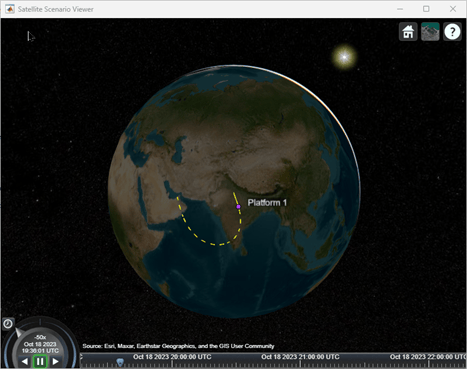
Consider an aircraft taking off from Delhi International Airport, flying over Bangalore, and then landing in Dubai. The total flying time is three hours. Create a trajectory using geoTrajectory.
trajectory = geoTrajectory([28.5567,77.1006,10600;13.1989,77.7068,30600;25.2566,55.3641,5600],[0,3600,3*3600],AutoPitch=true,AutoBank=true);
Add a platform to the satellite scenario based on the trajectory.
pltf = platform(sc,trajectory)
pltf =
  Platform with properties:

                  Name:  Platform 1
                    ID:  1
        ConicalSensors:  [1x0 matlabshared.satellitescenario.ConicalSensor]
               Gimbals:  [1x0 matlabshared.satellitescenario.Gimbal]
          Transmitters:  [1x0 satcom.satellitescenario.Transmitter]
             Receivers:  [1x0 satcom.satellitescenario.Receiver]
              Accesses:  [1x0 matlabshared.satellitescenario.Access]
               Eclipse:  [1x0 Aero.satellitescenario.Eclipse]
           GroundTrack:  [1x1 matlabshared.satellitescenario.GroundTrack]
                  Path:  [1x1 matlabshared.satellitescenario.Path]
        CoordinateAxes:  [1x1 matlabshared.satellitescenario.CoordinateAxes]
           MarkerColor:  [0.7176 0.2745 1]
            MarkerSize:  6
             ShowLabel:  true
        LabelFontColor:  [1 1 1]
         LabelFontSize:  15
         Visual3DModel:
    Visual3DModelScale:  1
hide(pltf.Path);
show(pltf.GroundTrack);
Play viewer.
play(sc);