이 제출물을 팔로우합니다
- 팔로우하는 게시물 피드에서 업데이트를 확인할 수 있습니다
- 정보 수신 기본 설정에 따라 이메일을 받을 수 있습니다
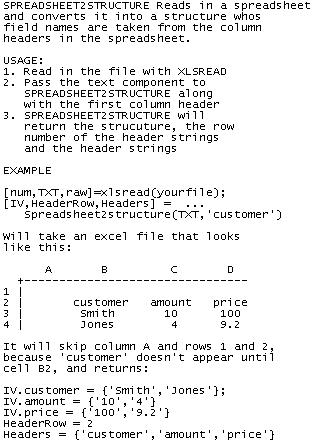
SPREADSHEET2STRUCTURE Reads in a spreadsheet and converts it into a structure whos field names are taken from the column headers in the spreadsheet.
USAGE:
1. Read in the file with XLSREAD
2. Pass the text component to
SPREADSHEET2STRUCTURE along
with the first column header
3. SPREADSHEET2STRUCTURE will
return the strucuture, the row
number of the header strings
and the header strings
EXAMPLE
[num,TXT,raw]=xlsread(yourfile);
[IV,HeaderRow,Headers] = ...
Spreadsheet2structure(TXT,'customer')
Will take an excel file that looks
like this:
A B C D
+--------------------------------
1 |
2 | customer amount price
3 | Smith 10 100
4 | Jones 4 9.2
It will skip column A and rows 1 and 2,
because 'customer' doesn't appear until
cell B2, and returns:
IV.customer = {'Smith','Jones'};
IV.amount = {'10','4'}
IV.price = {'100','9.2'}
HeaderRow = 2
Headers = {'customer','amount','price'}
It's not fancy, but it works
인용 양식
Michael Robbins (2026). Spreadsheet2Structure (https://kr.mathworks.com/matlabcentral/fileexchange/8127-spreadsheet2structure), MATLAB Central File Exchange. 검색 날짜: .
| 버전 | 퍼블리시됨 | 릴리스 정보 | Action |
|---|---|---|---|
| 1.0.0.0 |