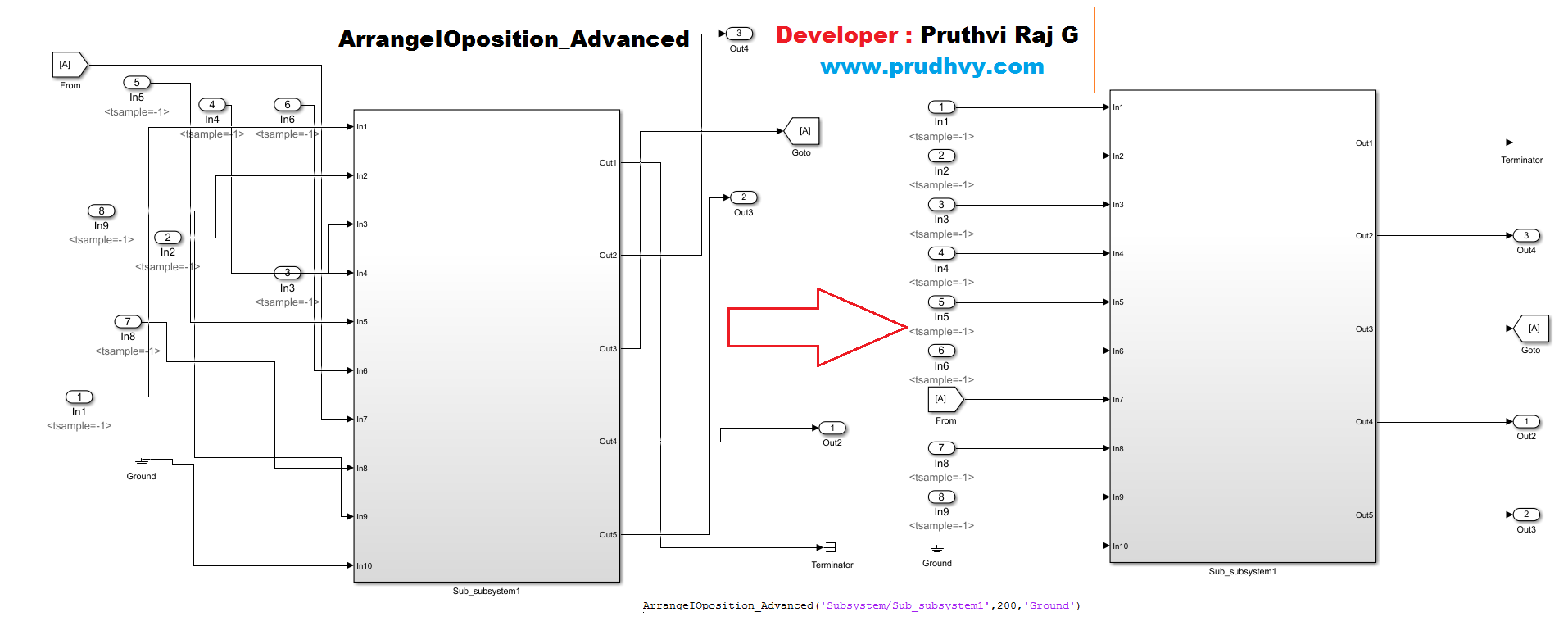
Arranging the following blocktype (inports, outports ,from-goto blocks , terminator) connected to Subsystem.
이 제출물을 팔로우합니다
- 팔로우하는 게시물 피드에서 업데이트를 확인할 수 있습니다
- 정보 수신 기본 설정에 따라 이메일을 받을 수 있습니다
Name : ArrangeIOposition_Advanced.m
Author : Pruthvi Raj G
Version : Version 1.0
Input : gcbName = Subsystem path Name for
offset = Distance from subsystem to ports.
BlkType = Add if any other type of BlockType required.
Output : Arranging the following blocktype (inports, outports ,from-goto blocks , terminator) connected to Subsystem.
Date : 17-December-2018 07:41:00
Updates : 1. Gives Line handles for the selected line.
2. If multiple lines are tapped to the single line the
handles are stored in array.
Examples : 1. ArrangeIOposition_Advanced('Subsystem/Sub_subsystem1',200,'Ground')
2. ArrangeIOposition_Advanced('Subsystem/Sub_subsystem1')
The tool allows to automatically align (inports, outports ,from-goto blocks , terminator) connected to Subsystem..
Read above for info
인용 양식
Pruthvi G (2026). Simulink Alignment Tool - Auto Layout Subsystems - Function (https://kr.mathworks.com/matlabcentral/fileexchange/70998-simulink-alignment-tool-auto-layout-subsystems-function), MATLAB Central File Exchange. 검색 날짜: .
