Interactive 2D Plot Magnifier with Matlab

버전 1.0.0.3 (2.52 KB) 작성자: Hristo Zhivomirov
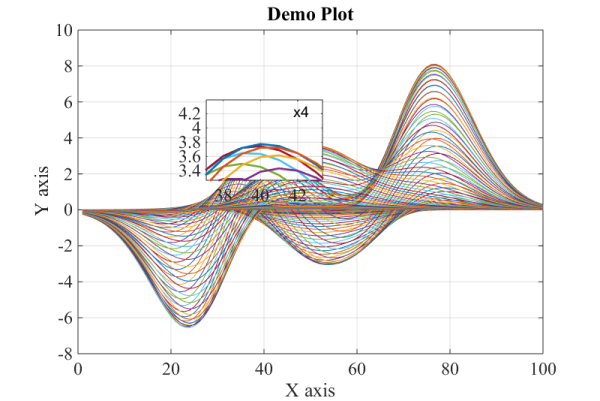
Interactive zooming on a 2D plot using a magnifier.
다운로드 수: 750
업데이트 날짜: 2020/10/14

라이선스 보기

The present code is a Matlab function that allows the user to enable interactive zooming on a 2D plot. Clicking the left mouse button and dragging over the axes draws a rectangular magnifier with zoom factor of 2, centred beneath the mouse cursor. Simultaneously, one may turn the mouse scroll wheel to zoom in or out additionally. When the left mouse button is released the magnifier disappears, unless the “Ctrl” button is pressed.

Instructions for use:
- Click and hold the left mouse button to turn the magnifier on;
- Simultaneously, turn the mouse scroll wheel to increase or decrease the magnification factor;
- Release the left mouse button to remove the magnifier;
- Press and hold the "Ctrl" key while operate with the magnifier in order to preserve the zoomed area when the left mouse button is released.

An example is given in order to clarify the usage of the function. For convenience, the input and output arguments are given in the beginning of the function.

인용 양식

Hristo Zhivomirov (2026). Interactive 2D Plot Magnifier with Matlab (https://kr.mathworks.com/matlabcentral/fileexchange/65561-interactive-2d-plot-magnifier-with-matlab), MATLAB Central File Exchange. 검색 날짜: .

MATLAB 릴리스 호환 정보
개발 환경: R2017b
모든 릴리스와 호환
플랫폼 호환성
Windows macOS Linux
카테고리
Help CenterMATLAB Answers에서 Data Exploration에 대해 자세히 알아보기
도움

도움 받은 파일: magnify

버전 게시됨 릴리스 정보
1.0.0.3

A new version of the code has been uploaded.

1.0.0.2

A new version of the code has been uploaded.

1.0.0.1

A new version of the code has been uploaded.

1.0.0.0