이 제출물을 팔로우합니다
- 팔로우하는 게시물 피드에서 업데이트를 확인할 수 있습니다
- 정보 수신 기본 설정에 따라 이메일을 받을 수 있습니다
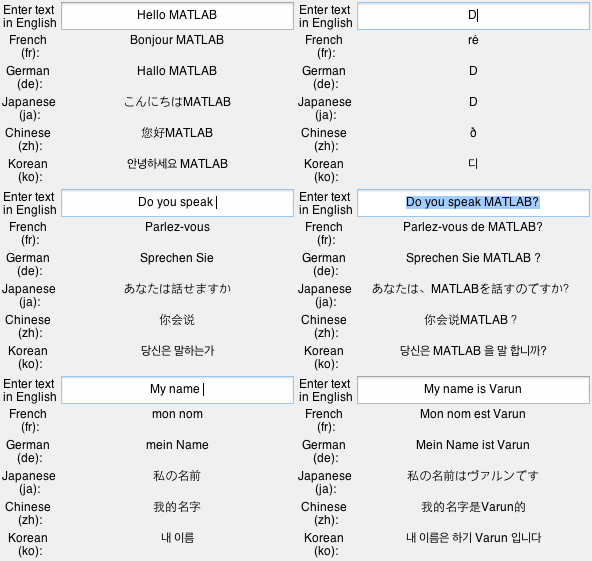
There are two files in this submission. The first one is the MATLAB function translate.m and the other one is an example app (googleTranslateExample.m) that shows you how one can use translate.
%TRANSLATE uses Google(r)'s free web service at translate.google.com to translate
%a string from one language to another.
%
% Usage:
% translate('thank you', 'ja') - translates the first argument to Japanese
% translate('merci', 'ja', 'fr') - translate the first argument from french to Japanese
% translate('thank you') - translate the first argument from English to German
%
% Inputs:
% Arg1: stringToBeTranslated - char array or cell array of strings to be translated
% - Required
% Arg2: toLanguage - Language to be which 'stringToBeTranslated' will be translated
% - Optional
% - Default - 'de'(German)
% Arg3: fromLanguage - Language in which 'stringToBeTranslated' is specified
% - Optional
% - Default - 'en'(English)
%
% Output: Translated string returned by Google(r)
% Output is of the same type as the input 'stringToBeTranslated' - Char array or cell array of string
% Output is not translated if internet is not available of something went wrong with the query to Google.
%
%
%
% See also googleTranslateExample
인용 양식
Varun Gandhi (2026). Translate strings from one language to another (https://kr.mathworks.com/matlabcentral/fileexchange/49566-translate-strings-from-one-language-to-another), MATLAB Central File Exchange. 검색 날짜: .
도움
도움 받은 파일: Google(R) Translate
