이 제출물을 팔로우합니다
- 팔로우하는 게시물 피드에서 업데이트를 확인할 수 있습니다
- 정보 수신 기본 설정에 따라 이메일을 받을 수 있습니다
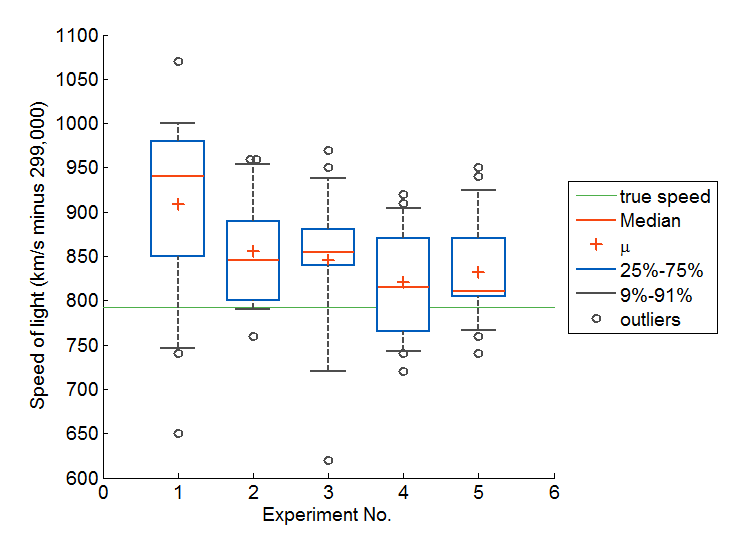
bplot(X)
This function will create a nice boxplot from a set of data. You don't
need a toolbox.
bplot(D) will create a boxplot of data D, no fuss.
T = bplot(D) If X is a matrix, there is one box per column; if X is a
vector, there is just one box. On each box, the central
mark is the median, the edges of the box are the 25th and
75th percentiles
array 'T' for a legend. You can add the legend as legend(T)
T = bplot(D,x) will plot the boxplot of data D above the 'x' value x
T = bplot(D,y,'horiz') will plot a horizontal boxplot at the 'y' value of y
T = bplot(...,'Property', . . . )
T = bplot(...,'PropertyName',PropertyValue, . . . )
% Jitter feature
The boxplot has a cool jitter feature which will help you view each
outlier separately even if two have identical values. It jitters the
points around the other axis so that you can see exactly how many are
there.
% Examples:
bplot(randn(30,3),'outliers')
bplot(randn(30,3),'color','black');
----
X = round(randn(30,4)*5)/5; % random, with some duplicates
T = bplot(X,'points');
legend(T,'location','eastoutside');
% This function was created for inclusion in my larger nhist function.
인용 양식
Jonathan C. Lansey (2026). Box and whiskers plot (without statistics toolbox) (https://kr.mathworks.com/matlabcentral/fileexchange/42470-box-and-whiskers-plot-without-statistics-toolbox), MATLAB Central File Exchange. 검색 날짜: .
| 버전 | 퍼블리시됨 | 릴리스 정보 | Action |
|---|---|---|---|
| 1.0.0.0 | Minor update |