Quick_Figure

버전 1.0.0.0 (7.01 KB) 작성자: Zach
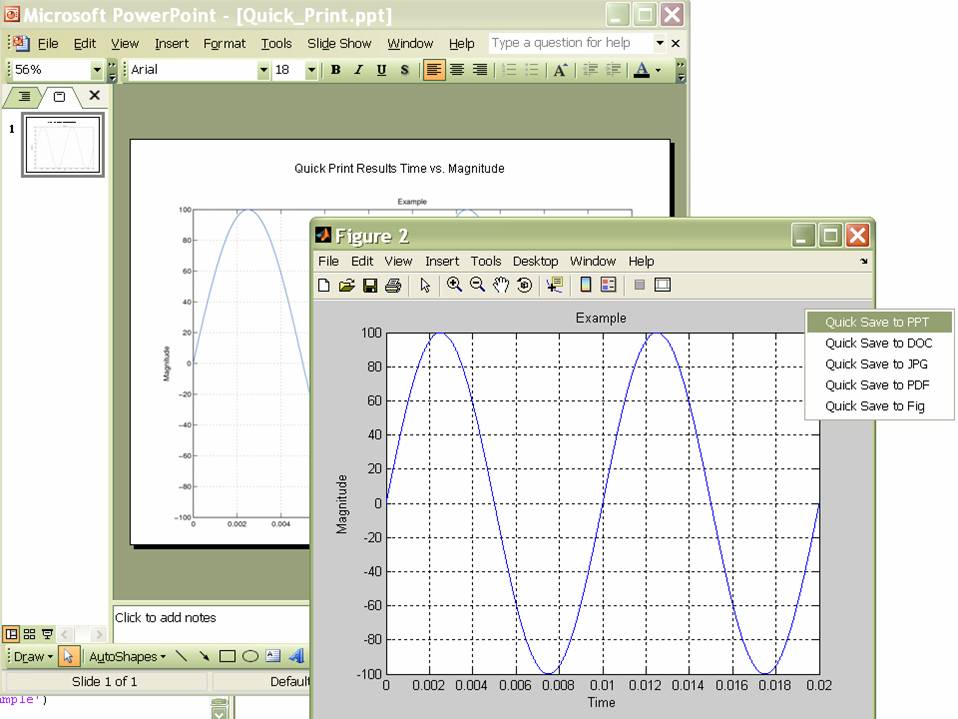
Adds a context menu to allow quick saving of matlab figures to Powerpoint (ppt), Word (doc), JPG and
다운로드 수: 3.1K
업데이트 날짜: 2016/3/29

라이선스 보기

Quick_Figure function adds context menus to a matlab figure that allows you to save to multiple formats for quick and easy use of plots in reports and presentations. Currently, quick_figure can save to Powerpoint (ppt), Word (doc), JPG, PDF, and Fig. This function uses a modified version of the saveppt and save2word functions - instead of copying the figure to the windows clipboard, the new function inserts an image of the plot to the document, allowing for a better looking result.
Usage is fairly simple, instead of typing
>> figure;
Type the following for a figure with the context menu already added:
>> quick_figure;
Type the following to add the context menu to any figure:
>> quick_figure('on');

Various preferences for the quick_figure functions are saved in the quick_figure_prefs.m file.

These functions require Ghostscript 8.51 or later, Powerpoint/Word 2003 or later.

Thanks,
Zach

인용 양식

Zach (2026). Quick_Figure (https://kr.mathworks.com/matlabcentral/fileexchange/14903-quick_figure), MATLAB Central File Exchange. 검색 날짜: .

MATLAB 릴리스 호환 정보
개발 환경: R2006a
모든 릴리스와 호환
플랫폼 호환성
Windows macOS Linux
카테고리
Help CenterMATLAB Answers에서 Simulink Report Generator에 대해 자세히 알아보기
도움

도움 받은 파일: saveppt, save2word, savefig

버전 게시됨 릴리스 정보
1.0.0.0

BSD License
I've updated the quick figure functions to simplify things a bit. All of the functions have now been consolidated into one m file and one preferences file.

Thanks,
Zach