hline and vline

Draws 'low-impact' horizontal or vertical lines on the current axes

이 제출물을 팔로우합니다

편집자 메모: Popular File 2019

This file was a File Exchange Pick of the Week

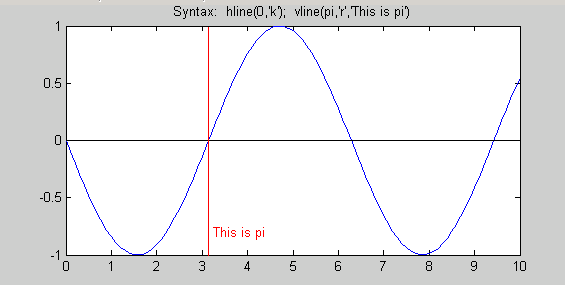
These functions draw horizontal or vertical lines at specified places on the current axes. The axes are automatically held for the drawing of the lines, and restored to their previous 'hold' states afterwards. THe HandleVisibility of the new lines is "off" so that they don't appear on legends. (Incidentally, this also makes them invisible to moveplot.m and addplot.m) Objects with HandleVisibility set to off can be "found" by setting the root object's "ShowHiddenHandles" property to "on". Also, if an output argument is specified, the function will return the handle to the otherwise 'hidden' object.

Further arguments allow the user to set the linetype and color of the line (default is 'r:'), and to add labels. For example:

h = vline(42,'g','The Answer')

will return a handle to a vertical line at x=42 on the current axes, colored green, and with a text label "The Answer" on the axes close to the line, and in the same color of the line.

hline and vline both accept vector inputs.

인용 양식

Brandon Kuczenski (2026). hline and vline (https://kr.mathworks.com/matlabcentral/fileexchange/1039-hline-and-vline), MATLAB Central File Exchange. 검색 날짜: .

카테고리

Help CenterMATLAB Answers에서 Language Fundamentals에 대해 자세히 알아보기

일반 정보

MATLAB 릴리스 호환 정보

  • 모든 릴리스와 호환

플랫폼 호환성

  • Windows
  • macOS
  • Linux
버전 퍼블리시됨 릴리스 정보 Action
1.0.0.0