프로그래밍 방식으로 시퀀스 다이어그램 만들기
R2026bR2024b 이후
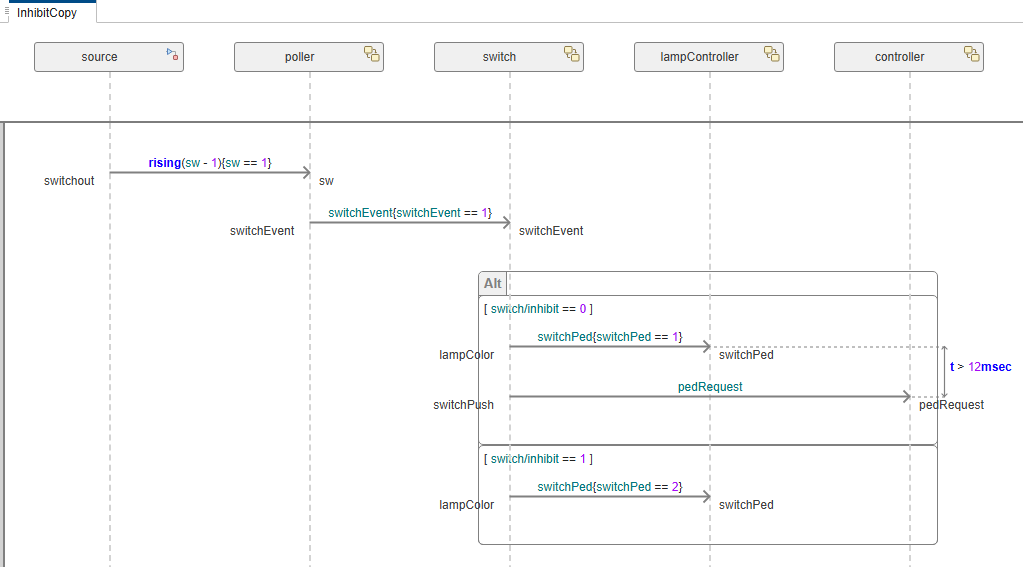
신호등이 있는 교차로에서 보행자가 도로를 건너는 시나리오를 설명하는 시퀀스 다이어그램을 프로그래밍 방식으로 만듭니다.
시퀀스 다이어그램에 대한 자세한 내용은 Author Sequence Diagrams Interactively 항목을 참조하십시오.
신호등 예제 열기
TLExample 아키텍처 모델을 불러옵니다.
model = systemcomposer.openModel('TLExample');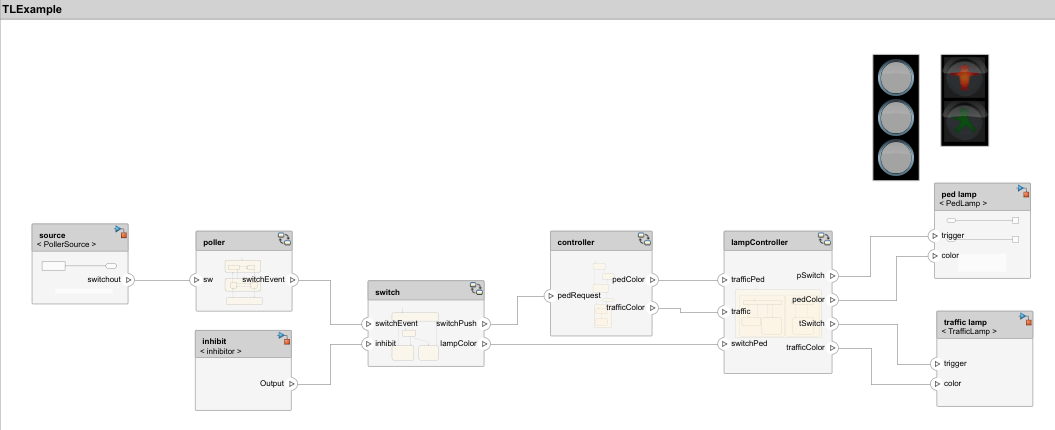
'InhibitCopy'라는 새 시퀀스 다이어그램을 만듭니다.
diagram = model.addInteraction('InhibitCopy');수명선 추가하기
아키텍처의 각 컴포넌트에 대해 수명선을 추가합니다.
sourceLifeline = diagram.addLifeline('TLExample/source');
pollerLifeline = diagram.addLifeline('TLExample/poller');
switchLifeline = diagram.addLifeline('TLExample/switch');
lampLifeline = diagram.addLifeline('TLExample/lampController');
controllerLifeline = diagram.addLifeline('TLExample/controller');
상호 작용의 루트 프래그먼트와 루트 오퍼랜드를 가져옵니다.
rootFragment = diagram.RootFragment;
rootOperand = rootFragment.Operands(1);
메시지 및 프래그먼트 추가하기
루트 오퍼랜드에 두 개의 메시지를 추가합니다.
sourceToPollerMsg = rootOperand.addMessage(sourceLifeline, "switchout", pollerLifeline, "sw", "rising(sw-1){sw==1}");
pollerToSwitchMsg = rootOperand.addMessage(pollerLifeline, "switchEvent", switchLifeline, "switchEvent", "switchEvent{switchEvent==1}");
루트 오퍼랜드에 대체 프래그먼트를 추가합니다.
altFrag = rootOperand.addFragment('Alt');대체 프래그먼트의 각 오퍼랜드에 대해 가드식을 지정합니다.
op1 = altFrag.Operands(1);
op1.Guard = "switch/inhibit==0";
op2 = altFrag.addOperand("switch/inhibit==1");
대체 프래그먼트의 첫 번째 오퍼랜드에 두 개의 메시지를 추가합니다.
switchToLampControllerMsg1 = op1.addMessage(switchLifeline, "lampColor", lampLifeline, "switchPed", "switchPed{switchPed==1}");
switchToControllerMsg = op1.addMessage(switchLifeline, "switchPush", controllerLifeline, "pedRequest", "pedRequest");
대체 프래그먼트의 두 번째 오퍼랜드에 한 개의 메시지를 추가합니다.
switchToLampControllerMsg2 = op2.addMessage(switchLifeline, "lampColor", lampLifeline, "switchPed", "switchPed{switchPed==2}");
지속 시간 제약 조건 추가하기
대체 프래그먼트의 첫 번째 오퍼랜드에 있는 두 개의 메시지 사이에 지속 시간 제약 조건을 추가합니다.
startEvent = switchToLampControllerMsg1.End;
endEvent = switchToControllerMsg.End;
expression = "t > 12msec";
durationConstraint = diagram.addDurationConstraint(startEvent, endEvent, expression);
시퀀스 다이어그램 열기
새로 만든 시퀀스 다이어그램을 엽니다.
open(diagram);
참고 항목
systemcomposer.interaction.Interaction | systemcomposer.interaction.Lifeline
참고 항목
툴
함수
openViews|sim|addInteraction|getInteraction|getInteractions|open|addLifeline|addFragment|addOperand|addMessage|addDurationConstraint|addAnnotation|findLifeline|findElement|move|move|move|destroy|next|current|reset
객체
systemcomposer.arch.Model|systemcomposer.interaction.Interaction|systemcomposer.interaction.Iterator|systemcomposer.interaction.Lifeline|systemcomposer.interaction.MessageEvent|systemcomposer.interaction.FormalGate|systemcomposer.interaction.Message|systemcomposer.interaction.Fragment|systemcomposer.interaction.Operand|systemcomposer.interaction.DurationConstraint|systemcomposer.interaction.Annotation

