disconnect
R2026bDescription
newPipeline = disconnect(pipeline,connections)connections from the pipeline
pipeline.
Examples
Create a pipeline with two components and display the connections.
featureSelector = featureSelectionClassificationMRMRComponent;
knnClassifier = classificationKNNComponent;
pipeline = series(featureSelector,knnClassifier);
pipeline.Connections
ans =

  7×2 table

                        Source                                     Destination
    ______________________________________________    ______________________________________

    "X"                                               "FeatureSelectionClassificationMRMR/X"
    "Y"                                               "FeatureSelectionClassificationMRMR/Y"
    "FeatureSelectionClassificationMRMR/XSelected"    "ClassificationKNN/Predictors"
    "Y"                                               "ClassificationKNN/Response"
    "ClassificationKNN/Predictions"                   "Predictions"
    "ClassificationKNN/Scores"                        "Scores"
    "ClassificationKNN/Loss"                          "Loss"
The XSelected output of the
FeatureSelectionClassificationMRMR component is connected to the
Predictors input of the ClassificationKNN
component.
Disconnect the two ports. View the pipeline.
newPipeline = disconnect(pipeline, ...
    ["FeatureSelectionClassificationMRMR/XSelected", ...
    "ClassificationKNN/Predictors"]);
view(newPipeline)
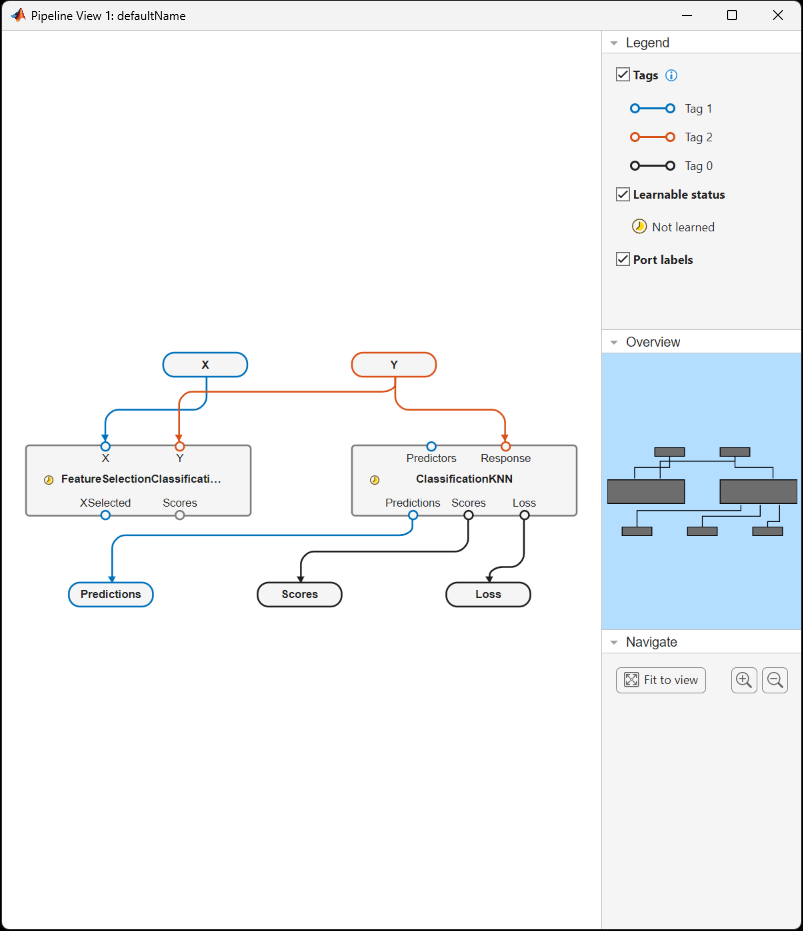
XSelected is disconnected from the Predictors
input of the KNN component.
Input Arguments
Output Arguments
More About
Version History
Introduced in R2026a

