Create Software Component Models in Simulink
R2026bWhen designing a software component, it is useful to distinguish between the algorithms implemented in the component and the interaction of the component with its target software environment. In Simulink®, you can configure a model as a software component to enable an explicit component boundary and prepare the model for defining component interfaces and run-time behavior.
To configure a Simulink model as a software component, you need the Software Component Designer for Simulink support package. For installation instructions, see Install Software Component Designer for Simulink Support Package.
Configure Simulink Model As Software Component
To create a software component, open the Software Component Designer app from an existing Simulink model or a blank model.
Create a blank Simulink model or open an existing model.
In the Simulink toolstrip, select the Apps tab.
In the Code Generation section, click Software Component Designer
 .
.
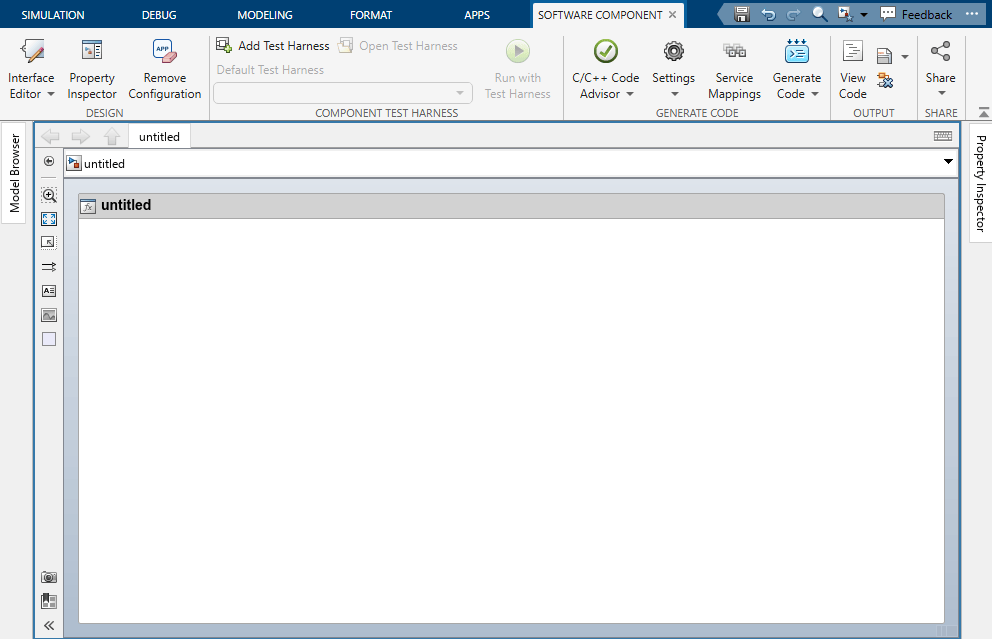
When the Software Component Designer app opens, Simulink displays a visual boundary around the model. This boundary indicates that the model is now configured as a software component.
Next Steps
After you configure a model as a software component, use the Software Component Designer app to define how the component interacts with other software components at run time:
Define data and service interfaces on component ports. See Define Data and Service Interfaces Between Components.
Configure communication and execution behavior using quality of service (QoS) properties. See Configure Communication and Execution Behavior of Software Components.
Validate component behavior through simulation. See Simulate Software Architectures to Validate Run-time Behavior (System Composer).

