hilite_system
R2026bHighlight block, signal line, or annotation
Description
Examples
Suppose you have a model named myModel. The model
contains an Integrator block named myBlock. A branched signal
line connects the output port of myBlock to multiple other blocks. Highlight
the signal line, including all branches.
In this example, you want to get the handle of a signal line, including all branches. You
can get the line handle by using the get_param function to query which
signal lines connect to a given block. If you query the block connected to the signal line at
the output port, the get_param function returns the handle of the entire
signal line, including all branches. If you query one of the blocks connected to the signal
line at the input port, the function returns the handle of the branch connected to that block.
In this example, you want to get the line handle of the entire signal line, so you want to
query the block connected to signal line at the output port.
Get the handles of all signal lines connected to the Integrator block.
hAll = get_param("myModel/myBlock","LineHandles");
Get the handle of the signal line connected to the output port of the Integrator block.
h = hAll.Outport;
Highlight the signal line, including all branches, in the default style.
hilite_system(h);
Suppose you have a model named myModel that containing
a block named myBlock1 and a block named myBlock2.
Highlight the blocks in the default style.
blockPaths = "myModel/"+["myBlock1";"myBlock2"];
hilite_system(blockPaths);
Highlight the blocks in the find style.
hilite_system(blockPaths,"find");Suppose you have a model named myModel containing a
highlighted block named myBlock.
Remove the highlighting from the block by setting the highlighting style to
none.
hilite_system("myModel/myBlock","none")
Alternatively, remove the highlighting interactively by pressing Ctrl+Shift+H. On macOS, press Command+Shift+H.
Suppose you have a model named myModel. The model
contains an Integrator block. A branched signal line connects the output port of
the Integrator block to multiple other blocks, including a block named
myBlock. Highlight the branch of the signal line connected to
myBlock.
In this example, you want to get the handle of the branch of a signal line. You can get
the line handle by using the get_param function to query which signal
lines connect to a given block. If you query the block connected to the signal line at the
output port, the get_param function returns the handle of the entire
signal line, including all branches. If you query one of the blocks connected to the signal
line at the input port, the function returns the handle of the branch connected to that block.
In this example, you want to get the line handle of a branch, so you want to query the block
connected to that branch at the input port.
Get the handles of all signal lines connected to myBlock.
hAll = get_param("myModel/myBlock","LineHandles");
Get the handle of the signal line connected to the input port of
myBlock.
h = hAll.Inport;
Highlight the branch of the signal line connected to myBlock in the
default style.
hilite_system(h);
Suppose you have a model named myModel. In the model,
highlight all annotations containing the word note.
Get the handles of all annotations containing the word note.
h = find_system("myModel",FindAll="on",Regexp="on",CaseSensitive="off",Name=".*note.*");
Highlight the annotations in the default style.
hilite_system(h);
You can customize a highlighting style by setting the value of the
HiliteAncestorsData parameter on the root-level model using the
set_param function.
set_param(0,HiliteAncestorsData=hiliteData)
Specify hiliteData as a structure array with these fields:
'HiliteType'— Highlighting style to customize, such as'user1','debug', or'error''ForegroundColor'— Color for block fill'BackgroundColor'— Color for block outline
The supported values for 'ForegroundColor' and
'BackgroundColor' are:
'black''white''gray''red''orange''yellow''green''darkGreen''blue''lightBlue''cyan''magenta'
Customize the debug highlighting style.
myHiliteData = struct(HiliteType='debug',ForegroundColor='darkBlue',BackgroundColor='magenta');
set_param(0,HiliteAncestorsData=myHiliteData);
Suppose you have a model named myModel containing a block named
myBlock. Highlight the block using the customized debug style.
hilite_system("myModel/myBlock","debug");
If you have a Simulink® Coder™ license, you can trace generated code to the corresponding source block in a model.
Open the RollAxisAutopilot model.
openExample("ecoder/GettingStartedEcoderExample")
open_system("RollAxisAutopilot");
Generate code for the model. In the Simulink® Toolstrip, on the Apps tab, under Code Generation, click Embedded Coder. The C Code tab appears in the toolstrip. On the C Code tab, click Build.
In an editor or in the code generation report, open a generated source or header file. As you review lines of code, note traceability tags that correspond to code of interest.
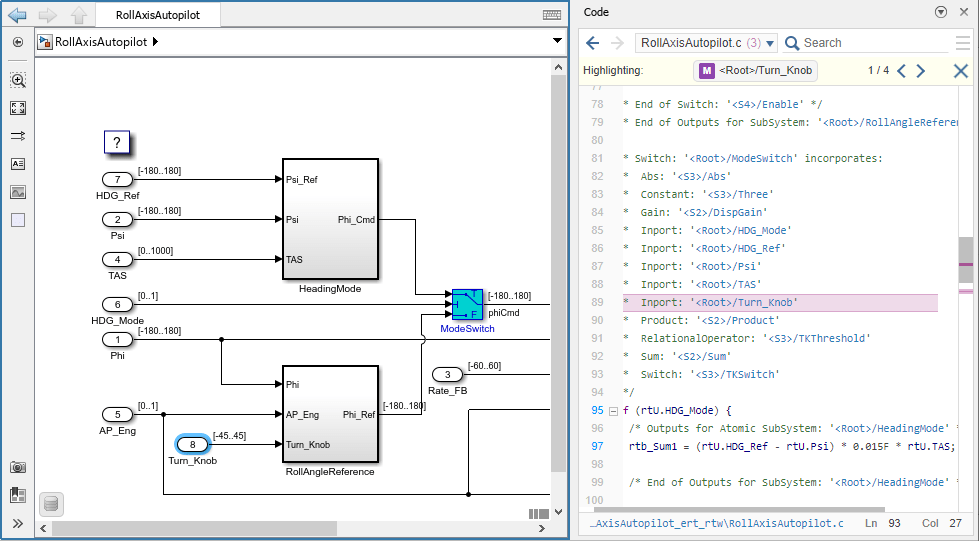
Highlight a block using a traceability tag.
hilite_system("<Root>/Turn_Knob")Highlight a block in a subsystem.
hilite_system("<S1>/RateGain")
Input Arguments
Version History
Introduced before R2006a

