gpsWaveformGenerator
R2026bDescription
The gpsWaveformGenerator
System object™ creates a Global Positioning System (GPS) waveform generator that supports
generation of these GPS waveforms.
Legacy L1 and L2 — Applies when you set the
SignalTypeproperty to"legacy".Modernized L1C — Applies when you set the
SignalTypeproperty to"l1c".Modernized L2C — Applies when you set the
SignalTypeproperty to"l2c".L5 — Applies when you set the
SignalTypeproperty to"l5".
To understand the algorithms associated with each waveform generated using
gpsWaveformGenerator, see Algorithms.
To create a GPS waveform generator:
Create the
gpsWaveformGeneratorobject and set its properties.Call the object with arguments, as if it were a function.
To learn more about how System objects work, see What Are System Objects?
Creation
Description
gpsWaveObj = gpsWaveformGenerator
gpsWaveObj = gpsWaveformGenerator(Name=Value)gpsWaveformGenerator(PRNID=10)
specifies a pseudo-random noise (PRN) ID of 10.
Properties
Usage
Input Arguments
Output Arguments
Object Functions
To use an object function, specify the
System object as the first input argument. For
example, to release system resources of a System object named obj, use
this syntax:
release(obj)
Examples
Generate random bits of navigation data.
navdata = randi([0 1],2,1);
Create a GPS waveform generation System object™, and set its properties.
gpswaveobj = gpsWaveformGenerator;
gpswaveobj.EnablePCode = true;
gpswaveobj.SampleRate = 4*10.23e6;
Generate a legacy GPS waveform.
waveform = gpswaveobj(navdata);
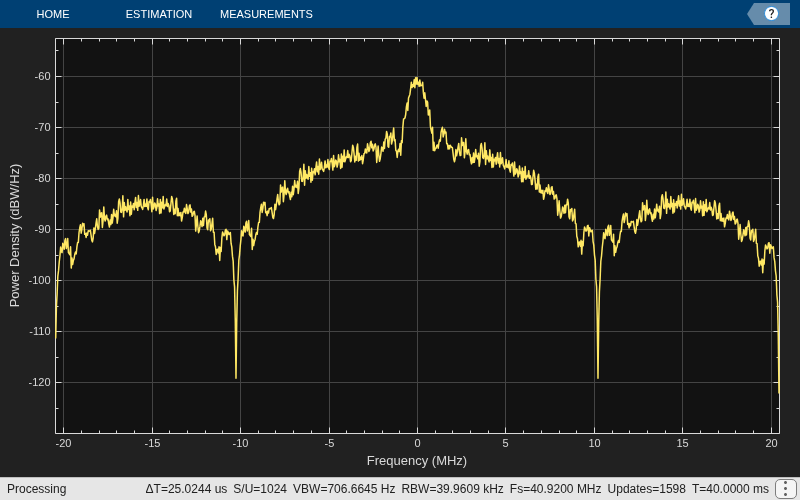
Visualize the spectrum of the waveform.
txscope = spectrumAnalyzer(SampleRate=gpswaveobj.SampleRate, ...
    SpectrumType="power-density",SpectrumUnits="dBW/Hz");
txscope(waveform)
Set the PRN indices, and generate random bits of navigation data.
prn = [4 70];
numsat = length(prn);
numbits = 100;
msg = randi([0 1],numbits,numsat);
Create a GPS waveform generation System object™, and set its properties.
fs = 25e6;
gpswaveobj = gpsWaveformGenerator(SignalType="l1c", ...
                     PRNID=prn,SampleRate=fs);
Generate a GPS L1C waveform.
waveform = gpswaveobj(msg);
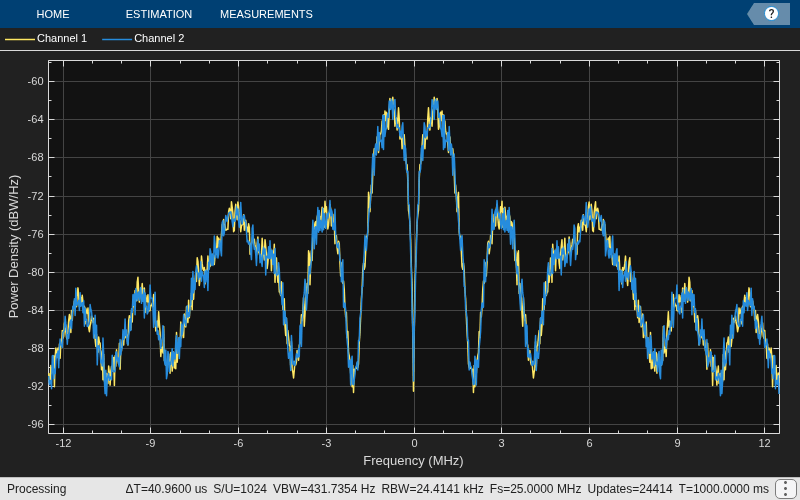
Visualize the spectrum of the waveform.
txscope = spectrumAnalyzer(SampleRate=fs, ...
   SpectrumType="power-density",SpectrumUnits="dBW/Hz");
txscope(waveform)
Generate a GPS L2C waveform with random LNAV and CNAV data for four GPS satellites.
Set the PRN indices and generate random LNAV and CNAV data.
prn = [7 11 20 28];
numsat = length(prn);
numbits = 10;
lnavdata = randi([0 1],numbits,numsat);
cnavdata = randi([0 1],numbits,numsat);
Create a GPS waveform generation System object™, and set its properties.
gpswaveobj = gpsWaveformGenerator;
gpswaveobj.SignalType = "l2c";
gpswaveobj.PRNID = prn;
gpswaveobj.SampleRate = 15e6;
gpswaveobj.EnablePCode = true;
Get the characteristic information about the GPS waveform generator.
info(gpswaveobj)
ans = struct with fields:
         CurrentTime: 0
      SecondsElapsed: 0
    NumBitsProcessed: 0
Generate a GPS L2C waveform.
waveform = gpswaveobj({lnavdata cnavdata});
size(waveform)
ans = 1×2
3000000 4
Generate a GPS L5 waveform, add impairments, and visualize the resultant waveform.
Generate L5 Waveform
Set the PRN indices, and generate random navigation data.
prn = [185, 189];
numsat = length(prn);
numbits = 40;
msg = randi([0,1],numbits,numsat);
Create a GPS waveform generation System object™, and set its properties.
fs = 25e6;
gpswaveobj = gpsWaveformGenerator(SignalType="l5",PRNID=prn, ...
    InitialTime=42123, SampleRate=fs);
Generate a GPS L5 waveform.
waveform = gpswaveobj(msg);
% Generated waveform has 2 columns, corresponding to the two satellites
size(waveform)
ans = 1×2
10000000 2
Introduce Impairments
Initialize objects that model the impairments.
fqyoffsetobj = comm.PhaseFrequencyOffset(FrequencyOffsetSource="Input port", ...
    SampleRate=fs);
delayval = 5.23e-4;
delobj = dsp.Delay(round(delayval*fs));
Add impairments to the waveform to get the resultant waveform.
fwave = fqyoffsetobj(waveform,[3e3 -4.6e3]); % Add frequency offset
dwave = delobj(fwave);                        % Add delay
bbwave = sum(dwave,2);                        % Add all signals to get final signal
size(bbwave)                                  % Resultant baseband waveform is a complex column vector
ans = 1×2

    10000000           1
Visualize Waveform
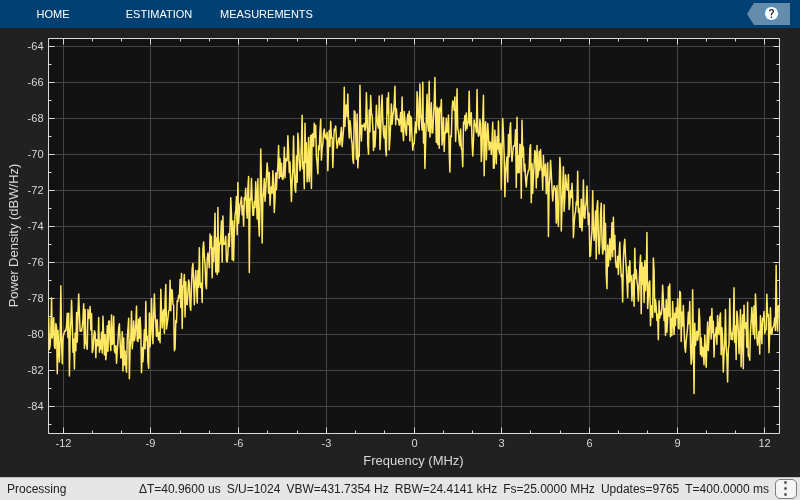
Visualize the resultant waveform.
txscope = spectrumAnalyzer(SampleRate=fs, ...
    SpectrumType="power-density",SpectrumUnits="dBW/Hz");
txscope(bbwave)
Algorithms
The sections detail the algorithm used to generate GPS waveforms using
gpsWaveformGenerator.
This section details the algorithm used to generate legacy waveforms using
gpsWaveformGenerator.
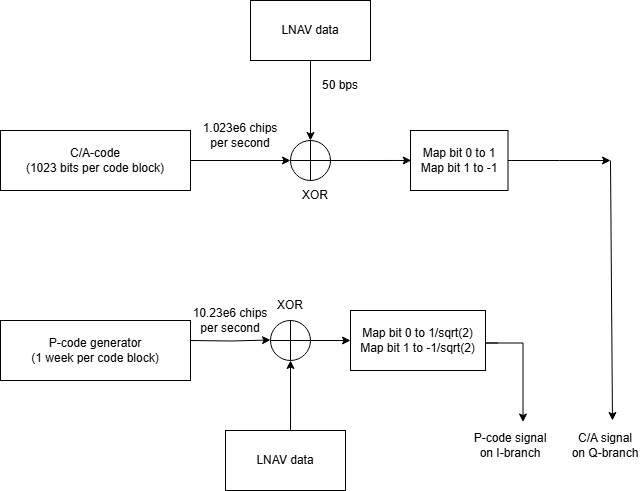
You can generate legacy GPS waveforms by following these steps.
Generate C/A-code using
gnssCACode.XOR the incoming legacy navigation (LNAV) data with the C/A-code. Ensure that the sample rates of LNAV data and C/A-code match.
Map bit 0 to +1 and bit 1 to –1 and then place this waveform on the Q-branch.
Generate P-code using
gpsPCode.XOR the incoming LNAV data with the P-code. Ensure that the sample rates of LNAV data and P-code match.
Map bit 0 to +1/sqrt(2) and bit 1 to –1/sqrt(2) and then place this waveform on the I-branch.
The resultant IQ waveform is the legacy waveform, with the P-code waveform on the I-branch and the C/A-waveform on the Q-branch.
This section details the algorithm used to generate GPS L1C waveform using
gpsWaveformGenerator.
You can generate an L1C waveform by following these steps.
Generate the data at 100 bits per second and each bit is of 10 millisecond duration, as defined in IS-GPS-800.
L1C uses two types of ranging codes: a ranging code for the data (L1CD code) and a ranging code for the pilot (L1CP code). The chip rate of both the L1CD and L1CP codes is 1.023 mega chips per second with 10 milliseconds in length. Therefore, the number of chips before repeating is 10,230.
Because one 10 millisecond data bit exactly matches the ranging code block size, one data bit is spread with one block of ranging code.
Spread the L1CD code with the user data bits to obtain the data component. The rate of the user data bits is 100 bits per second.
Spread the L1CP code with the overlay code (L1CO code) to obtain the pilot component. The rate of the L1CO code is 100 bits per second.
Modulate the data component by using BOC (1,1).
Modulate the pilot component by using the time-multiplexed BOC (TMBOC) modulation technique.
The final IQ waveform formed is the GPS L1C waveform. For more information on TMBOC modulation, see GPS L1C Waveform Generation.

This section details the algorithm used to generate GPS L2C waveform using
gpsWaveformGenerator.
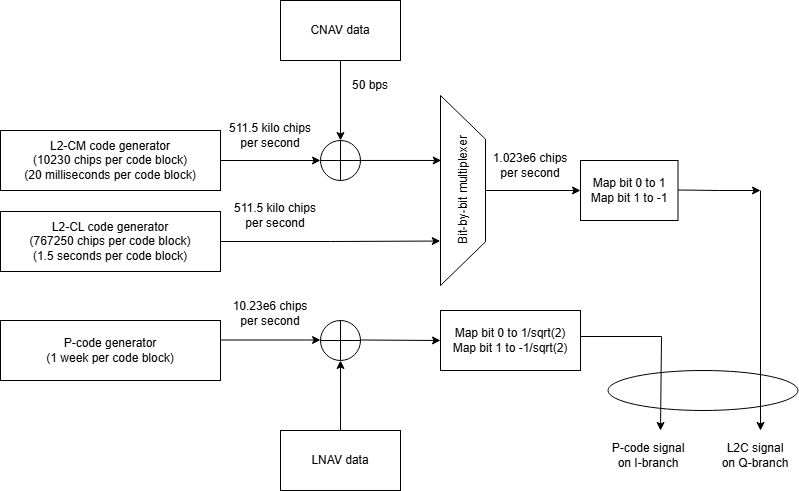
You can generate an L2C waveform by following these steps.
Generate an L2-CM and an L2-CL code.
XOR the civil navigation (CNAV) data with only the L2-CM code.
Multiplex the XORed CNAV and L2-CM data bit-by-bit with L2-CL code.
Because L2-CM and L2-CL each consists of 511.5 kilo chips per seconds, the multiplexed stream of bits consists of 1.023e6 chips per second
For the multiplexed stream generated in point 4, map bit 0 to +1 and bit 1 to –1. Place this waveform on the Q-branch.
Generate P-code using
gpsPCode.XOR the incoming legacy navigation (LNAV) data with the P-code. Ensure that the sample rates of LNAV data and P-code match.
For the XORed LNAV and P-code data, map bit 0 to +1/sqrt(2) and bit 1 to –1/sqrt(2) and then place this waveform on the I-branch.
The resultant IQ waveform is the baseband GPS L2C waveform.
This section details the algorithm used to generate GPS L5 waveform using
gpsWaveformGenerator.
You can generate the L5 waveform by following these steps.
Generate GPS L5 CNAV data, as defined in IS-GPS-705 standard.
Generate the ranging code for in-phase (I5-code) and quadrature-phase (Q5-code) components separately, as described in the standard.
Both I5 and Q5-code are at 10.23MHz chip rate and repeat after every 10230 chips. Hence, each code block is of 1 millisecond duration.
The GPS L5 data is at 100 bits per second. XOR each data bit with 10 Newman Huffman code bits for I-branch. This makes the output after this XOR operation to be at 1 kilo baud, meaning every bit will be of 1 millisecond duration, which is equal to one code block of spreading code.
XOR the 1 millisecond bit from the output of step 3 with I5-code block. Map bit 0 to +1/sqrt(2) and bit 1 to -1/sqrt(2) to get the in-phase branch signal component of the final waveform.
Generate 20 bits of Newman Huffman code for Q-branch which is at 1 kilo baud.
XOR each Q5-code block with the Newman Huffman code. Map bit 0 to +1/sqrt(2) and bit 1 to -1/sqrt(2) to get the quadrature-phase branch signal component of the final waveform.
The final IQ waveform formed is the baseband GPS L5 waveform.

Extended Capabilities
Version History
Introduced in R2025a

