Inline invariant signals
R2026bTransform symbolic names of Invariant signals in generated code
Model Configuration Pane: Code Generation / Optimization
Description
The Inline invariant signals parameter instructs the code generator to transform symbolic names of invariant signals into constant values.
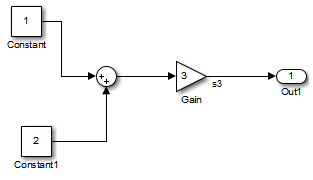
An invariant signal is a block output signal that does not change during Simulink® simulation. For example, in the following model the signal
S3 is an invariant signal. An invariant
signal is not the same as an invariant constant. The
two constants (1 and 2) and the gain value of 3 are invariant constants. To inline
invariant constants, set Default parameter behavior to
Inlined.
Category: Optimization
Dependencies
This parameter is enabled when you set Default parameter behavior to Inlined.
Settings
off (default) | on- On
Simulink Coder™ software uses the numerical values of model parameters, instead of their symbolic names, in generated code. An invariant signal is not inline if it is nonscalar, complex, or the block inport the signal is attached to takes the address of the signal.
- Off
Uses symbolic names of model parameters in generated code.
Examples
This example shows how to use inline invariant signals to optimize the generated code. This optimization transforms symbolic names of invariant signals into constant values.
The InlineInvariantSignals optimization:
Reduces ROM and RAM consumption.
Improves execution speed.
Example Model
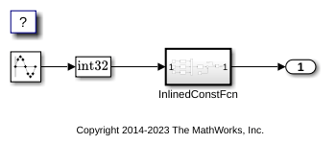
Consider the model InvariantSignalsInline.
model = 'InvariantSignalsInline';
open_system(model);
Generate Code
Build the model using Simulink® Coder™.
slbuild(model)
### Searching for referenced models in model 'InvariantSignalsInline'.
### Total of 1 models to build.
### Starting top model code generation target build for: InvariantSignalsInline
### Successful completion of build procedure for: InvariantSignalsInline

Build Summary

Top model targets:

Model                   Build Reason                                      Status                        Build Duration
======================================================================================================================
InvariantSignalsInline  Target (InvariantSignalsInline.c) did not exist.  Code generated and compiled.  0h 0m 13.734s

1 of 1 models built (0 models already up to date)
Build duration: 0h 0m 15.994s
View the generated code without the optimization. These lines of code are in InvariantSignalsInline.c.
cfile = fullfile('InvariantSignalsInline_grt_rtw',...
    'InvariantSignalsInline.c');
coder.example.extractLines(cfile,'/* Output and update for atomic system',...
    '/* Model output', 1, 0);
/* Output and update for atomic system: '<Root>/InlinedConstFcn' */
void InvariantSignal_InlinedConstFcn(int32_T rtu_In1,
  B_InlinedConstFcn_InvariantSi_T *localB, const ConstB_InlinedConstFcn_Invari_T
  *localC)
{
  /* Product: '<S1>/Product' */
  localB->Product = rtu_In1 * localC->Sum_p;
}
Enable Optimization
Open the Configuration Parameters dialog box.
On the Optimization pane, select Inline Invariant Signals.
Alternatively, you can use the command-line API to enable the optimization:
set_param(model, 'InlineInvariantSignals', 'on');
Generate Code with Optimization
The generated code uses the numerical values of the folded constants instead of creating an additional structure.
Build the model using Simulink Coder.
slbuild(model)
### Searching for referenced models in model 'InvariantSignalsInline'.
### Total of 1 models to build.
### Starting top model code generation target build for: InvariantSignalsInline
### Successful completion of build procedure for: InvariantSignalsInline

Build Summary

Top model targets:

Model                   Build Reason                                                  Status                        Build Duration
==================================================================================================================================
InvariantSignalsInline  Model or library InvariantSignalsInline has unsaved changes.  Code generated and compiled.  0h 0m 4.5372s

1 of 1 models built (0 models already up to date)
Build duration: 0h 0m 5.2085s
View the generated code with the optimization in InvariantSignalsInline.c.
coder.example.extractLines(cfile,...
    '/* Output and update for atomic system', '/* Model output', 1, 0);
/* Output and update for atomic system: '<Root>/InlinedConstFcn' */
void InvariantSignal_InlinedConstFcn(int32_T rtu_In1,
  B_InlinedConstFcn_InvariantSi_T *localB)
{
  /* Product: '<S1>/Product' */
  localB->Product = rtu_In1 << 5;
}
Close the model and code generation report.
bdclose(model)
Recommended Settings
| Application | Setting |
|---|---|
| Debugging | Off |
| Traceability | Off |
| Efficiency | On |
| Safety precaution | No impact |
Programmatic Use
Parameter: InlineInvariantSignals |
| Type: character vector |
Value: 'on' | 'off' |
Default: 'off' |
Version History
Introduced before R2006a

