coverageConfig
R2026bDescription
returns a configuration cfg = coverageConfig(scanner,Name=Value)struct
cfg that describes the current scan coverage of
scanner, with additional options specified using one or more
name-value arguments.
Examples
Create an electronic sector scan controller that scans the azimuth sector from -30 to 30 degrees for a bistatic transmitter that has a fan beam with a 10-degree azimuth beamwidth and a 30-degree elevation beamwidth.
Define the bistatic transmitter.
freq = 300e6; txAnt = phased.SincAntennaElement(Beamwidth=[10 30]); txRdr = bistaticTransmitter(TransmitAntenna=phased.Radiator(Sensor=txAnt,OperatingFrequency=freq));
Create a radar scenario and position a moving platform for the bistatic transmitter.
scnro = radarScenario; traj = kinematicTrajectory(Position=[0 10e3 0],Orientation=quaternion([-90 0 0],"eulerd","ZYX","frame")); txPlat = platform(scnro,Trajectory=traj);
Set the scan duration to 31 pulse repetition intervals (PRIs) so the beam sweeps slowly enough to capture the full transmit antenna pattern as it traverses the receive antenna's location.
pri = 1/txRdr.Waveform.PRF; txScnr = radarScanController("Electronic","Sector",AzimuthLimits=[-30 30],ScanDuration=31*pri)
txScnr =
ElectronicSectorScanner with properties:
AzimuthLimits: [-30 30]
ScanDuration: 0.0031
StepAngle: 1
DwellTimeSource: "Auto"
ScanAngle: -30
ScanTime: 0
Create a default coverage configuration structure using coverageConfig.
txCovCfg = coverageConfig(txScnr)
txCovCfg = struct with fields:
Index: 1
LookAngle: [-30 0]
FieldOfView: [0 0]
ScanLimits: [-30 30]
Range: 1
Position: [0 0 0]
Orientation: [1×1 quaternion]
Update the default coverage configuration to include information about the bistatic transmitter and platform.
txCovCfg.Index = txPlat.PlatformID; txCovCfg.Range = 20e3; txCovCfg.FieldOfView = txRdr.TransmitAntenna.Sensor.Beamwidth; txCovCfg.Position = txPlat.Position; txCovCfg.Orientation = quaternion(txPlat.Orientation,"eulerd","ZYX","frame")
txCovCfg = struct with fields:
Index: 1
LookAngle: [-30 0]
FieldOfView: [10 30]
ScanLimits: [-30 30]
Range: 20000
Position: [0 10000 0]
Orientation: [1×1 quaternion]
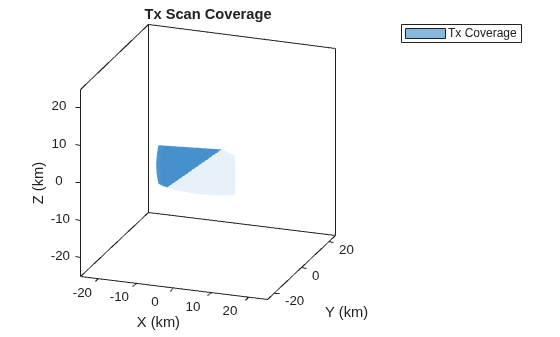
Plot the scan coverage using theaterPlot, coveragePlotter, and plotCoverage.
fig = figure(Name="Scan Coverage"); clf(fig); ax = axes(fig); tp = theaterPlot(Parent=ax,AxesUnits=["km" "km" "km"], ... XLimits=25e3*[-1 1],YLimits=25e3*[-1 1],ZLimits=25e3*[-1 1]); title(ax,"Tx Scan Coverage"); view(ax,20,20); txCovPltr = coveragePlotter(tp,DisplayName="Tx Coverage"); plotCoverage(txCovPltr,txCovCfg);
Input Arguments
Scan controller object (MechanicalRasterScanner,
MechanicalSectorScanner, ElectronicRasterScanner, or
ElectronicSectorScanner) generated by radarScanController.
Name-Value Arguments
Specify optional pairs of arguments as
Name1=Value1,...,NameN=ValueN, where Name is
the argument name and Value is the corresponding value.
Name-value arguments must appear after other arguments, but the order of the
pairs does not matter.
Example: cfg =
coverageConfig(scanner,FieldOfView=[60,30],Range=2000)
Configuration index corresponding to the cfg
"Index" field, specified as a positive integer. The default value
is 1.
Data Types: double
Field of view corresponding to the cfg
"FieldOfView" field, such as the field of view of the surveillance
radar, specified as a 2-element row vector, where the first element is the azimuth
field of view and the second element is the elevation field of view. Units are in
degrees (deg). The default value is [0 0].
Data Types: double
Range corresponding to the cfg
"Range" field, such as the maximum range of the surveillance radar,
specified as a positive scalar. Units are in meters (m). The default value is
1.
Data Types: double
Output Arguments
Coverage configuration, returned as a struct. Fields in the
struct include Index,
LookAngle, FieldOfView,
ScanLimits, Range, Position,
and Orientation.
| Field | Description |
Index | Configuration index, returned as an integer. The default value is 1. |
LookAngle | Current scan angle ( |
FieldOfView | Field of view, returned as a 2-element row vector, where the
first element is the azimuth field of view and the second
element is the elevation field of view. Units are in degrees. The default
value is |
ScanLimits | Scan limits, returned as a 1-by-2 vector or 2-by-2 matrix.
|
Range | Range, returned as a positive scalar. Units are in meters. The default
value is 1. |
Position | Origin position with respect to the global coordinate frame, returned
as a 3-element row vector in the form of [ |
Orientation | Orientation with respect to the global coordinate frame, returned as
a unitless scalar quaternion. A rotation matrix, a quaternion, or three Euler
angles in ZYX sequence can describe this rotation transformation. The default
value is |
You can use cfg to plot the scan coverage in a theaterPlot using its
plotCoverage object
function.
Version History
Introduced in R2026b
See Also
radarScanController | plotCoverage | scan | isScanDone | isLocked | release | bistaticTransmitter | bistaticReceiver
MATLAB Command
You clicked a link that corresponds to this MATLAB command:
Run the command by entering it in the MATLAB Command Window. Web browsers do not support MATLAB commands.
웹사이트 선택
번역된 콘텐츠를 보고 지역별 이벤트와 혜택을 살펴보려면 웹사이트를 선택하십시오. 현재 계신 지역에 따라 다음 웹사이트를 권장합니다:
또한 다음 목록에서 웹사이트를 선택하실 수도 있습니다.
사이트 성능 최적화 방법
최고의 사이트 성능을 위해 중국 사이트(중국어 또는 영어)를 선택하십시오. 현재 계신 지역에서는 다른 국가의 MathWorks 사이트 방문이 최적화되지 않았습니다.
미주
- América Latina (Español)
- Canada (English)
- United States (English)
유럽
- Belgium (English)
- Denmark (English)
- Deutschland (Deutsch)
- España (Español)
- Finland (English)
- France (Français)
- Ireland (English)
- Italia (Italiano)
- Luxembourg (English)
- Netherlands (English)
- Norway (English)
- Österreich (Deutsch)
- Portugal (English)
- Sweden (English)
- Switzerland
- United Kingdom (English)