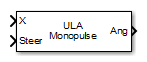
ULA Sum and Difference Monopulse
Sum-and-difference monopulse tracker for ULA
Libraries:
Phased Array System Toolbox /
Direction of Arrival
Description
The ULA Sum-and-Difference Monopulse block estimates the direction of arrival of a narrowband signal on a uniform linear array based on an initial guess using a sum-and-difference monopulse algorithm. The block obtains the difference steering vector by phase-reversing the latter half of the sum steering vector.
Ports
Input
Input signal, specified as a real-valued length-L row vector, where the number of columns corresponds to the number of channels.
Data Types: single | double
Initial estimate of the direction, specified as a scalar that represents the
broadside angle in degrees. The value of Steer is between –90° and 90°.
The angle is defined in the array's local coordinate system. For details regarding the
local coordinate system of the ULA, type
phased.ULA.coordinateSystemInfo
Data Types: single | double
Output
Estimate incoming direction, returned as a scalar that represents the broadside angle in degrees. The value is between –90° and 90°. The angle is defined in the array's local coordinate system.
Data Types: single | double
Parameters
To edit block parameters interactively, use the Property Inspector. From the Simulink® Toolstrip, on the Simulation tab, in the Prepare gallery, select Property Inspector.
Signal propagation speed, specified as a real-valued positive scalar. The default
value of the speed of light is the value returned by
physconst("LightSpeed"). Units are in meters per second.
Example: 3e8
Data Types: double
System operating frequency, specified as a positive scalar. Units are in Hz.
Data Types: single | double
The number of bits used to quantize the phase shift component of beamformer or steering vector weights. Specify the number of bits as a non-negative integer. A value of zero indicates that no quantization is performed.
Block simulation, specified as Interpreted Execution or
Code Generation. If you want your block to use the
MATLAB® interpreter, choose Interpreted Execution. If
you want your block to run as compiled code, choose Code
Generation. Compiled code requires time to compile but usually runs
faster.
Interpreted execution is useful when you are developing and tuning a model. The block
runs the underlying System object™ in MATLAB. You can change and execute your model quickly. When you are satisfied
with your results, you can then run the block using Code
Generation. Long simulations run faster with generated code than in
interpreted execution. You can run repeated executions without recompiling, but if you
change any block parameters, then the block automatically recompiles before
execution.
This table shows how the Simulate using parameter affects the overall simulation behavior.
When the Simulink model is in Accelerator mode, the block mode specified
using Simulate using overrides the simulation mode.
Acceleration Modes
| Block Simulation | Simulation Behavior | ||
Normal | Accelerator | Rapid Accelerator | |
Interpreted Execution | The block executes using the MATLAB interpreter. | The block executes using the MATLAB interpreter. | Creates a standalone executable from the model. |
Code Generation | The block is compiled. | All blocks in the model are compiled. | |
For more information, see Choosing a Simulation Mode (Simulink).
Programmatic Use
Block Parameter:
SimulateUsing |
| Type: enum |
Values:
Interpreted Execution, Code
Generation |
Default:
Interpreted Execution |
Version History
Introduced in R2014b
MATLAB Command
You clicked a link that corresponds to this MATLAB command:
Run the command by entering it in the MATLAB Command Window. Web browsers do not support MATLAB commands.
웹사이트 선택
번역된 콘텐츠를 보고 지역별 이벤트와 혜택을 살펴보려면 웹사이트를 선택하십시오. 현재 계신 지역에 따라 다음 웹사이트를 권장합니다:
또한 다음 목록에서 웹사이트를 선택하실 수도 있습니다.
사이트 성능 최적화 방법
최고의 사이트 성능을 위해 중국 사이트(중국어 또는 영어)를 선택하십시오. 현재 계신 지역에서는 다른 국가의 MathWorks 사이트 방문이 최적화되지 않았습니다.
미주
- América Latina (Español)
- Canada (English)
- United States (English)
유럽
- Belgium (English)
- Denmark (English)
- Deutschland (Deutsch)
- España (Español)
- Finland (English)
- France (Français)
- Ireland (English)
- Italia (Italiano)
- Luxembourg (English)
- Netherlands (English)
- Norway (English)
- Österreich (Deutsch)
- Portugal (English)
- Sweden (English)
- Switzerland
- United Kingdom (English)