Collect Statement and Function Coverage Metrics for MATLAB Source Code
R2026bWhen you run tests, you can collect and access code coverage
information for your MATLAB® source code by adding a plugin created from the matlab.unittest.plugins.CodeCoveragePlugin class to the test runner. As
the tests run, the plugin collects information that shows the parts of the source
code that were executed by the tests.
This example shows how to collect statement and function coverage metrics programmatically by adding a plugin to a test runner. You can also collect these metrics interactively by using the Test Browser app. For more information, see Run Tests Using Test Browser.
Statement and Function Coverage
With MATLAB, you can collect statement and function coverage. Additional coverage types, such as decision coverage, condition coverage, and modified condition/decision coverage (MC/DC), require MATLAB Test™. For a complete list, see Types of Code Coverage for MATLAB Source Code (MATLAB Test).
Statement Coverage
Statement coverage identifies the source code statements that execute when the tests run. Use this type of coverage to determine whether every statement in your source code is executed at least once.
To report statement coverage, MATLAB divides the source code into statements that are separated by a comma, semicolon, or newline character. For example, this code has three statements.
b = 1, a = 2 * (b + 10);
x = (b ~= 0) && (a/b > 18.5)
MATLAB divides control flow statements into smaller units for code coverage reporting.
For example, in the following control flow statement code, MATLAB reports coverage for these five units: if x > 0,
elseif x < 0, and three calls to the disp
function. To achieve 100% statement coverage, you need tests that execute each of these
units.
if x > 0
    disp("x is positive.")
elseif x < 0
    disp("x is negative.")
else
    disp("x is either zero or NaN.")
end
A keyword followed by an expression forms a unit for which MATLAB reports statement coverage. Among keywords that do not require an expression, MATLAB reports coverage for break, catch, continue, return, and try. It ignores keywords such as else, end, and otherwise.
In general, MATLAB reports coverage for statements that perform some action on program data or affect the flow of the program. It ignores code that defines functions, classes, or class members, such as function [y1,...,yN] = myfun(x1,...,xM) or classdef MyClass.
Function Coverage
Function coverage identifies the functions defined in the source code that execute when the tests run. Use this type of coverage to determine whether every function in your source code was called at least once.
For example, this code contains three defined functions: f, root, and square. To achieve 100% function coverage, you need tests that result in each of these functions being called.
function f(x)
if x >= 0
    root
else
    square
end
disp(x)

    function root
        x = sqrt(x);
    end
    function square
        x = x.^2;
    end
end
Collect and Analyze Code Coverage Information
To run tests and perform code coverage analysis, use a test runner with a plugin that provides access to statement and function coverage information for your source code. To create the plugin, construct a CodeCoveragePlugin object by using either a matlab.unittest.plugins.codecoverage.CoverageResult or matlab.unittest.plugins.codecoverage.CoverageReport format object. The CoverageResult class enables programmatic access to coverage results. In contrast, the CoverageReport class represents coverage results as an interactive HTML code coverage report.
For example, suppose you have a class named QuadraticPolynomial and an associated test class named QuadraticPolynomialTest1 that tests parts of the source code in QuadraticPolynomial. Create a test runner with a plugin that provides programmatic access to the statement and function coverage information for the source code.
import matlab.unittest.plugins.CodeCoveragePlugin
import matlab.unittest.plugins.codecoverage.CoverageResult

runner = testrunner("textoutput");
format = CoverageResult;
plugin = CodeCoveragePlugin.forFile("QuadraticPolynomial.m",Producing=format);
addPlugin(runner,plugin)
Create a test suite from the test class and run the tests.
suite1 = testsuite("QuadraticPolynomialTest1");
run(runner,suite1);
Running QuadraticPolynomialTest1 .. Done QuadraticPolynomialTest1 __________
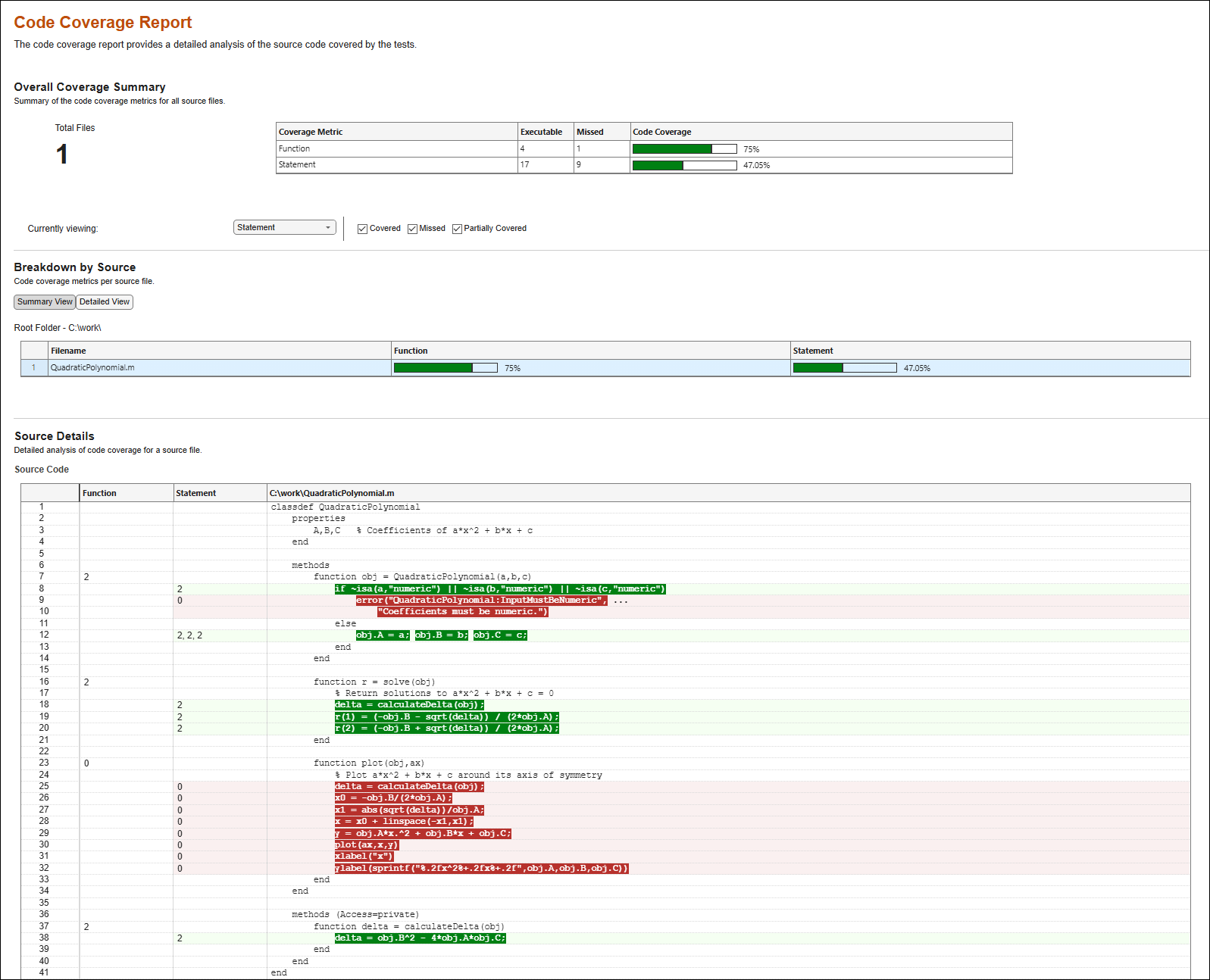
After the test run, the Result property of the CoverageResult object holds the coverage result. Access the coverage result and get a statement coverage summary. The returned vector includes the number of statements executed by the tests and the total number of statements, respectively. In this example, the tests executed 8 out of 17 statements.
result1 = format.Result;
statementSummary = coverageSummary(result1,"statement")
statementSummary = 1×2
8 17
Similarly, get a function coverage summary. The returned vector includes the number of functions (or class methods) called by the tests and the total number of functions, respectively. In this example, the tests called 3 out of 4 class methods.
functionSummary = coverageSummary(result1,"function")functionSummary = 1×2
3 4
You can use the additional output argument of the coverageSummary method to retrieve the execution count for each method. In this example, three methods were each called two times, and one method was not called.
[~,functionDescription] = coverageSummary(result1,"function")functionDescription = struct with fields:
NumJustified: 0
function: [1×4 struct]
disp([functionDescription.function.ExecutionCount])
2 2 0 2
Generate Code Coverage Report
Generate an interactive HTML code coverage report from the coverage result.
generateHTMLReport(result1)
The report uses different colors to highlight executed and missed statements. You can select a coverage type from the Currently viewing list to view detailed information about that coverage type, and you can control the highlighting for covered or missed executables. The Source Details section in the report shows all the statements that were covered or missed.
Improve Coverage with Additional Tests
To achieve full coverage, add tests that execute the parts of the source code that were not executed by the original tests. Then, run the new tests, and aggregate the old and new coverage results.
For example, suppose the QuadraticPolynomialTest2 test class covers the statements and functions that were missed by the original tests. Create a test suite from the new test class and run the tests.
suite2 = testsuite("QuadraticPolynomialTest2");
run(runner,suite2);
Running QuadraticPolynomialTest2 .
.
Done QuadraticPolynomialTest2
__________
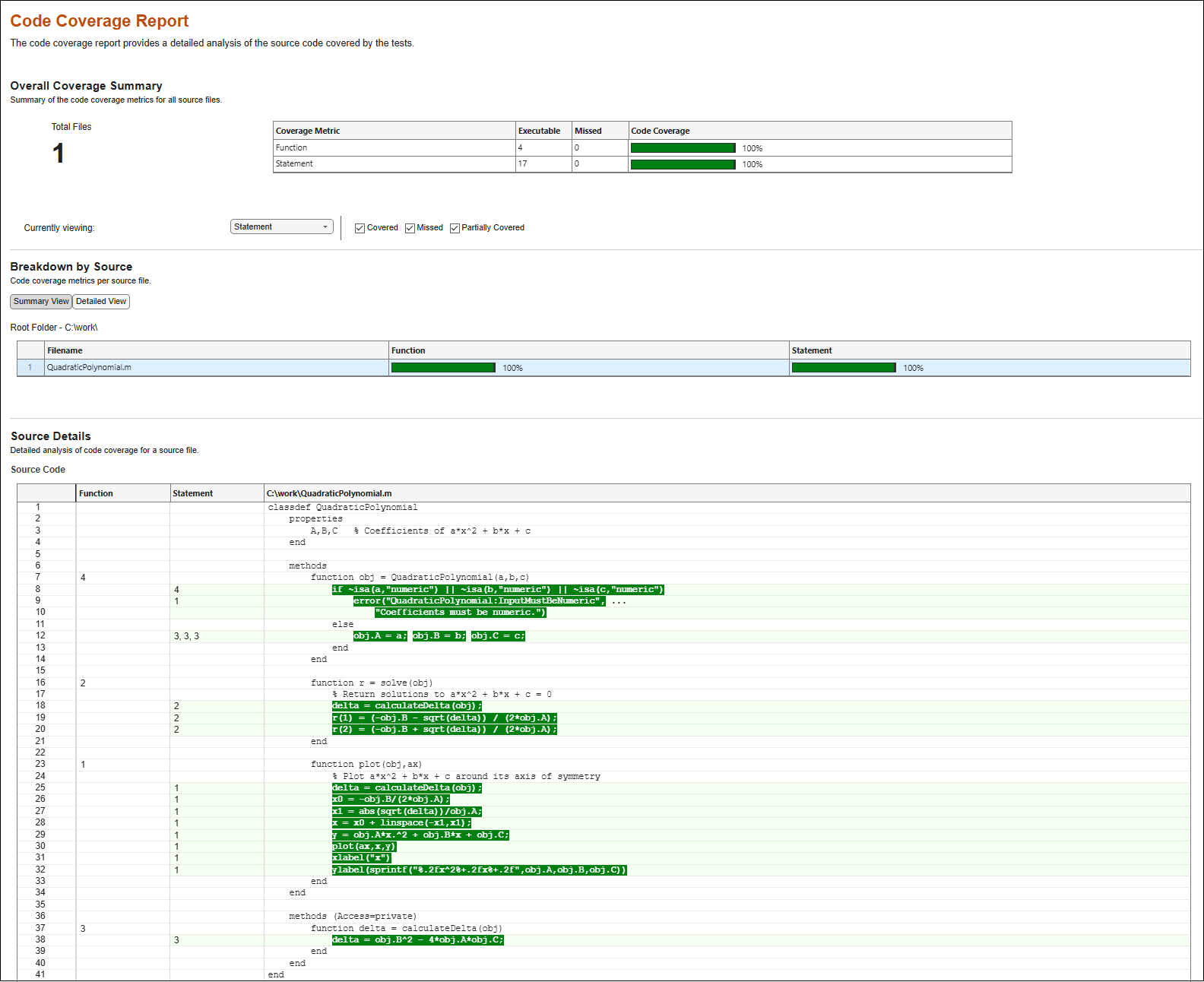
Aggregate the coverage results from both runs and generate an HTML code coverage report. In this example, the report generated from the aggregated results shows that the two test suites fully exercised all statements and functions in the source code.
result2 = format.Result;
generateHTMLReport(result1 + result2)
See Also
Apps
Functions
Classes
matlab.unittest.plugins.CodeCoveragePlugin|matlab.coverage.Result|matlab.unittest.plugins.codecoverage.CoverageResult|matlab.unittest.plugins.codecoverage.CoverageReport|matlab.unittest.plugins.codecoverage.CoberturaFormat

