이 페이지는 기계 번역을 사용하여 번역되었습니다. 영어 원문을 보려면 여기를 클릭하십시오.
움직이는 진자의 길이 구하기
R2026b이 예제는 움직이는 객체의 이미지를 캡처하고 분석하는 방법을 보여줍니다.
이 예제에서는 움직이는 진자의 이미지를 캡처합니다. 진자는 나일론 줄에 매달린 파란색 공으로 이루어져 있습니다. 진자가 흔들릴 때 이미지 데이터가 캡처됩니다. 이미지가 촬영되면, 진자의 길이를 파악하기 위해 이미지가 처리됩니다.
이미지는 Image Acquisition Toolbox™를 사용하여 수집하고, Image Processing Toolbox™를 사용하여 분석합니다.
이미지 수집하기
분석할 일련의 이미지를 확보하십시오.
% Access an image acquisition device.
vid = videoinput('winvideo', 1, 'RGB24_352x288');
vid.Timeout = 12;

% Configure object to capture every fifth frame.
vid.FrameGrabInterval = 5;

% Configure the number of frames to be logged.
vid.FramesPerTrigger = 50;

% Access the device's video source object selected for acquisition.
src = getselectedsource(vid);

% Configure the device to provide 30 frames per second.
src.FrameRate = '30';

% Open a live preview window. Focus camera onto a moving pendulum.
preview(vid);

% Initiate the acquisition.
start(vid);

% Extract frames from memory.
frames = getdata(vid);

% Remove video input object from memory.
delete(vid)
clear vid

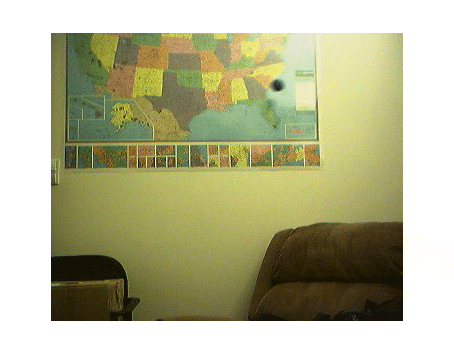
% Display the first frame in the series.
imshow( frames(:, :, :, 1) );
% Display all acquired images.
imaqmontage(frames);

관심 영역 선택하기
진자의 움직임은 일련의 이미지 중 상반부에만 국한되어 있으므로, 관심 영역이 포함된 새로운 일련의 프레임을 생성하십시오.
imcrop를 사용하여 일련의 프레임을 자르려면, 먼저 하나의 프레임에 imcrop를 적용하고 그 결과를 저장하십시오. 그런 다음 이전 출력물의 크기와 동일한 일련의 프레임을 생성합니다.
% Determine the total number of frames acquired.
nFrames = size(frames, 4);

% Crop the first frame.
roi = [50 16 222 68];
firstFrame = frames(:,:,:,1);
frameRegion = imcrop(firstFrame, roi);

% Create a storage for the modified image series.
regions = repmat(uint8(0), [size(frameRegion) nFrames]);
for count = 1:nFrames
    regions(:,:,:,count) = imcrop(frames(:,:,:,count), roi);
    imshow(regions(:,:,:,count));
end

각 프레임에서 진자를 분할하기
진자는 배경보다 훨씬 어두우므로, 각 프레임을 그레이스케일로 변환한 후 임계값 처리를 하고 배경 구조물을 제거함으로써 진자를 분리할 수 있습니다.
% Initialize array to contain the segmented pendulum frames.
segPend = false([size(frameRegion, 1) size(frameRegion, 2) nFrames]);
centroids = zeros(nFrames, 2);
structDisk = strel('disk', 3);

for count = 1:nFrames
    % Convert to grayscale.
    fr = regions(:,:,:,count);
    gfr = rgb2gray(fr);
    gfr = imcomplement(gfr);

    % Experimentally determine the threshold.
    bw = imbinarize(gfr, .7);
    bw = imopen(bw, structDisk);
    bw = imclearborder(bw);
    segPend(:,:,count) = bw;
    imshow(bw);
end

각 분할된 진자의 중심을 구하시오
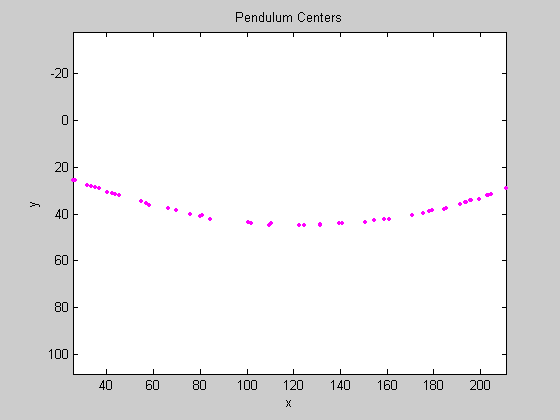
각 프레임에서 분할된 진자의 모양은 큰 문제가 되지 않는데, 진자의 길이를 결정하는 데 필요한 유일한 특징은 진자의 중심이기 때문이다.
% Calculate the pendulum centers.
for count = 1:nFrames
    property = regionprops(segPend(:, :, count), 'Centroid');
    pendCenters(count,:) = property.Centroid;
end

% Display the pendulum centers and adjust the plot.
figure;
x = pendCenters(:, 1);
y = pendCenters(:, 2);
plot(x, y, 'm.');
axis ij;
axis equal;
hold on;
xlabel('x');
ylabel('y');
title('Pendulum Centers');
진자 길이 구하기
진자의 중심점들에 원을 피팅하면 진자의 길이를 구할 수 있습니다. 원의 기본 방정식을 다시 쓰십시오:
(x-xc)^2 + (y-yc)^2 = radius^2
여기서 (xc, yc)는 파라미터 a, b, c를 통해 표현되는 중심이며:
x^2 + y^2 + a*x + b*y + c = 0
여기서
a = -2*xc
b = -2*yc
c = xc^2 + yc^2 - radius^2.
최소제곱법을 사용하여 파라미터 a, b, c를 구하면, 위의 방정식은 다음과 같이 다시 쓸 수 있습니다:
a*x + b*y + c = -(x^2 + y^2)
이는 다음과 같이 다시 쓸 수도 있습니다:
[a; b; c] * [x y 1] = -x^2 - y^2
이 방정식은 MATLAB®에서 백슬래시(\) 연산자를 사용하여 풀 수 있습니다.
% Solve the equation.
abc = [x y ones(length(x),1)] \ [-(x.^2 + y.^2)];
a = abc(1);
b = abc(2);
c = abc(3);
xc = -a/2;
yc = -b/2;
circleRadius = sqrt((xc^2 + yc^2) - c);

% Circle radius is the length of the pendulum in pixels.
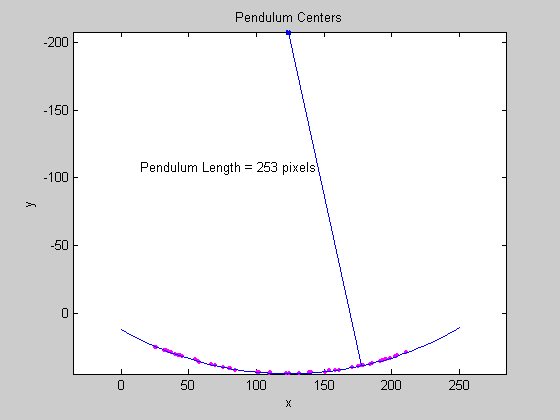
pendulumLength = round(circleRadius)
pendulumLength =

   253
% Superimpose results onto the pendulum centers.
circle_theta = pi/3:0.01:pi*2/3;
x_fit = circleRadius*cos(circle_theta) + xc;
y_fit = circleRadius*sin(circle_theta) + yc;
plot(x_fit, y_fit, 'b-');
plot(xc, yc, 'bx', 'LineWidth', 2);
plot([xc x(1)], [yc y(1)], 'b-');
titleStr = sprintf('Pendulum Length = %d pixels', pendulumLength);
text(xc-110, yc+100, titleStr);