Create and Plot Identified Models Using Control System Toolbox Software
R2026bThis example shows how to create and plot models using the System Identification Toolbox™ software and Control System Toolbox™ software. The example requires a Control System Toolbox license.
Construct a random numeric model using the Control System Toolbox software.
rng('default');
sys0 = drss(3,3,2);
rng('default') specifies the setting of the random number generator as its default setting.
sys0 is a third-order numeric state-space model with three outputs and two inputs.
Convert sys0 to an identified state-space model and set its output noise variance.
sys = idss(sys0);
sys.NoiseVariance = 0.1*eye(3);
Generate input data for simulating the output.
u = iddata([],idinput([800 2],'rbs'));Simulate the model output with added noise.
opt = simOptions('AddNoise',true);
y = sim(sys,u,opt);
opt is an option set specifying simulation options. y is the simulated output for sys0.
Create an input-output ( iddata ) object.
data = [y u];
Estimate the state-space model from the generated data using ssest.
estimated_ss = ssest(data(1:400));
estimated_ss is an identified state-space model.
Convert the identified state-space model to a numeric transfer function.
sys_tf = tf(estimated_ss);
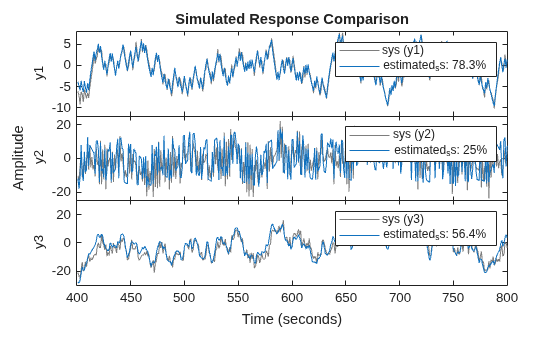
Plot the model output for identified state-space model.
compare(data(401:800),estimated_ss)
Plot the response of identified model using the Linear System Analyzer.
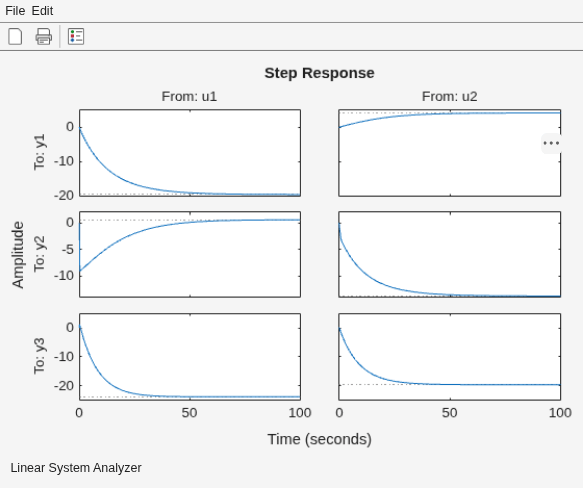
linearSystemAnalyzer(estimated_ss);