readHistory
Syntax
Description
reads the recorded values of the AF attributes identified by attributeValues = readHistory(attributeObj,startTime,endTime)attributeObj
for the time range specified by startTime and
endTime.
specifies options for the read operation using name-value arguments. Options include reading
values in a specified unit of measure, returning aggregated data, specifying calculation
mode, and sampling at a specified time interval.attributeValues = readHistory(attributeObj,startTime,endTime,Name=Value)
Note
You must install the AF SDK library to connect to a PI AF server from MATLAB®. For more information, see AF SDK Overview.
Examples
Create an AF client. The client is associated with the default database of the PI AF server.
afclientObj = afclient("EVS-Hydroplant");Browse the elements in the AF database using graphical interface.
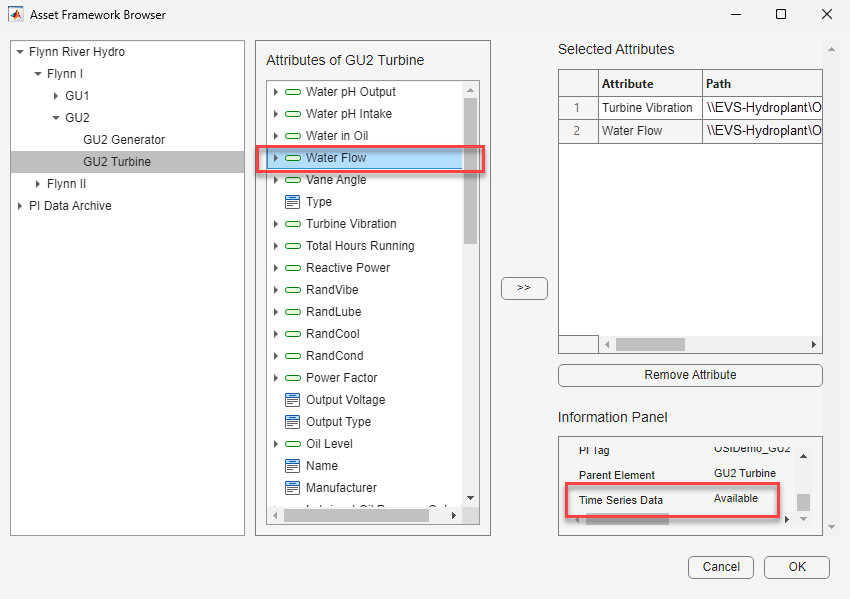
guAttribute = browseElements(afclientObj)
Select required attributes and click >> to move the
attributes into the Selected Attributes pane. You can retrieve
historical data only from attributes that have time series data. To check availability,
select an attribute in the centre pane and review the Information Panel. If
Time Series Data is Available, add the
attribute. After you add all required attributes to the Selected
Attributes pane, click OK.
1×2 Attribute array:
Index Name Path ServerDataType
----- ---------- --------------------------------------------------------------------------------------------------- --------------
1 Water Flow \\EVS-HydroPlant\OSIDemo_PG_HydroPlant\Flynn River Hydro\Flynn I\GU1\GU1 Turbine|Turbine Vibration Double
2 Water Flow \\EVS-HydroPlant\OSIDemo_PG_HydroPlant\Flynn River Hydro\Flynn I\GU1\GU1\GU1 Turbine|Water Flow DoubleRetrieve data for the specified AF attributes in the specified time range.
starttime = datetime("01-Sep-2025 11:00:00"); endtime = datetime("09-Sep-2025"); attributeValues = readHistory(guAttribute,starttime,endtime)
attributeValues =
7×5 timetable
Time Attribute Element Value Unit Status
____________________ ___________________ _____________ _________ ________________________ ______
04-Sep-2025 10:58:07 "Turbine Vibration" "GU1 Turbine" {[0.6000]} "millimeter" "Good"
06-Sep-2025 10:58:07 "Turbine Vibration" "GU1 Turbine" {[0.8000]} "millimeter" "Good"
08-Sep-2025 10:58:07 "Turbine Vibration" "GU1 Turbine" {[0.4000]} "millimeter" "Good"
04-Sep-2025 10:58:07 "Water Flow" "GU1 Turbine" {[ 20]} "cubic meter per second" "Good"
06-Sep-2025 10:58:07 "Water Flow" "GU1 Turbine" {[ 10]} "cubic meter per second" "Good"
07-Sep-2025 10:58:07 "Water Flow" "GU1 Turbine" {[ 30]} "cubic meter per second" "Good"
08-Sep-2025 10:58:07 "Water Flow" "GU1 Turbine" {[ 60]} "cubic meter per second" "Good"
Read attribute values with the specified unit of measure. If the specified unit of
measure is not supported for a attribute, the value is represented in its default unit
of measure. In this example, the specified liter per second is
supported only for the Water Flow attribute so the function converts
only the Water Flow attribute values to the specified unit of
measure.
attributeValues = readHistory(guAttribute,starttime,endtime,Unit="liter per second")attributeValues =
2×5 timetable
Time Attribute Element Value Unit Status
____________________ ___________________ _____________ _________ __________________ ______
04-Sep-2025 10:58:07 "Turbine Vibration" "GU1 Turbine" {[0.6000]} "millimeter" "Good"
06-Sep-2025 10:58:07 "Turbine Vibration" "GU1 Turbine" {[0.8000]} "millimeter" "Good"
08-Sep-2025 10:58:07 "Turbine Vibration" "GU1 Turbine" {[0.4000]} "millimeter" "Good"
04-Sep-2025 10:58:07 "Water Flow" "GU1 Turbine" {[ 20000]} "liter per second" "Good"
06-Sep-2025 10:58:07 "Water Flow" "GU1 Turbine" {[ 10000]} "liter per second" "Good"
07-Sep-2025 10:58:07 "Water Flow" "GU1 Turbine" {[ 30000]} "liter per second" "Good"
08-Sep-2025 10:58:07 "Water Flow" "GU1 Turbine" {[ 60000]} "liter per second" "Good"
You can also read aggregated data at regular intervals within a specified time range. This example retrieves average values of the selected attributes aggregated over 2 day intervals between the given time range.
attributeValues = readHistory(guAttribute,starttime,endtime,Interval=days(2),AggregateFcn="average");Input Arguments
AF attribute, specified as an icomm.af.Attribute object or an array
of icomm.af.Attribute objects. You can create attribute objects using
functions like getAttributes or findAttributeByPath. Or, you can use the Asset Framework
Browser to graphically browse the AF database, and then select an attribute or
attributes to create an icomm.af.Attribute object or array of AF
attribute objects, respectively.
Time range to read AF attribute values, specified as datetime values returned by
datetime function. The time ranges
between startTime (inclusive) and endTime
(exclusive).
Name-Value Arguments
Specify optional pairs of arguments as
Name1=Value1,...,NameN=ValueN, where Name is
the argument name and Value is the corresponding value.
Name-value arguments must appear after other arguments, but the order of the
pairs does not matter.
Example: averagedData =
readHistory(airTempAttrObj,startTime,endTime,Interval=hours(4),AggregateFcn="average")
returns the average values of the AF attribute aggregated over 4-hour intervals between
startTime and endTime.
Unit of measure for the input AF attribute, specified as a string or character
vector. If you do not specify Unit, or if you specify an
unsupported unit, readHistory returns values in the default unit
for the attribute. To find the list of supported units for an attribute, use the
listSupportedUnits function.
Example: attributeValues =
read(guAttributeObj,startTime,endTime,unit="liter per
second")
Data Types: char | string
Time interval of sampling to extract interpolated data, specified as a duration.
Example: attributeValues =
read(guAttributeObj,startTime,endTime,Interval=hours(4)) returns the raw
interpolated values of AF attribute with 4-hour intervals between
startTime and endTime.
Data Types: duration
Aggregate function used to process the data, specified as one of these listed values.
"none"— Raw interpolated data"total"— Sum of all data points within the interval in the time range"average"— Average of all data points within the interval in the time range"minimum"— Smallest value within the interval"maximum"— Largest value within the interval"range"— Difference between the maximum and minimum values within the interval in the time range"standard-deviation"— Standard deviation of the data within the interval in the time range"population-standard-deviation"— Population standard deviation over the time range"count"— Number of data points within the interval in the time range"percent-good"— Percentage of data points with good values within the interval in the time range
Example: attributeValues =
read(guAttributeObj,startTime,endTime,Interval=hours(4),AggregateFcn="average")
returns the average values of AF attribute aggregated over 4-hour intervals between
startTime and endTime.
Data Types: char | string
Calculation mode used to process the data, specified as one of these listed values.
"event"— Gives equal weight to each event (a timestamped data point). Requires at least one event (two for standard deviation). May exclude one or both ends of the interval, depending on interval count and order."time"— Weights each value by the time it spans within the interval. Interpolates boundary values if needed."time-continuous"— Same astime, but treats data as continuous for interpolation."time-discrete"— Same astime, but treats data as discrete steps for interpolation."event-exclude-recent"— Same asevent, but ignores the most recent event at interval boundaries."event-exclude-earliest"— Same asevent, but ignores the earliest event at interval boundaries."event-include-ends"— Includes events at both ends of the interval in the calculation.
Example: attributeValues =
read(guAttributeObj,startTime,endTime,Interval=hours(4),AggregateFcn="average",CalculationMode="event-exclude-recent")
returns the average values of AF attribute aggregated over 4-hour intervals between
startTime and endTime, excluding the most
recent data point in each interval.
Data Types: char | string
Output Arguments
Values of the input AF attributes between the specified time range, returned in a
timetable. For information about how MATLAB interprets the Value of each AF attribute, see PI Asset Framework Server Data Types. The returned
timetable has these variables.
| Variable | Description | Variable Data Type |
|---|---|---|
Time | Timestamp of the retrieved value | Datetime array |
Attribute | Name of the AF attribute | String array |
Element | Parent Element of the AF attribute | String array |
Value | Value of the AF attribute at the corresponding time | Cell array of values. Data type of each value depends on the server data type of the corresponding attribute. |
Unit | Unit of measure of the retrieved value | String array |
Status | Data quality of the retrieved value | String array |
Version History
Introduced in R2026a
See Also
Functions
Apps
MATLAB Command
You clicked a link that corresponds to this MATLAB command:
Run the command by entering it in the MATLAB Command Window. Web browsers do not support MATLAB commands.
웹사이트 선택
번역된 콘텐츠를 보고 지역별 이벤트와 혜택을 살펴보려면 웹사이트를 선택하십시오. 현재 계신 지역에 따라 다음 웹사이트를 권장합니다:
또한 다음 목록에서 웹사이트를 선택하실 수도 있습니다.
사이트 성능 최적화 방법
최고의 사이트 성능을 위해 중국 사이트(중국어 또는 영어)를 선택하십시오. 현재 계신 지역에서는 다른 국가의 MathWorks 사이트 방문이 최적화되지 않았습니다.
미주
- América Latina (Español)
- Canada (English)
- United States (English)
유럽
- Belgium (English)
- Denmark (English)
- Deutschland (Deutsch)
- España (Español)
- Finland (English)
- France (Français)
- Ireland (English)
- Italia (Italiano)
- Luxembourg (English)
- Netherlands (English)
- Norway (English)
- Österreich (Deutsch)
- Portugal (English)
- Sweden (English)
- Switzerland
- United Kingdom (English)