Access Data from OPC UA Servers
R2026bIf you have an OPC Unified Architecture (UA) server, you can retrieve current and historical data in MATLAB® by creating an OPC UA client.
The sample code on this page assumes a Prosys OPC UA Simulation Server running on the same machine as MATLAB. Optionally, you can install a Local Discovery Server (LDS) and register the Prosys server with it. For installation instructions, see Install an OPC UA Simulation Server for OPC UA Examples. You can also adapt the code to work with other OPC UA servers.
Locate Your OPC UA Server
To connect to an OPC UA server from MATLAB, you need information that uniquely identifies the server.
First, you need the host name of the server computer, either a descriptive name
like "historian-server" or an IP address such as
192.168.16.32. The host name identifies that computer on the
network, and the OPC protocols use it to determine the available OPC servers on that
computer. Your network administrator can provide a list of host names of computers
running OPC servers on your network. This example assumes that the OPC server runs
on the same machine as MATLAB, so use the host name localhost.
Each OPC UA server is identified by a URL starting with
opc.tcp://. You need this URL to create a client,
particularly when connecting to a remote server. Your system administrator can
provide server URLs for a particular host. Alternatively, if your host has an
installed LDS and the OPC UA server is registered with the LDS, then you can use the
opcuaserverinfo function to query the
host for registered servers.
serverList = opcuaserverinfo("localhost")serverList =
1×2 OPC UA ServerInfo array:
index Description Hostname Port Best Message Security Best Channel Security User Tokens
----- ----------------------------- ------------ ----- --------------------- --------------------- --------------------------------
1 SimulationServer myhost.local 53530 SignAndEncrypt Aes256_Sha256_RsaPss Anonymous | Username | Certificate
2 Quickstart Data Access Server myhost.local 62547 SignAndEncrypt Aes256_Sha256_RsaPss Anonymous | Username | CertificateLocate the server of interest by using the findDescription function to search for text in the server
description.
hsInfo = findDescription(serverList,"Simulation")hsInfo =
OPC UA ServerInfo 'SimulationServer':
Connection Information
Hostname: 'myhost.local'
Port: 53530
Endpoints: [1×11 opc.ua.EndpointDescription]
Security Information:
BestMessageSecurity: SignAndEncrypt
BestChannelSecurity: Aes256_Sha256_RsaPss
UserTokenTypes: {'Anonymous' 'Username' 'Certificate'}Note the port on which the OPC UA server listens for connections, 53530.
Create an OPC UA Client and Connect to the Server
After locating your OPC UA server, create an OPC UA client to manage the
connection to the server, obtain key server characteristics, and read and write data
from the server. To do so, use the opcua function with the server information
hsInfo.
uaClient = opcua(hsInfo);
Alternatively, create a client using the hostname and port.
uaClient = opcua("localhost",53530)uaClient =
OPC UA Client:
Server Information:
Name: 'SimulationServer@localhost'
Hostname: 'localhost'
Port: 53530
EndpointUrl: 'opc.tcp://localhost:53530/OPCUA/SimulationServer'
Connection Information:
Timeout: 10
Status: 'Disconnected'
ServerState: '<Not connected>'
Security Information:
MessageSecurityMode: SignAndEncrypt
ChannelSecurityPolicy: Aes256_Sha256_RsaPss
Endpoints: [1×11 opc.ua.EndpointDescription]For a server on a remote machine, provide the server URL.
uaClient = opcua("opc.tcp://192.168.1.100:53530/OPCUA/SimulationServer");The client is initially disconnected from the server, as shown by the
Status property. Connect to the server. When you do so, the
client object includes additional information about the connection.
connect(uaClient)
uaClient

OPC UA Client:

   Server Information:
                       Name: 'SimulationServer@localhost'
                   Hostname: 'localhost'
                       Port: 53530
                EndpointUrl: 'opc.tcp://localhost:53530/OPCUA/SimulationServer'

   Connection Information:
                    Timeout: 10
                     Status: 'Connected'
                ServerState: 'Running'

   Security Information:
        MessageSecurityMode: SignAndEncrypt
      ChannelSecurityPolicy: Aes256_Sha256_RsaPss
                  Endpoints: [1×11 opc.ua.EndpointDescription]

   Server Limits:
              MinSampleRate: 0 sec
               MaxReadNodes: 0
              MaxWriteNodes: 0
        MaxHistoryReadNodes: 0
    MaxHistoryValuesPerNode: 0
The additional properties describe capabilities of the server, notably limits for read and write operations. A limit value of 0 indicates that the server does not impose a direct limit on that capability.
If your server requires username and password authentication, pass the credentials
to the connect function.
connect(uaClient,"myUsername",getSecret("myPassword"));
Browse OPC UA Server Namespace
OPC UA servers provide a single namespace for you to read and write current and historical data. The namespace is organized as a hierarchy of nodes, each of which has attributes. A node is uniquely identified by a namespace index and a node identifier. To uniquely describe a node, you must provide both the namespace index and the identifier, because the identifier might not be unique across multiple namespace indices.
Industrial Communication Toolbox™ exposes the hierarchy of nodes through the
Namespace property of the OPC UA client. Each element of the
property is a node at the top-most level of the server. Every node in the namespace
has a Children property which exposes the subnodes contained in
that node. You can browse the namespace graphically using the browseNamespace function. This command opens a dialog box where you
can select the nodes you want from the hierarchy.
serverNodes = browseNamespace(uaClient)
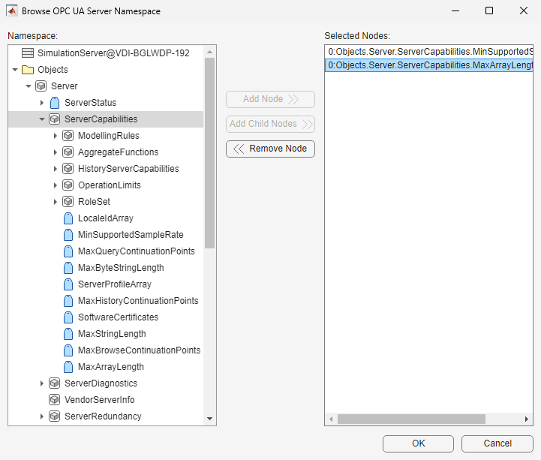
Clicking OK imports the selected nodes into the MATLAB workspace.
serverNodes =
1x2 OPC UA Node array:
    index           Name           NsInd  Identifier  NodeType
    -----  ----------------------  -----  ----------  --------
      1    MinSupportedSampleRate  0      2272        Variable
      2    MaxArrayLength          0      11702       Variable
Nodes can be associated with data values or can be containers for other nodes. The
NodeType property of a node identifies the node as an
object node (container) or variable node (data). For more information on how to
programmatically search the server namespace, see Browse OPC UA Server Namespace.
Read Current Values from the OPC UA Server
Read current values from the server using the readValue function with an array of the nodes you want to read.
Current data includes the value, a timestamp of when the server received the data
value, and a quality describing the accuracy and source of the data value.
[val,ts,qual] = readValue(uaClient,serverNodes)
val =
  2×1 cell array
    {[0 sec]}
    {[65535]}
ts =
  2×1 datetime array
   23-Apr-2024 08:58:23
   23-Apr-2024 08:58:23
qual =
OPC UA Quality ID:
	'Good'
	'Good'
For more information on reading and writing current values, see Read and Write Current OPC UA Server Data.
Read Historical Data from the OPC UA Server
Historical data is stored for some nodes on the OPC UA server. You can query the
Historizing property of a Node to determine whether the
server is currently archiving data for that node.
This example queries serverNodes, which is a node array
containing two nodes. Use the array notation to collect the outputs using
concatenation.
[serverNodes.Historizing]
ans =
  1×2 logical array
   0   0
None of the server nodes are currently historized. In addition, the server does
not allow historical access to these nodes, as you can see by examining the
AccessLevelHistory property of the nodes.
{serverNodes.AccessLevelHistory}ans =
1×2 cell array
{'none'} {'none'}To locate nodes with historical data, first query the server namespace for a node
that has Historizing enabled. The server used in this example
stores historical data under a parent node named Simulation.
Locate the node using the findNodeByName function.
simNode = findNodeByName(uaClient.Namespace,"Simulation")simNode =
OPC UA Node:
Node Information:
Name: 'Simulation'
Description: ''
NamespaceIndex: 3
Identifier: '85/0:Simulation'
NodeType: 'Object'
Hierarchy Information:
Parent: Server
Children: 7The Simulation node is an Object node with
seven child nodes, as shown in the Children property. Now use the
parent node to locate the Sinusoid and Random
child nodes. The "-partial" flag finds nodes beginning with the
argument provided.
sineNode = findNodeByName(simNode,"Sinusoid","-partial");
randNode = findNodeByName(simNode,"Random","-partial")
randNode =

OPC UA Node:

   Node Information:
                      Name: 'Random'
               Description: ''
            NamespaceIndex: 3
                Identifier: 1003
                  NodeType: 'Variable'

   Hierarchy Information:
                    Parent: 'Simulation'
                  Children: 1


            ServerDataType: 'Double'
        AccessLevelCurrent: 'read'
        AccessLevelHistory: 'read'
               Historizing: 1
Both these nodes are archived (Historizing = 1) so you can read
historical data from the nodes. If Historizing = 0, the node is
not currently archiving data. In this case you can read historical data only if
archiving was previously active for the node. To read all data stored on the server
in a specified time range, use the readHistory function, passing the nodes to read and the time range
over which to read the data.
histData = readHistory(uaClient,[sineNode,randNode],datetime("now")-seconds(10),datetime("now"))
histData =
1-by-2 OPC UA Data object array:

         Timestamp                Sinusoid                     Random
    -------------------  --------------------------  --------------------------
    04/23/2024  9:00 AM        1.732051 [Good (Raw)]       -1.343764 [Good (Raw)]
    04/23/2024  9:00 AM        1.486290 [Good (Raw)]       -0.985439 [Good (Raw)]
    04/23/2024  9:00 AM        1.175571 [Good (Raw)]        0.821036 [Good (Raw)]
    04/23/2024  9:00 AM        0.813473 [Good (Raw)]        1.179361 [Good (Raw)]
    04/23/2024  9:00 AM        0.415824 [Good (Raw)]        0.150251 [Good (Raw)]
    04/23/2024  9:00 AM        0.000000 [Good (Raw)]        0.508576 [Good (Raw)]
    04/23/2024  9:00 AM       -0.415823 [Good (Raw)]       -0.589333 [Good (Raw)]
    04/23/2024  9:00 AM       -0.813473 [Good (Raw)]       -0.231007 [Good (Raw)]
    04/23/2024  9:00 AM       -1.175570 [Good (Raw)]       -1.351849 [Good (Raw)]
    04/23/2024  9:00 AM       -1.486290 [Good (Raw)]       -0.901792 [Good (Raw)]
    04/23/2024  9:00 AM       -1.732051 [Good (Raw)]       -0.128899 [Good (Raw)]
Obtain a summary of the data retrieved.
summary(histData)
1-by-2 OPC UA Data object:

      Name         Value          Start Timestamp       End Timestamp                Quality
    --------  ----------------  -------------------  -------------------  -----------------------------
    Sinusoid  11 double values  04/23/2024  9:00 AM  04/23/2024  9:00 AM  1 unique quality [Good (Raw)]
    Random    11 double values  04/23/2024  9:00 AM  04/23/2024  9:00 AM  1 unique quality [Good (Raw)]
Plot Retrieved Data
You can plot the data directly from the resulting OPC UA Data
object.
plot(histData)
legend show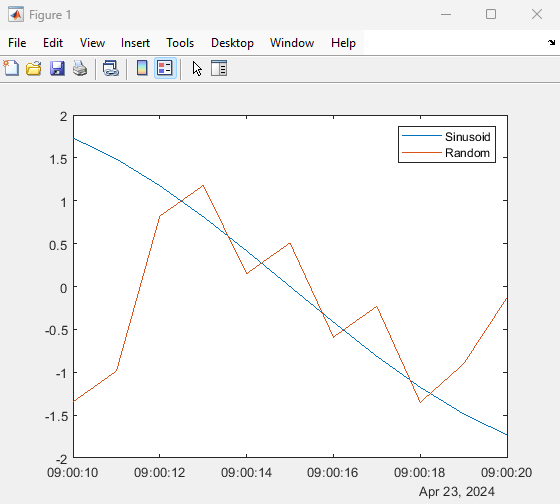
You can also convert the data into MATLAB native data types for further processing. For information on processing data, see Visualize and Preprocess OPC UA Data.
Clean Up
When you have finished exchanging data with the OPC server, disconnect from the server.
disconnect(uaClient)
You can then clear the OPC UA variables from MATLAB memory. If you clear an OPC UA client from memory, the connection to the server is automatically closed.
See Also
Functions
opcuaserverinfo|opcua|connect|browseNamespace|readValue|readHistory|writeValuefindNodeByName|setSecurityModel

