Cylinder Design Parameter Estimation
R2026bThis example shows how to parameterize and test a tandem primary cylinder starting from a manufacturer datasheet. This example uses optimization to determine remaining unknown parameters, given the numerical data extracted from the datasheet. After the model is simulated, it compares the resulting push rod force - brake pressure relationship curve to the curve provided on the manufacturer datasheet. Understanding the behavior of the tandem primary cylinder is important when selecting other braking system components.
Model
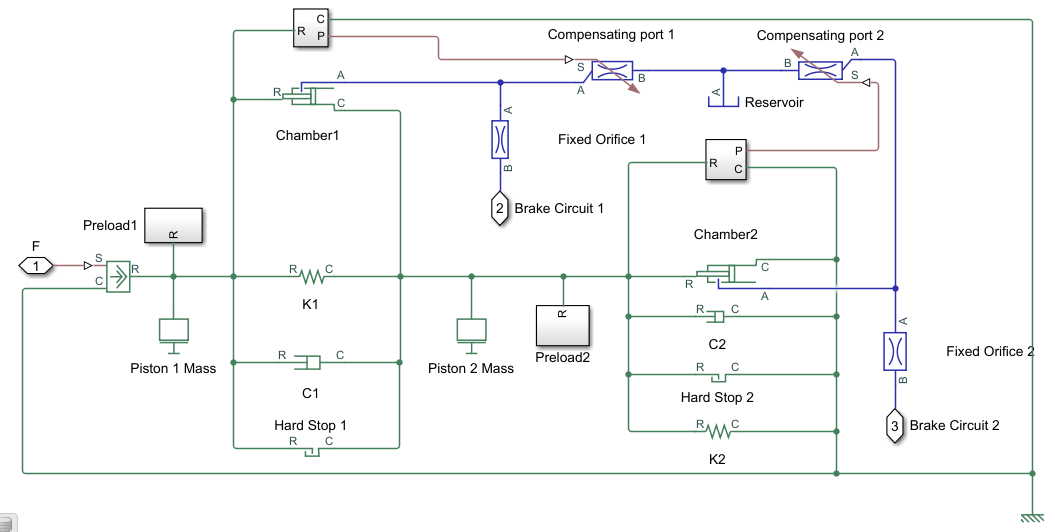
The following figure shows the tandem primary cylinder test harness. The model uses spring-loaded accumulators for loading in the and the circuits in place of disk or drum brakes. The input to the model is the push rod force coming from the lever mechanism or the brake booster. The output of the model is the pressures achieved in the brake circuits 1 and 2 respectively.
open_system('CylinderDesignParameterEstimation')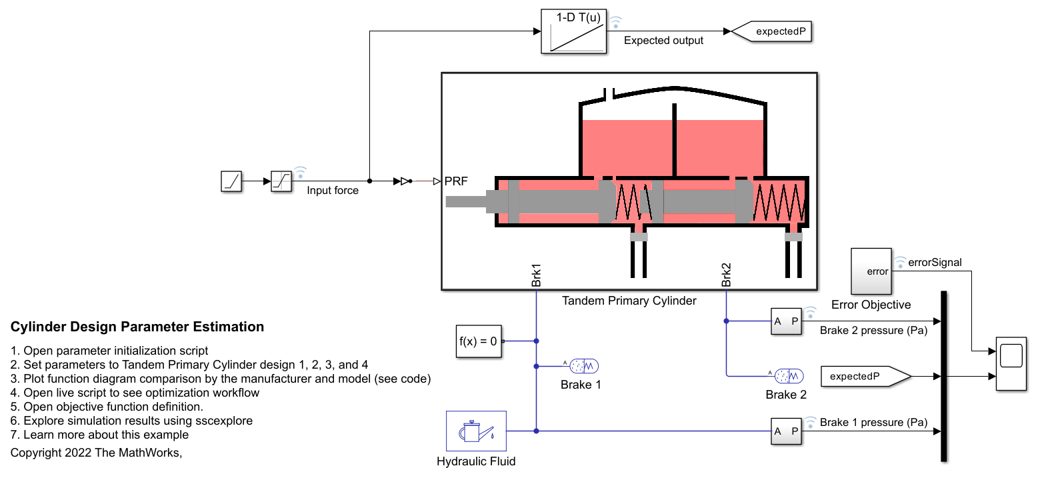
Manufacturer Datasheet Data
The supplier has provided the following data in the datasheet.
tpcPistonDiameter: first and second circuit piston diameter.tpcPistonStroke1: first circuit piston stroke.tpcPistonStroke2: second circuit piston stroke.tpcTotalStroke: overall stroke.tpcCircuit1Disp: first circuit displacement.tpcCircuit2Disp: second circuit displacement.tpcTotalDisp: net displacement._tpcMaxPressure _: max pressure.
Read in the data and initialize the design number for the parameters if it does not exist.
if ~exist('caseNum','var')
    caseNum = 1; % There are parameters set available for 4 designs
end
CylinderDesignParameterEstimationInput
Pressure Development Characteristics
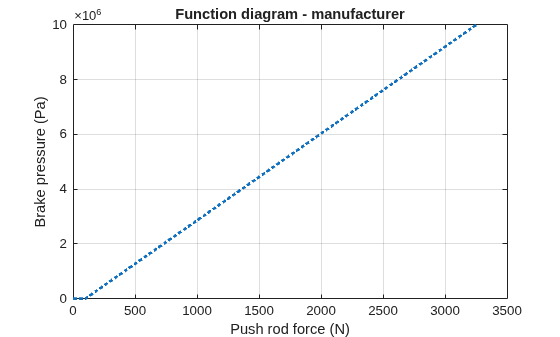
The supplier datasheet gives the following function diagram for the push rod force-brake pressure curve for the tandem primary cylinder which should be followed by the brake circuit 1 and 2 as per supplier catalog. It is required for a tandem primary cylinder to have same brake pressures created in brake circuits for uniform braking.
Plot the function diagram of the tandem primary cylinder.
plot(tpcPushRodF,tpcCircuitPressure,':', 'LineWidth', 2);
xlabel('Push rod force (N)');
ylabel('Brake pressure (Pa)');
title('Function diagram - manufacturer');
grid on
Equations of Motion (EoM) of System
The following figure shows the tandem primary cylinder. Mass 1 and mass 2 use the coordinate frames shown below. This description only includes the mechanical EoM of the system. The fluid dynamics equations are not shown.

, when
, when
, when
, when
where,
and are positions of piston mass 1 and mass 2 from the left side assumed hard stop.
and are masses of piston 1 and 2 respectively.
and are damping coefficients of piston 1 and 2 respectively.
and are stiffness coefficients of left (Spring 1) and right (spring 2) respectively.
is force applied on push rod of primary cylinder.
and are pressures in brake circuit 1 and 2 respectively.
and are reaction forces on mass 1 and 2 respectively when both masses are at the leftmost position.
and are preloads on left and right side springs, respectively.
Parameter Estimation Scheme
The following steps outline how to estimate unknown feasible parameters of the tandem primary cylinder.
1. Identify Parameters to be Estimated
Some parameters, which are required for component model simulation, are not provided in the manufacturer's datasheet. Therefore, in order to validate the model with supplier function diagram it is necessary to estimate these parameters. The supplier function diagram gives quasi- steady state behavior of the tandem primary cylinder.
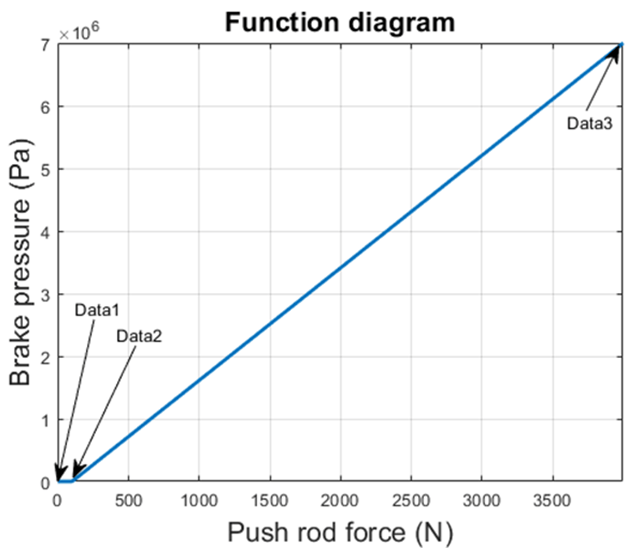
Where,
Data1, Data2, and Data3 are 3 points on the manufacturer function diagram.
Data1 point represents the leftmost points of the pistons in their respective coordinate frames.
Data3 point represent the right most points of the pistons in their respective coordinate frame, which are given in the datasheet.
Data2 point represent pistons movement at which brake circuits 1 and 2 get disconnected from the brake oil reservoir by the closing of the compensating ports. Movement beyond Data2 point in the right direction results in pressure building in the brake circuits. These points are not given in the datasheet and have to be estimated.
Left and right spring stiffness coefficients and pre-compression are unknown.
Therefore there are 6 unknown parameters, which can be estimated with the information available in datasheet.
tpcPosOpen1, which is piston 1 movement up to which compensating port remains connected with the brake circuit 1.
tpcPosOpen2, which is piston 2 movement up to which compensating port remains connected with the brake circuit 2.
tpcStiffness1Coeff, which is first spring stiffness coefficient
tpcStiffness2Coeff, which is second spring stiffness coefficient
tpcSpring1Comp, which is first spring pre-compression displacement
tpcSpring2Comp, which is second spring pre-compression displacement. This parameter can be computed from the constraint that Preload1 and Preload2 are equal at rest in the steady state of the system.
Datasheet does not provide the step test data, therefore overshoot, rise time, settling time, and recovery time are unknown. Hence inertia and damping coefficient can't be estimated.
2. Provide Lower, Upper Bound, Scaling Factor and Initialization Point for the Parameter Estimation through Optimization
tpcPosOpen1Bound        = [0.5 1.5]*1e-3; % (m) Lower and upper bound for compensating port 1 parameter
tpcPosOpen2Bound        = [0.5 1.5]*1e-3; % (m) Lower and upper bound for compensating port 2 parameter
tpcStiffness1CoeffBound = [1e4 6e4];      % (N/m^2) Lower and upper bound for first spring stiffness coefficient
tpcStiffness2CoeffBound = [1e4 6e4];      % (N/m^2) Lower and upper bound for second spring stiffness coefficient
tpcSpring1CompBound     = [1e-3 1e-2];    % (m) Lower and upper bound for first spring pre-compression
Defining scaling factor for better numerical performance of the optimization algorithm. Define the lower and upper bound vectors for optimization.
scalingFactor           = [1/tpcPosOpen1Bound(2) 1/tpcPosOpen2Bound(2) 1/tpcStiffness1CoeffBound(2),...
    1/tpcStiffness2CoeffBound(2) 1/tpcSpring1CompBound(2)];
lowerBound              = scalingFactor.*[tpcPosOpen1Bound(1) tpcPosOpen2Bound(1)...
    tpcStiffness1CoeffBound(1) tpcStiffness2CoeffBound(1)...
    tpcSpring1CompBound(1)];
upperBound              = scalingFactor.*[tpcPosOpen1Bound(2) tpcPosOpen2Bound(2)...
    tpcStiffness1CoeffBound(2) tpcStiffness2CoeffBound(2)...
    tpcSpring1CompBound(2)];
Initialize random point in parameter limits for parameters to be estimated and define the random initialization point for the optimization.
tpcPosOpen1Rand           = tpcPosOpen1Bound(1)+(tpcPosOpen1Bound(2)-tpcPosOpen1Bound(1))*rand(1);
tpcPosOpen2Rand           = tpcPosOpen2Bound(1)+(tpcPosOpen2Bound(2)-tpcPosOpen2Bound(1))*rand(1);
tpcStiffness1CoeffRand    = tpcStiffness1CoeffBound(1)+(tpcStiffness1CoeffBound(2)-tpcStiffness1CoeffBound(1))*rand(1);
tpcStiffness2CoeffRand    = tpcStiffness2CoeffBound(1)+(tpcStiffness2CoeffBound(2)-tpcStiffness2CoeffBound(1))*rand(1);
tpcSpring1CompRand        = tpcSpring1CompBound(1)+(tpcSpring1CompBound(2)-tpcSpring1CompBound(1))*rand(1);
initParam                 = scalingFactor.*[tpcPosOpen1Rand tpcPosOpen2Rand...
    tpcStiffness1CoeffRand tpcStiffness2CoeffRand...
    tpcSpring1CompRand];
3. Define Objective Function
The optimization algorithm minimizes the objective function to estimate the required unknown parameters. The function used here defines the least squared error between the simulation output and the expected output from the datasheet. The Error Objective subsystem computes the least squared error vector.
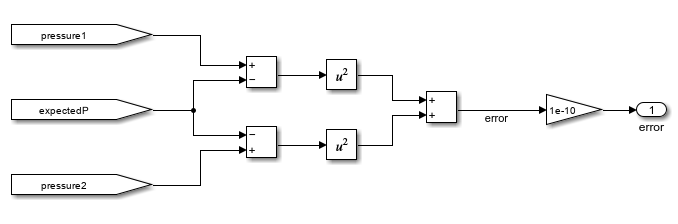
The optimization algorithm assumes that the objective function has one input x, where x has as many elements as the number of unknown variables in the problem. The objective function computes the scalar value of the objective function and returns it in its single output argument y. Open the objective function definition file, CylinderDesignParameterEstimationObjectiveFunction, to see the cumulative error estimation code.
4. Setting up model for Fast Restart
You can save computational time by setting up the model in Fast Restart mode. Set parameter configurability to Run-Time so that optimization algorithm can be executed in fast restart mode. This requires modeling spring pre-compressions through Ideal force Source blocks in the model.
load_system('CylinderDesignParameterEstimation')
set_param('CylinderDesignParameterEstimation','FastRestart','on')
5. Parameter Estimation Using Optimization Algorithm
It is important to choose an algorithm which matches the problem complexity and type. No single optimization algorithm can perform the same for all types of problems. This example uses surrogate optimization to estimate the unknown parameters.
Define the objective function, lower bound, upper bound, and optimization initialization point.
load_system('CylinderDesignParameterEstimation')
ObjectiveFunction = @(x) CylinderDesignParameterEstimationObjectiveFunction(x,scalingFactor);
lb = lowerBound;
ub = upperBound;
x0 = initParam;
rng default
Configuring the options for Surrogate optimization.
options = optimoptions('surrogateopt','MaxTime',600,'MaxFunctionEvaluations',200);
x = surrogateopt(ObjectiveFunction,lb,ub);
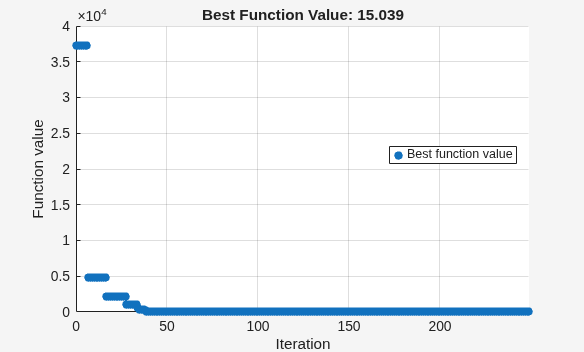
surrogateopt stopped because it exceeded the function evaluation limit set by
'options.MaxFunctionEvaluations'.
The estimated parameters are converted to their respective values through the defined scale. This conversion utilizes the constraint that Preload1 and Preload2 are equal for spring-mass damper system at rest in steady state for estimating the last unknown parameter.
tpcPosOpen1        = x(1)/scalingFactor(1);
tpcPosOpen2        = x(2)/scalingFactor(2);
tpcStiffness1Coeff = x(3)/scalingFactor(3);
tpcStiffness2Coeff = x(4)/scalingFactor(4);
tpcSpring1Comp     = x(5)/scalingFactor(5);
tpcSpring2Comp     = x(3)*x(5)/(x(4)*scalingFactor(5));

set_param('CylinderDesignParameterEstimation','FastRestart','off')
Simulation
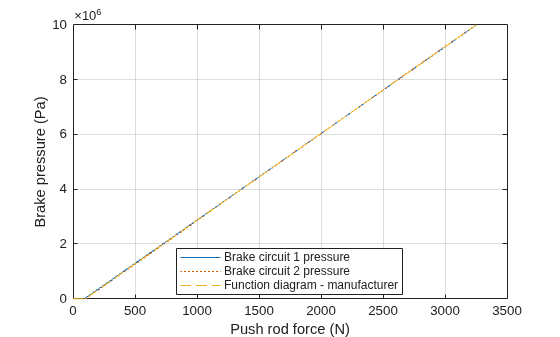
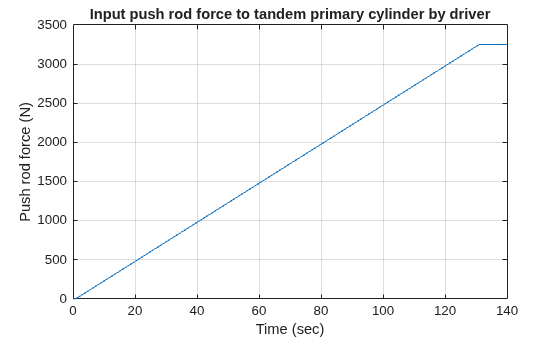
The model generates push rod force-brake pressure plots for the selected manufacturer design based on the optimization algorithm parameter estimation. The applied push rod force to the tandem primary cylinder is ramped at 25 N/sec rate in the simulation.
Plot the output from the tandem primary cylinder model and compare with the function diagram.
output = sim('CylinderDesignParameterEstimation',simT);
figure
plot(output.logsout_CylinderDesignParameterEstimation{5}.Values.Time,...
    output.logsout_CylinderDesignParameterEstimation{5}.Values.Data);
xlabel('Time (sec)');
ylabel('Push rod force (N)');
title('Input push rod force to tandem primary cylinder by driver');
grid on
figure
plot(output.logsout_CylinderDesignParameterEstimation{5}.Values.Data, ...
    output.logsout_CylinderDesignParameterEstimation{3}.Values.Data, ...
    output.logsout_CylinderDesignParameterEstimation{5}.Values.Data, ...
    output.logsout_CylinderDesignParameterEstimation{4}.Values.Data,...
    ':',tpcPushRodF,tpcCircuitPressure,'--');
legend('Brake circuit 1 pressure','Brake circuit 2 pressure','Function diagram - manufacturer','location','best');
grid on
xlabel('Push rod force (N)');
ylabel('Brake pressure (Pa)');