Generate HDL and HLS Code from an Adaptive Median Filter Algorithm
R2026bThis example shows how to generate HDL and HLS code from a MATLAB® function that implements an adaptive median filter for image noise removal.
An adaptive median filter removes salt-and-pepper noise from an image while preserving edges and detail. Unlike a standard median filter that uses a fixed window size, the adaptive version progressively expands the filter window (from 3x3 up to 9x9) until it finds a reliable median value. This approach avoids over-smoothing regions that contain fine detail. Image processing pipelines in medical imaging, surveillance, and machine vision systems use adaptive median filtering as a preprocessing step before edge detection or feature extraction.
Examine the MATLAB Design and Test Bench
Set up the MATLAB function and test bench for this example. In the MATLAB Command Window, enter:
mlhdlc_demo_setup("mlhdlc_median_filter");MATLAB function
Test bench
<model>_runme.mscript, which includes the commands to generate HDL code<model>_runme_hls.mscript, which includes the commands to generate HLS code
The MATLAB function, mlhdlc_median_filter, accepts a column of pixel
data and a column index as inputs. It maintains a 9x9 sliding window using a persistent
buffer, computes sorted medians for 3x3, 5x5, 7x7, and 9x9 neighborhoods, and selects the
smallest window whose median is not an extremum. The function outputs the filtered pixel
value and a validity flag that indicates when the pipeline has filled.
To view the function, enter:
open mlhdlc_median_filter.m;The test bench file, mlhdlc_median_filter_tb, verifies the behavior
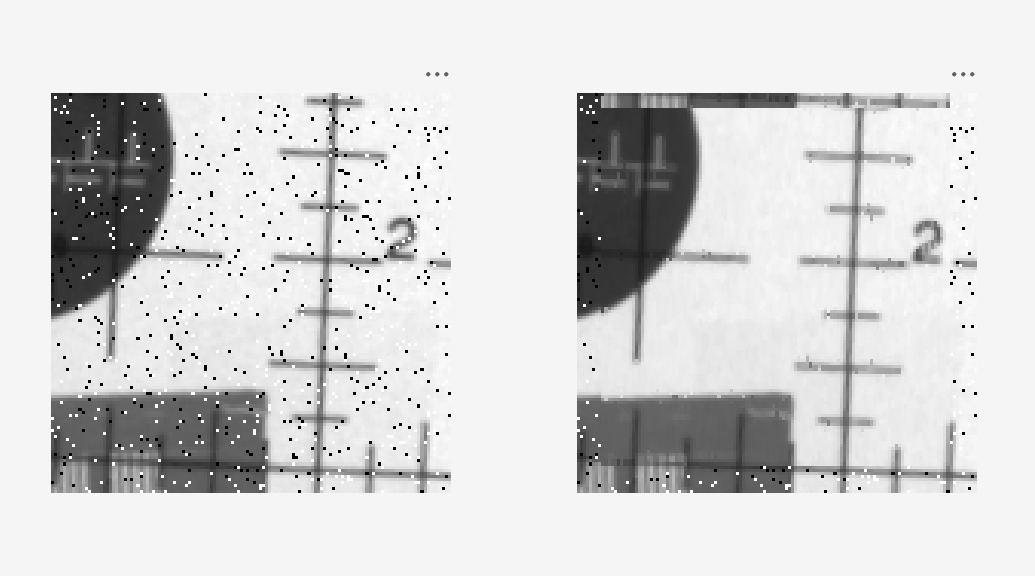
of the MATLAB function. It reads a noisy test image, streams columns of pixel data through
the filter, reconstructs the filtered image, and displays the original and filtered images
side by side. To view the test bench,
enter:
open mlhdlc_median_filter_tb;Simulate the Design
To check for run-time errors, simulate the design by running the test bench. In the MATLAB Command Window, enter:
mlhdlc_median_filter_tb
Generate HDL Code
The mlhdlc_median_filter_runme script specifies the target files,
enables the settings required for this example, and generates HDL code.
The script specifies the MATLAB function and test bench, then creates a fixed-point
configuration object and an HDL configuration object by using the
coder.config function. It associates the test bench with both
configuration
objects.
designName = "mlhdlc_median_filter";
designTB = "mlhdlc_median_filter_tb";
fixptCfg = coder.config("fixpt");
fixptCfg.TestBenchName = designTB;
cfg = coder.config("hdl");
cfg.TestBenchName = designTB;
The script then generates code:
codegen("-float2fixed", "fixptCfg", "-config", "cfg", designName, ...
"-launchreport");
Run the Script
First, modify the mlhdlc_median_filter_runme script. The script
disables synthesis by default. Set the SynthesizeGeneratedCode
property to
true:
cfg.SynthesizeGeneratedCode = true;
Update the settings for your synthesis tool:
cfg.SynthesisTool = "Xilinx Vivado";
cfg.SynthesisToolChipFamily = "Artix7";
cfg.SynthesisToolDeviceName = "xa7a100t";
cfg.SynthesisToolPackageName = "csg324";
cfg.SynthesisToolSpeedValue = "-1I";
Then, generate code by running the script:
mlhdlc_median_filter_runme
After code generation completes, the report opens. Examine the generated HDL code in the report.
Generate HLS Code
The mlhdlc_median_filter_runme_hls script specifies the target files,
enables the settings required for this example, and generates HLS code.
The script specifies the MATLAB function and test bench, then creates a fixed-point
configuration object by using the coder.config function. It associates
the test bench with the configuration
object.
designName = "mlhdlc_median_filter";
designTB = "mlhdlc_median_filter_tb";
fixptCfg = coder.config("fixpt");
fixptCfg.TestBenchName = designTB;
The script creates an HLS configuration object by using the
coder.config function, associates the test bench, and enables
simulation.
cfg = coder.config("hls");
cfg.TestBenchName = designTB;
cfg.GenerateHLSTestBench = true;
cfg.SimulateGeneratedCode = true;
The script then generates code:
codegen("-float2fixed", "fixptCfg", "-config", "cfg", designName, ...
"-launchreport");
Run the Script
First, modify the mlhdlc_median_filter_runme_hls script. The script
disables synthesis by default. Set the SynthesizeGeneratedCode
property to
true:
cfg.SynthesizeGeneratedCode = true;
Depending on your synthesis tool, set one of these flags to
true:
isCodingForStratusHLS = false;
isCodingForVitisHLS = true;
Depending on your synthesis tool, update these synthesis tool settings:
if isCodingForStratusHLS
    cfg.SynthesisTool = "Cadence Stratus HLS";
elseif isCodingForVitisHLS
    cfg.SynthesisTool = "Xilinx Vitis HLS";
    cfg.SynthesisToolChipFamily = "Artix7";
    cfg.SynthesisToolDeviceName = "xa7a100t";
    cfg.SynthesisToolPackageName = "csg324";
    cfg.SynthesisToolSpeedValue = "-1I";
end
Then, generate code by running the script:
mlhdlc_median_filter_runme_hls
After code generation completes, the report opens. Examine the generated HLS code in the report.

