이 페이지는 기계 번역을 사용하여 번역되었습니다. 최신 내용을 영문으로 보려면 여기를 클릭하십시오.
SIL 및 PIL 시뮬레이션을 통해 생성된 코드 테스트하기
R2026aSIL(Software-in-the-Loop) 및 PIL(Processor-in-the-Loop) 시뮬레이션을 사용하여 모델 컴포넌트와 해당 컴포넌트로부터 생성한 실제 코드 간의 수치적 등가성을 테스트합니다.
SIL 시뮬레이션을 사용하면 개발 컴퓨터에서 소스 코드를 테스트할 수 있습니다. PIL 시뮬레이션을 사용하면, 실제 타깃 하드웨어나 명령어 세트 시뮬레이터에서 오브젝트 코드를 실행함으로써, 프로덕션 환경에 배포할 예정인 컴파일된 오브젝트 코드를 테스트할 수 있습니다. 모델 컴포넌트와 생성된 코드가 수치적으로 동등한지 확인하려면, SIL 및 PIL 결과를 정상 모드 결과와 비교하십시오.
이 예제는 최상위 모델 및 Model 블록의 SIL 및 PIL 시뮬레이션을 실행하는 방법을 보여줍니다. 이러한 시뮬레이션 기법에 대한 자세한 내용은 SIL 또는 PIL 접근법 선택를 참조하십시오.
타깃 연결 구성
PIL 시뮬레이션을 실행하려면 먼저 타깃 연결을 구성해야 합니다. 타깃 연결 구성을 통해 PIL 시뮬레이션에서 다음을 수행할 수 있습니다:
타깃 애플리케이션을 빌드합니다.
타깃 기기에서 애플리케이션을 다운로드하고, 실행하고, 중지합니다.
Simulink와 타깃 간의 통신을 지원합니다.
타깃 연결 구성을 생성하려면 제공된 타깃 연결 API를 사용할 수 있습니다. 자세한 내용은 Simulink에 대한 PIL 타깃 연결 구성 생성 항목을 참조하십시오.
지원되는 하드웨어의 경우, 타깃 지원 패키지를 사용할 수 있습니다. 자세한 내용은 Embedded Coder에서 지원되는 하드웨어 항목을 참조하십시오.
최고의 모델을 활용한 SIL 또는 PIL 시뮬레이션
최상위 모델의 SIL 또는 PIL 시뮬레이션을 실행하여 생성된 모델 코드를 테스트하십시오. 이러한 접근 방식을 통해:
독립형 코드 인터페이스를 사용하는 최상위 모델에서 생성된 코드를 테스트합니다.
모델을 구성하여 MATLAB 작업 공간에서 테스트 벡터나 자극 입력을 불러오도록 설정합니다.
최상위 모델의 시뮬레이션 모드를 일반, SIL, PIL 모드 간에 손쉽게 전환할 수 있습니다.
간단한 카운터 최상위 모델을 엽니다.
model='SILTopModel';
close_system(model,0)
open_system(model)
수치적 등가성 테스트에 집중하려면 다음을 비활성화하십시오:
모델 커버리지
코드 커버리지
실행 시간 프로파일링
set_param(gcs, 'RecordCoverage','off');
coverageSettings = get_param(model, 'CodeCoverageSettings');
coverageSettings.CoverageTool='None';
set_param(model, 'CodeCoverageSettings',coverageSettings);
set_param(model, 'CodeExecutionProfiling','off');
입력 자극 데이터를 설정합니다.
[ticks_to_count, reset, counter_mode, count_enable] = ...
    SILTopModelData(T);
모델에서 로깅 옵션을 구성합니다.
set_param(model, 'LoadExternalInput','on');
set_param(model, 'ExternalInput','ticks_to_count, reset, counter_mode, count_enable');
set_param(model, 'SignalLogging', 'on');
set_param(model, 'SignalLoggingName', 'logsOut');
set_param(model, 'SaveOutput','on')
일반 모드 시뮬레이션을 실행하십시오.
set_param(model,'SimulationMode','normal')
sim_output = sim(model,10);
yout_normal = [sim_output.yout.signals(1).values sim_output.yout.signals(2).values];
최상위 모델 SIL 시뮬레이션을 실행하십시오.
set_param(model,'SimulationMode','Software-in-the-Loop (SIL)')
sim_output = sim(model,10);
### Searching for referenced models in model 'SILTopModel'.
### Total of 1 models to build.
### Starting build procedure for: SILTopModel
### Successful completion of build procedure for: SILTopModel

Build Summary

Top model targets:

Model        Build Reason                                         Status                        Build Duration
==============================================================================================================
SILTopModel  Information cache folder or artifacts were missing.  Code generated and compiled.  0h 0m 17.068s

1 of 1 models built (0 models already up to date)
Build duration: 0h 0m 19.24s
### Preparing to start SIL simulation ...
Building with 'gcc'.
MEX completed successfully.
### Updating code generation report with SIL files ...
### Starting SIL simulation for component: SILTopModel
### Application stopped
### Stopping SIL simulation for component: SILTopModel
yout_sil = [sim_output.yout.signals(1).values sim_output.yout.signals(2).values];
이 모델에 대한 최신 코드가 없는 경우, 새로운 코드가 생성되어 컴파일됩니다. 생성된 코드는 사용자의 컴퓨터에서 별도의 프로세스로 실행됩니다.
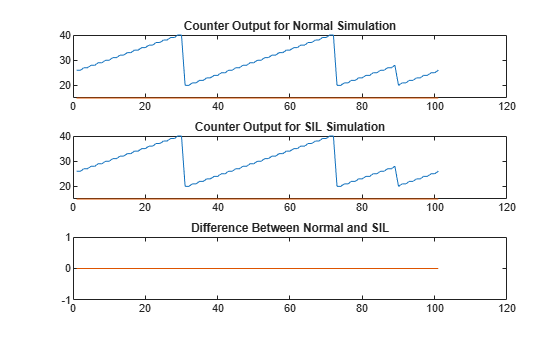
정규 시뮬레이션과 SIL 시뮬레이션의 결과를 그래프로 나타내고 비교하십시오. 결과가 일치하는 것을 확인해 보십시오.
fig1 = figure;
subplot(3,1,1), plot(yout_normal), title('Counter Output for Normal Simulation')
subplot(3,1,2), plot(yout_sil), title('Counter Output for SIL Simulation')
subplot(3,1,3), plot(yout_normal-yout_sil), ...
    title('Difference Between Normal and SIL');
정리합니다.
close_system(model,0);
if ishandle(fig1), close(fig1), end
clear fig1
simResults = {'yout_sil','yout_normal','model','T',...
              'ticks_to_count','reset'};
save([model '_results'],simResults{:});
clear(simResults{:},'simResults')
Model 블록을 사용한 SIL 또는 PIL 시뮬레이션
SIL 모드에서 Model 블록을 실행하는 테스트 하네스 모델을 사용하여 생성된 모델 코드를 테스트합니다. 이러한 접근 방식을 통해:
최상위 모델이나 참조 모델에서 생성된 코드를 테스트할 수 있습니다. 최상위 모델의 코드는 독립형 코드 인터페이스를 사용합니다. 참조된 모델의 코드는 모델 참조 코드 인터페이스를 사용합니다. 자세한 내용은 SIL 및 PIL용 코드 인터페이스 항목을 참조하십시오.
테스트 벡터나 자극 입력을 제공하기 위해 테스트 하네스 모델이나 시스템 모델을 사용합니다.
Model 블록은 일반, SIL 및 PIL 시뮬레이션 모드 간에 손쉽게 전환할 수 있습니다.
동일한 모델을 참조하는 두 개의 Model 블록이 포함된 예제 모델을 엽니다. 시뮬레이션에서는 하나의 Model 블록을 SIL 모드로, 다른 하나의 Model 블록을 일반 모드로 실행합니다.
model='SILModelBlock';
open_system(model);
끄기:
코드 커버리지
실행 시간 프로파일링
coverageSettings = get_param(model, 'CodeCoverageSettings');
coverageSettings.CoverageTool='None';
set_param(model, 'CodeCoverageSettings',coverageSettings);
open_system('SILModelBlock')
set_param('SILModelBlock', 'CodeExecutionProfiling','off');
open_system('SILCounter')
set_param('SILCounter', 'CodeExecutionProfiling','off');
currentFolder=pwd;
save_system('SILCounter', fullfile(currentFolder,'SILCounter.slx'))
모델에 대한 상태 로깅을 구성합니다.
set_param('SILCounter', 'SaveFormat','Dataset');
save_system('SILCounter', fullfile(currentFolder,'SILCounter.slx'))
set_param(model, 'SaveFormat','Dataset');
set_param(model, 'SaveState','on');
set_param(model, 'StateSaveName', 'xout');
최상위 모델 코드 테스트
SIL 모드의 Model 블록에 대해서는, 독립형 코드 인터페이스를 사용하는 최상위 모델 코드 생성을 지정하십시오.
set_param([model '/CounterA'], 'CodeInterface', 'Top model');
테스트 하네스 모델에 대한 시뮬레이션을 실행하십시오.
out = sim(model,20);
### Searching for referenced models in model 'SILModelBlock'.
### Total of 1 models to build.
### Searching for referenced models in model 'SILCounter'.
### Total of 1 models to build.
### Starting build procedure for: SILCounter
### Successful completion of build procedure for: SILCounter

Build Summary

Top model targets:

Model       Build Reason                                         Status                        Build Duration
=============================================================================================================
SILCounter  Information cache folder or artifacts were missing.  Code generated and compiled.  0h 0m 5.8762s

1 of 1 models built (0 models already up to date)
Build duration: 0h 0m 6.3338s
### Preparing to start SIL simulation ...
Building with 'gcc'.
MEX completed successfully.
### Updating code generation report with SIL files ...
### Starting SIL simulation for component: SILCounter
### Application stopped
### Stopping SIL simulation for component: SILCounter
SIL 모드의 모델 블록은 컴퓨터에서 별도의 프로세스로 실행됩니다. 작업 폴더에서, 이전 빌드에서 생성된 코드가 없는 경우 참조된 모델에 대한 독립 실행형 코드가 생성된 것을 확인할 수 있습니다.
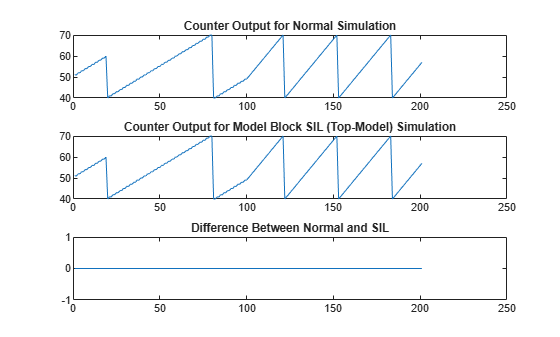
일반 모드와 SIL 모드에서 Model 블록의 동작을 비교해 보십시오. 결과가 일치합니다.
yout = out.logsOut;
yout_sil = yout.get('counterA').Values.Data;
yout_normal = yout.get('counterB').Values.Data;
fig1 = figure;
subplot(3,1,1), plot(yout_normal), title('Counter Output for Normal Simulation')
subplot(3,1,2), ...
    plot(yout_sil), title('Counter Output for Model Block SIL (Top-Model) Simulation')
subplot(3,1,3), plot(yout_normal-yout_sil), ...
    title('Difference Between Normal and SIL');
일반 모드 및 SIL 모드 시뮬레이션에서 기록된 Model 블록의 상태를 비교해 보십시오.
xout = out.xout;
xout_sil = xout{1}.Values.Data;
xout_normal = xout{2}.Values.Data;
fig1 = figure;
subplot(3,1,1), plot(xout_sil), title('State Logging for Normal Simulation')
subplot(3,1,2), ...
    plot(xout_normal), title('State Logging for Model Block SIL (Top-Model) Simulation')
subplot(3,1,3), plot(xout_normal-xout_sil), ...
    title('Difference Between Normal and SIL');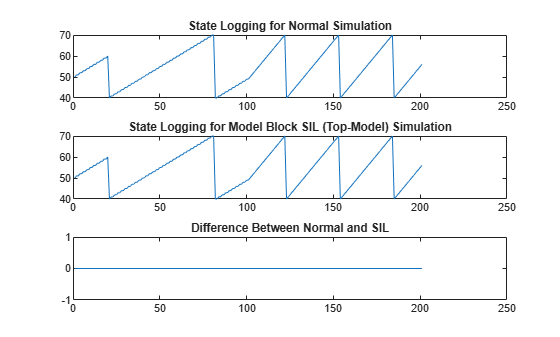
테스트 모델 참조 코드
SIL 모드의 Model 블록에 대해서는, 모델 참조 코드 인터페이스를 사용하는 참조 모델 코드의 생성을 지정하십시오.
set_param([model '/CounterA'], 'CodeInterface', 'Model reference');
테스트 하네스 모델에 대한 시뮬레이션을 실행하십시오.
out2 = sim(model,20);
### Searching for referenced models in model 'SILModelBlock'.
### Total of 1 models to build.
### Starting serial code generation build.
### Starting build procedure for: SILCounter
### Successful completion of build procedure for: SILCounter

Build Summary

Model reference code generation targets:

Model       Build Reason                          Status                        Build Duration
==============================================================================================
SILCounter  Target (SILCounter.c) did not exist.  Code generated and compiled.  0h 0m 5.3953s

1 of 1 models built (0 models already up to date)
Build duration: 0h 0m 6.4814s
### Preparing to start SIL simulation ...
Building with 'gcc'.
MEX completed successfully.
### Updating code generation report with SIL files ...
### Starting SIL simulation for component: SILCounter
### Application stopped
### Stopping SIL simulation for component: SILCounter
SIL 모드의 모델 블록은 컴퓨터에서 별도의 프로세스로 실행됩니다. 작업 폴더에서, 이전 빌드에서 생성된 코드가 없는 경우 모델 참조 코드가 생성되는 것을 확인할 수 있습니다.
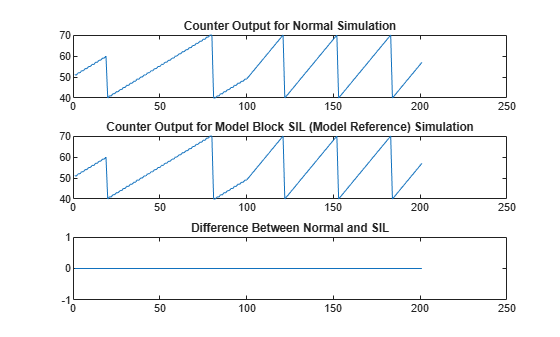
일반 모드와 SIL 모드에서 Model 블록의 동작을 비교해 보십시오. 결과가 일치합니다.
yout2 = out2.logsOut;
yout2_sil = yout2.get('counterA').Values.Data;
yout2_normal = yout2.get('counterB').Values.Data;
fig1 = figure;
subplot(3,1,1), plot(yout2_normal), title('Counter Output for Normal Simulation')
subplot(3,1,2), ...
    plot(yout2_sil), title('Counter Output for Model Block SIL (Model Reference) Simulation')
subplot(3,1,3), plot(yout2_normal-yout2_sil), ...
   title('Difference Between Normal and SIL');
일반 모드 및 SIL 모드 시뮬레이션에서 기록된 Model 블록의 상태를 비교해 보십시오.
xout2 = out.xout;
xout2_sil = xout2{1}.Values.Data;
xout2_normal = xout2{2}.Values.Data;
fig1 = figure;
subplot(3,1,1), plot(xout2_sil), title('State Logging for Normal Simulation')
subplot(3,1,2), ...
    plot(xout2_normal), title('State Logging for Model Block SIL (Model Reference) Simulation')
subplot(3,1,3), plot(xout2_normal-xout2_sil), ...
    title('Difference Between Normal and SIL');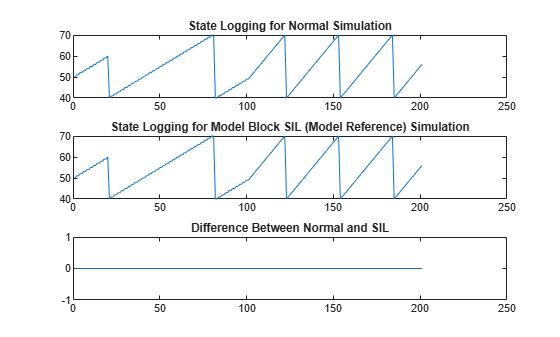
정리합니다.
close_system(model,0);
if ishandle(fig1), close(fig1), end, clear fig1
simResults={'out','yout','yout_sil','yout_normal', ...
            'out2','yout2','yout2_sil','yout2_normal', ...
            'SilCounterBus','T','reset','ticks_to_count','Increment'};
save([model '_results'],simResults{:});
clear(simResults{:},'simResults')
하드웨어 구현 설정
SIL 시뮬레이션을 실행할 때는 개발 컴퓨터에서 컴파일할 수 있도록 하드웨어 구현 설정(네이티브 워드 크기 등의 특성)을 구성해야 합니다. 이러한 설정은 실제 프로덕션 하드웨어에 사용할 모델을 빌드할 때 적용하는 하드웨어 구현 설정과 다를 수 있습니다. SIL 및 PIL 시뮬레이션 간에 하드웨어 구현 설정을 변경할 필요가 없도록 하려면, 이식 가능한 워드 크기를 활성화하십시오. 자세한 내용은 하드웨어 구현 설정 구성 항목을 참조하십시오.

