Baseband File Writer
R2026bWrite baseband signals to file
Baseband File Writer block

To add a block to a model, double-click the canvas and start typing the block name. Then, select the block from the list.
Libraries:
Communications Toolbox /
Comm Sinks
Description
The Baseband File Writer block writes a baseband signal to a specific type of binary file. Baseband signals are typically down-converted from a nonzero center frequency to 0 Hz. Sample rate, which is determined by the input signal sample time and frame size, and center frequency are saved when the signal is written to a file.
Examples
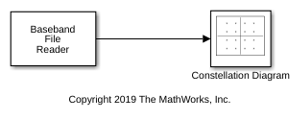
Generate and write a QPSK-modulated signal to a file. Then, read the file and plot the constellation diagram of the signal.
The model cm_baseband_writer_ex1 generates a QPSK-modulated signal and writes the noisy QPSK signal to a file named bbw_example.bb.
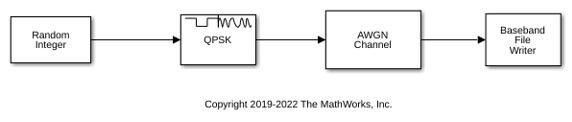
Open a second model, cm_baseband_writer_ex2, to read the signal from the file and display the constellation diagram.
Ports
Input
Parameters
Block Characteristics
Data Types |
|
Multidimensional Signals |
|
Variable-Size Signals |
|
Programmatic Use: Add Block
To add the block programmatically, use the add_block function with one of these library block paths as the source.
"commsink2/Baseband File Writer"
Example: add_block("commsink2/Baseband File Writer","myModel/myBlock",MakeNameUnique="on")
Tips
The Baseband File Writer block writes baseband signals to uncompressed binary files. To share these files, you can compress them to a zip file using the
zipfunction. For more information, see Create and Extract from Zip Archives.

