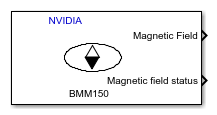
BMM150
Libraries:
NVIDIA Jetson and NVIDIA DRIVE /
Sensors /
IMU sensors
Description
Add-On Required: This feature requires the MATLAB Coder Support Package for NVIDIA Jetson and NVIDIA DRIVE Platforms add-on.
The BMM150 block outputs the values of magnetic field along X, Y, and Z axes as measured by the BMM150 sensor connected to an NVIDIA® embedded board.
Ports
Output
Magnetic field strength in micro Tesla (µT) measured by a BMM150 sensor connected
to an NVIDIA embedded board, along the X, Y, and Z axes. The block outputs the
magnetic field as a 1-by-3 vector.
Data Types: double
Status of magnetic field reading. 0 indicates that the data
read is new and 1 indicates that the data read is not new.
Dependencies
This output port appears only if you select the Status parameter.
Data Types: int8
Parameters
The I2C module to be used for communication to the BMM150 sensor. The number of I2C modules supported varies across different NVIDIA embedded boards.
Programmatic Use
Block Parameter:
I2CModule
|
| Type: character vector |
Values:
''|positive integer |
Default:
'' |
The I2C address used by BMM150 sensor communicating with the an NVIDIA embedded board. The default parameter value (0x13)
corresponds to the I2C address used by the BOOSTXL-SENSORS
BoosterPack™ Plug-in Module.
Programmatic Use
Block Parameter:
I2CAddress
|
| Type: character vector |
Values:
'0x10'|'0x11'|'0x12'|'0x13' |
Default:
'0x13' |
Select this parameter to set Magnetic Field Status as one of the output ports.
Programmatic Use
Block Parameter:
Status |
| Type: character vector |
Values: 'on' |
'off' |
Default: 'on' |
Specify the preset value for the operating condition of BMM150 sensor while reading the values. The selection of one of the four preset values affects the electrical characteristics (like supply current) and the required output accuracy with respect to ODR and output noise.
Programmatic Use
Block Parameter:
MagnetometerPreset
|
| Type: character vector |
Values:
'Low
power'|'Regular'|'Enhanced'|'High
accuracy' |
Default:
'Low power' |
Specify the output data type for the values read from BMM150 sensor. The default
data type for an NVIDIA embedded boards is single. Use this parameter to change
the values to double, if required.
Programmatic Use
Block Parameter:
DataType
|
| Type: character vector |
Values:
'single'|'double' |
Default:
'single' |
Specify how often this block reads the data from the BMM150 sensor. When you set this parameter to -1, Simulink determines the best sample time for the block based on the block context within the model.
Programmatic Use
Block Parameter:
SampleTime
|
| Type: character vector |
| Values: scalar | vector |
Default:
'0.1'
|
Version History
Introduced in R2022b
MATLAB Command
You clicked a link that corresponds to this MATLAB command:
Run the command by entering it in the MATLAB Command Window. Web browsers do not support MATLAB commands.
웹사이트 선택
번역된 콘텐츠를 보고 지역별 이벤트와 혜택을 살펴보려면 웹사이트를 선택하십시오. 현재 계신 지역에 따라 다음 웹사이트를 권장합니다:
또한 다음 목록에서 웹사이트를 선택하실 수도 있습니다.
사이트 성능 최적화 방법
최고의 사이트 성능을 위해 중국 사이트(중국어 또는 영어)를 선택하십시오. 현재 계신 지역에서는 다른 국가의 MathWorks 사이트 방문이 최적화되지 않았습니다.
미주
- América Latina (Español)
- Canada (English)
- United States (English)
유럽
- Belgium (English)
- Denmark (English)
- Deutschland (Deutsch)
- España (Español)
- Finland (English)
- France (Français)
- Ireland (English)
- Italia (Italiano)
- Luxembourg (English)
- Netherlands (English)
- Norway (English)
- Österreich (Deutsch)
- Portugal (English)
- Sweden (English)
- Switzerland
- United Kingdom (English)