Check for and Review Coding Standard Violations
R2026bUsing Polyspace®, you can check your C/C++ code for violations of various external coding standards such as MISRA C™:2025, MISRA C++:2023, and AUTOSAR C++:14. For a list of supported standards, see Coding Standards. Adhering to coding standards can reduce the number of defects and improve the quality of your code.
You can check violations of predefined sets of coding rules from the supported coding standards. Alternatively, you can curate a custom selection of coding rules.
Configure Coding Standards User Interface
To configure checking for violations of coding standards in the Polyspace Platform user interface, open the Checkers Selection dialog box:
Double-click the Configure node of the Projects pane.
On the Static Analysis tab, select Defects and Coding Standards. Select Use custom checkers file and then click Open (
 ) next to the option Checkers activation
file.
) next to the option Checkers activation
file.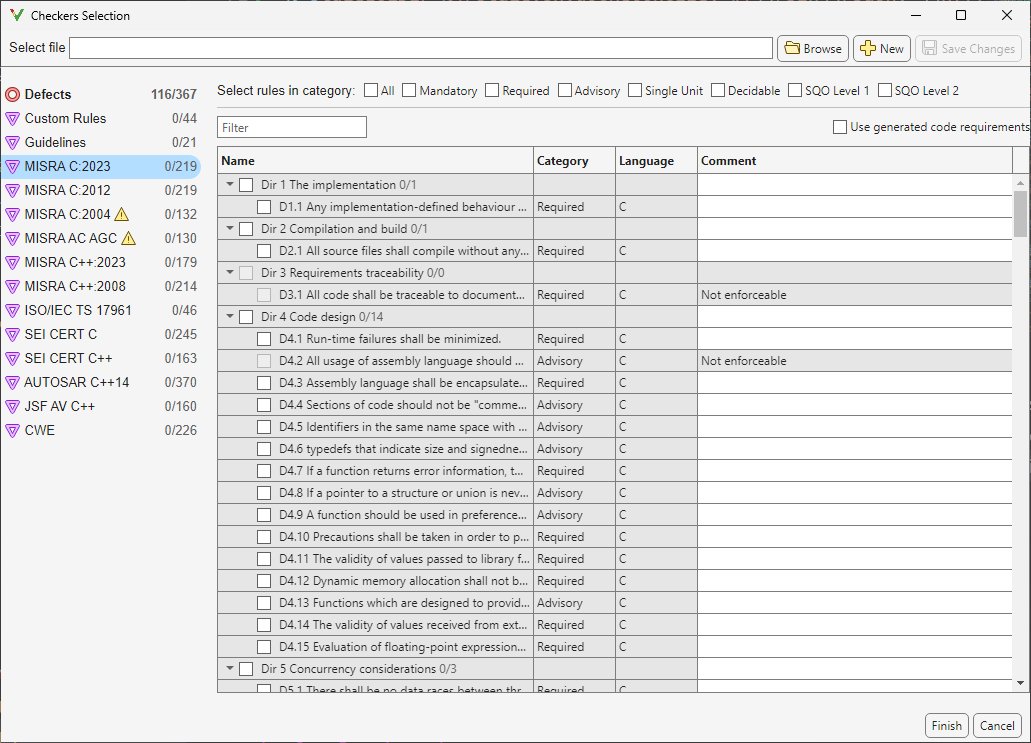
In the Checkers Selection dialog box, select coding rules from supported coding standards. Some coding standards, such as MISRA C:2023 or MISRA C++:2023, support predefined subsets such as Mandatory, Required, Advisory. You can select rules from these predefined subsets by selecting the corresponding checkbox. Alternatively, activate individual coding rules. Find rules that you want to activate by using the Filter.
After activating the coding rules, save your selection as a reusable checkers activation file (
.xml).
In addition to activating coding rules, you can use the Checkers Selection dialog box to:
Add comments to a coding rule. After running an analysis, these comments appear in the result review. Use the comments to add extra information that can be used for sorting the results.
Configure thresholds for the Guidelines checks. See Reduce Software Complexity by Using Polyspace Checkers.
Configure patterns and conventions for custom rules. See Enforce Naming Conventions for C/C++ Variables and Functions.
Configure Coding Standards at Command Line
At the command line, you can activate coding rules and defect checkers in two ways:
Checkers activation file — If you have a preexisting checkers activation file, specify it as an input to the option
Checkers activation file (-checkers-activation-file):You do not need to specify options for individual coding standard or defects. If you do not have a preexisting activation file, create the activation file in the Polyspace user interface once and then reuse the file in subsequent command line analysis. If you are running Polyspace Bug Finder Server and do not have access to the Polyspace Platform user interface, you can create the activation file in a text editor. See Create New Checkers Activation File Without Polyspace User Interface.polyspace-bug-finder -sources src.c -checkers-activation-file my_activation.xml
Standard-specific options — Alternatively, you can explicitly enable individual options for coding standards. In this workflow, you can only select predefined subsets of coding rules. For example, this command activates the MISRA C:2025 rules that are categorized as Required:
You can use these options and their values to activate subsets of rules from the corresponding coding standard:polyspace-bug-finder -sources src.c -misra-c-2025 required
For MISRA C standards, to apply rule categories for automatically generated code, specify the option
Use generated
                code requirements for MISRA standards (-misra-agc-mode)
.
Review Coding Rule Violations
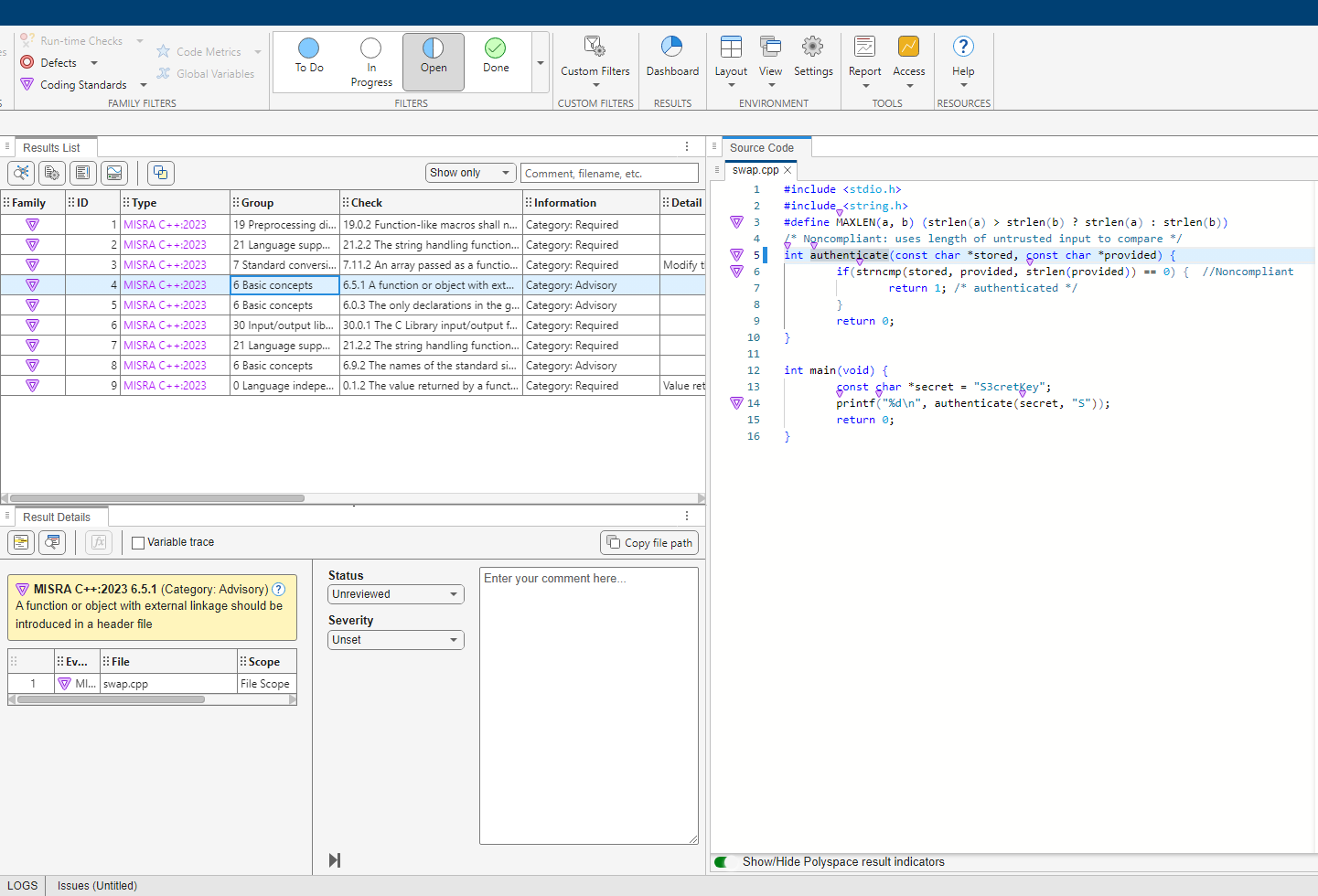
After analysis, you see the coding standard violations on the Results List pane. Select a violation to see further details on the Result Details pane and the source code on the Source Code pane.
Violations of coding standards are indicated in the source code with the  icon.
icon.
For further steps, see Reviewing and Reporting Results or Review Bug Finder Results (Polyspace Access).
Generate Reports
You can generate reports of coding standard violations using the CodingStandards template, which is explicitly defined for coding standards. This template:
Reports only coding standard violations in your analysis results, and omits other types of results such as defects, run-time errors or code metrics.
Creates a separate chapter in the report for each coding standard. The chapter provides an overview of all violations of the standard and then lists each violation.
To see how you can generate a report after running an analysis, see Generate Reports of Bug Finder or Code Prover Results.
See Also
Topics
- Interpret Polyspace Bug Finder Results in Polyspace Platform User Interface
- Interpret Bug Finder Results in Polyspace Access Web Interface (Polyspace Access)
- Address Polyspace Results Through Bug Fixes or Justifications
- Filter and Sort Results in Polyspace Platform User Interface
- Generate Reports of Bug Finder or Code Prover Results

